Mutation XSS#
Mutation XSS is a kind of attack that takes advantage of HTML’s tolerant nature.
Highly recommended taking a look at https://mizu.re/post/exploring-the-dompurify-library-bypasses-and-fixes after reading this. Most of the payload does not work anymore, because of browser’s fix and dompurify’s fix. However, it is a good read
Mutations#
Mutation in HTML is any kind of change made to the markup for some reason or another:
- When a parser fixes a broken markup (
<p>test→<p>test</p>) - Normalizing attribute quotes (
<a alt=test>→<a alt=”test”>) - Rearranging elements (
<table><a>→<a></a><table></table>)
Elements handle their content (the text between opening and closing tags eg. <p>content</p>) differently, with seven distinct parsing modes at play:
area,base,br,col,embed,hr,img,input,link,meta,source,track,wbr
template
script,style,noscript,xmp,iframe,noembed,noframes
textarea,title
svg,math
plaintext
- All other allowed HTML elements are normal elements.
It’s recommended that you check out mXSS cheatsheet by sonarsource for more information
Different content parsing types#
We can fairly easily demonstrate a difference between parsing types using the following example:
This is a div element, which is a normal element. The content of <div> is considered as HTML, so the <a> tag is created. What seems to be a closing div and an img tag is actually an attribute value of the a element
Take another similar HTML, this time, it is <style> tag instead of <div>, which is a raw text element. As you can see, inside <style> tag is now considered as raw text, so no <a> tag created. Instead, we have a XSS payload inside <img> tag
Foreign content elements#
Foreign content elements, like <svg> and <math> elements have distinct namespaces, meaning they follow different parsing rules compared to standard HTML.
Let’s take a look at the same example as before but this time encapsulated inside an svg element:
In this case, we do see an a tag being created. The <style> tag doesn’t follow the raw text parsing rules, because it is inside a different namespace.
When residing within an SVG or MathML namespace, the parsing rules change and no longer follow the HTML language.
Integration points#
HTML integration points and MathML text integration points can be used to switch from the SVG and MathML namespace to the HTML namespace.
List of MathML text integration points:
<mi><mo><mn><ms><mtext>
List of HTML integration points:
<annotation-xml><foreignObject><desc><title>
For example, we can see that the <p> tag is in HTML namespace when inside <title>, which is a HTML integration point
mXSS Attacks#
Parser differentials#
An attacker can take advantage of a parser mismatch between the sanitizer’s algorithm vs the renderer’s
Let’s take for example the noscript element. The parsing rule for it is: If JavaScript is enabled, switch the content to the raw text state. Otherwise, leave the content in the data state.
It is logical that JavaScript would not be enabled in the sanitizer stage but will be in the renderer. This behavior is not wrong, but could cause bypass:
This is how it will be rendered when javascript is disabled. As you can see, the <style> tag is created
And if javascript is enabled, it will be rendered like this. The content inside <noscript> tag becomes text, so <style> tag is never created, and the XSS payload is present. (Dom-Explorer doesn’t have an option to enable js, so you will have to take my word for it :D)
<noscript>
	#text: <style>
<img src=x onerror=”alert(1)”>
Parsing round trip#
Parsing round trip is a well-known and documented phenomenon. If you parse HTML, serialize it, then parse again, it might not return the original tree structure.
Let’s take a look at the official example provided in the specification:
But first, we need to understand that a form element cannot have another form nested inside of it, as written in the specs
As you can see, on the first parse, the </form> is ignored because of the unclosed <div>, and the input element will be associated with the inner <form> element.
However, when this tree structure is serialized and reparsed, the <form id="inner"> tag is deleted, since there can’t be <form> descendant inside a <form> tag, and so the input element will be associated with the outer form element instead.
Attackers can use this behaviour to create namespace confusion between the sanitizer and the renderer resulting in bypasses such as:
On the first parse, <style> tag is still in HTML namespace, so the content inside of it is considered raw text.
However, when it is re-parsed, the inner <form> element disapears, so <style> tag is in MathML namespace, meaning the content inside <style> is now considered normal elements.
Node flattening#
When parsing an HTML tree, there are many factors to consider. One aspect that might not immediately come to mind is how deep a DOM tree can be? Interestingly, the HTML specification does not provide explicit guidelines on how this should be handled.

Because of this, each HTML parsing implementation can define its own limit and act differently when reaching it, which significantly increases the risk of parsing discrepancies.
| Language | Library | Nested node limit | Handling |
|---|---|---|---|
| Chromium | DOMParser | 512 | Flattening |
| Firefox | DOMParser | 512 | Flattening |
| Safari | DOMParser | 512 | Flattening |
| Ruby | nokogiri (updated version of libxml2) | 256 | Removing |
| C | libxml2 | 255 | Removing |
| PHP | php-xml (libxml2) | 255 | Removing |
| Python | lxml (libxml2) | 255 | Removing |
| Python | html.parser | No limit? | - |
| javascript | parse5 | No limit? | - |
| javascript | htmlparser2 | No limit? | - |
| Golang | x/net/html | No limit? | - |
| Rust | html5ever | No limit? | - |
| Java | Jsoup | No limit? | - |
| Perl | HTML::TreeBuilder | No limit? | - |
For instance, this is how your browser (that uses DOMParser) handle 512 depth nested nodes:
However, when we increase it to 513 depth, notice that the <style> tag is flattened out, BUT is still in SVG namespace. This strongly indicates that the flattening occurs after the node has been parsed
As a result, it’s possible to create an “invalid” HTML DOM tree, which would lead to another mutation if it is serialized and parsed again.
HTML Parsing states#
We are going to focus on two concepts: HTML insertion modes and the stack of open elements.
As explained in the HTML specification, HTML insertion modes aim to define how content inside tags are processed while parsing an HTML string.
For instance, based on the in caption insertion mode definition, if the parser finds a <caption> start tag inside a <caption> tag, it needs to pop elements from the stack of open elements until a <caption> element has been popped out.
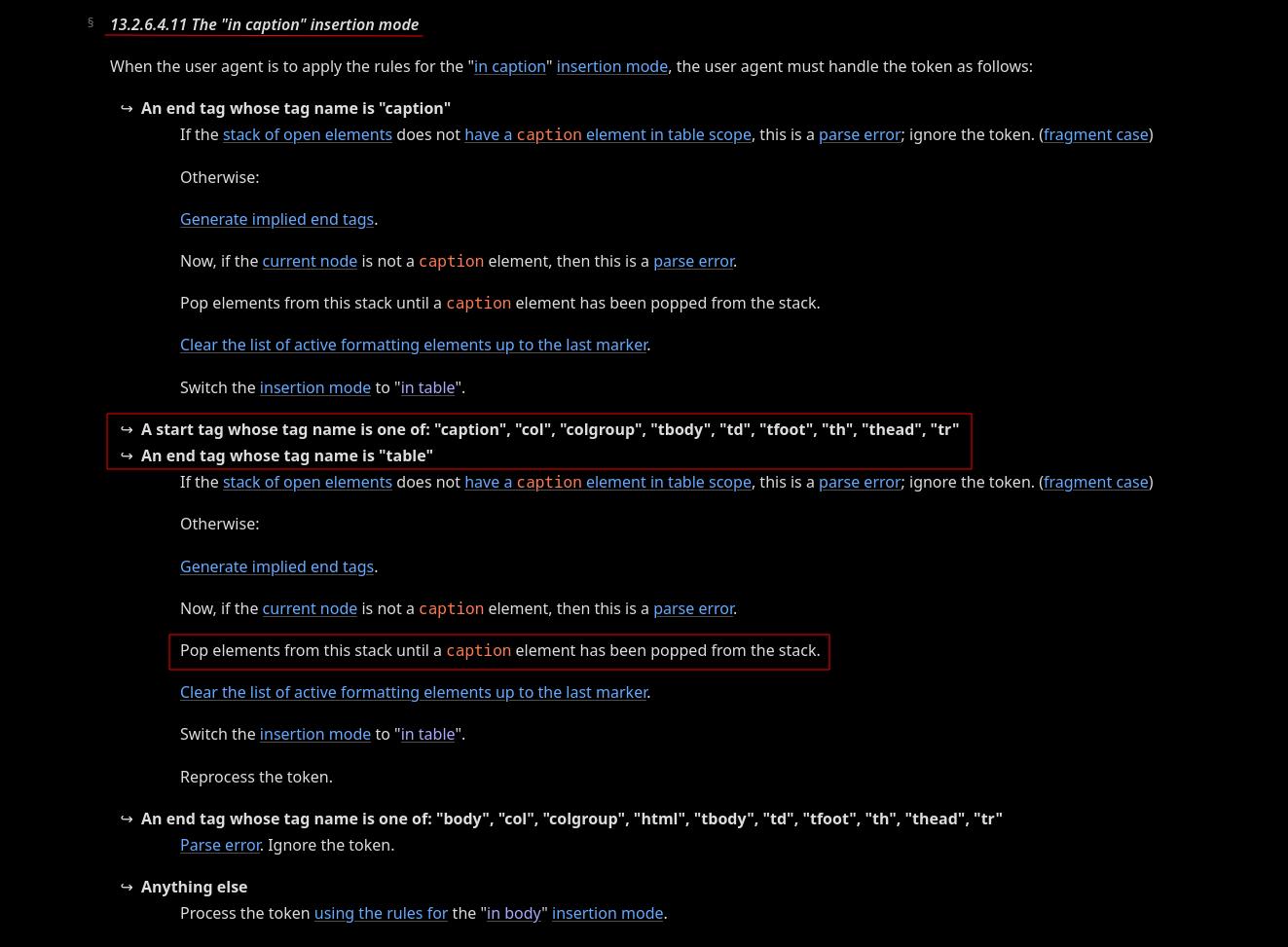
What is the stack of open elements?
Essentially, it’s a LIFO (Last In First Out) stack of HTML elements. This stack grows downward as the HTML is parsed.
For example, we have a opening <caption> tag nested inside another <caption>. This will pop out all elements below the nested <caption>, even if they are valid.
In this case, <div id="after"> gets popped outside, even when it is valid, and the nested <caption> tag popped out 1 level to the same as the other <caption>
What makes it even more interesting is that it doesn’t take into account the namespace of the tag that gets popped out, so we can do some shenanigans like this:
As you can see, <style> should have been inside SVG namespace. However, it gets popped out into HTML namespace due to our trick, and so its content is now raw text, and the xss payload fires
Desanitization#
Desanitization is a mistake made by applications when interfering with the sanitizer’s output before sending it to the client, essentially undoing the work of the sanitizer.
Any small change to the markup could have a major impact on the final DOM tree, resulting in a bypass of the sanitization.
Here is an example of desanitization. An application takes the sanitizer’s output and renames the <svg> element to <custom-svg>, this changes the namespace of the element and could cause XSS when re-rendering.
Let’s say this is the sanitizer’s output. <style> tag is in SVG namespace, so the <a> tag is created, no harm done
However, when the webapp change <svg> tag into <custom-svg>, the <style> tag is in HTML namespace, so its content is now raw text, and the xss payload appears when browser renders it
Context-dependent#
Here is an example of context-dependent mXSS. An application sanitizes an input, but when embedding it into the page, it encapsulates it in SVG, changing the context to an SVG namespace.
In HTML namespace, <style> tag’s content is raw text, so the xss payload does not fire
However, when you encapsulate it in <svg>, <style> tag is now in SVG namespace, so the <img> tag is created, and the xss payload fires