AD Enumeration#
AD common sense#
- The SYSTEM account on a domain-joined host can impersonate the computer account, which is essentially a special user account
- Computer accounts usually has a complex random long password set and rotate automatically around every 30 days. Cracking them is impossible.
- Computer accounts cannot do cross-forest kerberoast. However, they can do kerberoast in the same domain
- Computer accounts that is member of
PRE-WINDOWS 2000 COMPATIBLE ACCESShave their password set to the same as username.- However, being a member of a group that is a member of
PRE-WINDOWS 2000 COMPATIBLE ACCESSDOES NOT count. it isn’t inheritable
- However, being a member of a group that is a member of
- If you authenticate via kerberos, and change something in AD, but you don’t the privilege you should have had, you should request a ticket again. This is because the old ticket don’t update your privilege
OPSEC Notes#
- Always request kerberos ticket with aes-256 key. RC4(NTLM) encryption is not the default windows behavior.
impacket-getTGTdefault always use RC4, which is bad - Never dump a
.kirbifile. Onlymimikatzand some other pentest tools does this. NO SINGLE app on windows create a.kirbifile. Always dump base64 on terminal - Use
Rubeus.mimikatzis a POC tool.Rubeusis a tool designed by an operator with the mindset of a red team operator.
RSAT#
Remote Server Administration Tools (RSAT) is a GUI tool that provides lots and lots of server management features.
This also include ActiveDirectory Powershell module
We can list all RSAT tools using powershell like this:
Get-WindowsCapability -Name RSAT* -Online | Select-Object -Property Name, StateInstall ALL RSAT tools
Get-WindowsCapability -Name RSAT* -Online | Add-WindowsCapability –OnlineInstall specific tool:
Add-WindowsCapability -Name Rsat.ActiveDirectory.DS-LDS.Tools~~~~0.0.1.0 –OnlineOnce installed, all of the tools will be available in the Control Panel under Administrative Tools.
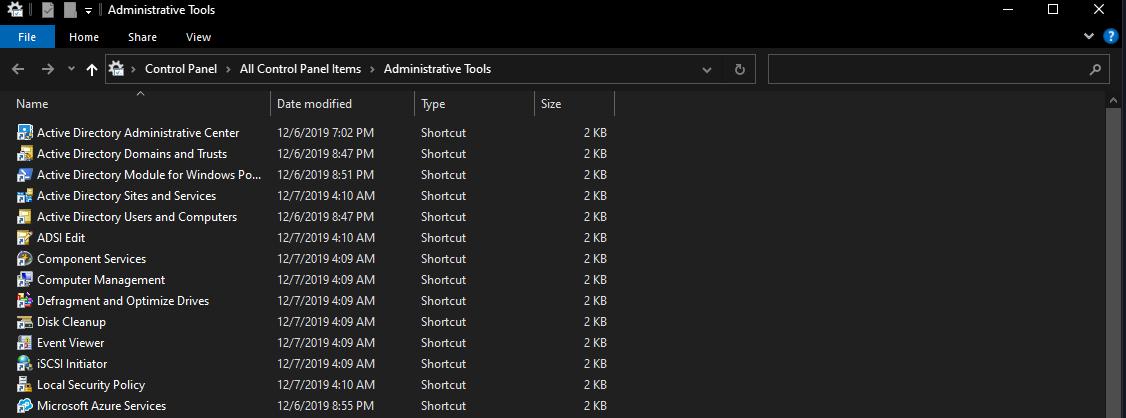
When you use these tools, you might want to switch your context to a domain account, instead of a local account.
You can use runas /netonly, which is the most OPSEC wise thing to do:
runas /netonly /user:htb.local\jackie.may powershellOr requesting a TGT with Rubeus or mimikatz, if you only have NTLM hash.
This is not good OPSEC wise. Nobody is requesting TGT with NTLM hash, they use aes keys instead. This might get flagged
rubeus.exe asktgt /user:jackie.may /domain:htb.local /dc:10.10.110.100 /rc4:ad11e823e1638def97afa7cb08156a94
mimikatz.exe sekurlsa::pth /domain:htb.local /user:jackie.may /rc4:ad11e823e1638def97afa7cb08156a94
We can open the MMC Console to launch any RSAT tools on a non-domain joined windows host that can connect to the DC
runas /netonly /user:Domain_Name\Domain_USER mmcWe can add any of the RSAT snap-ins and enumerate the domain
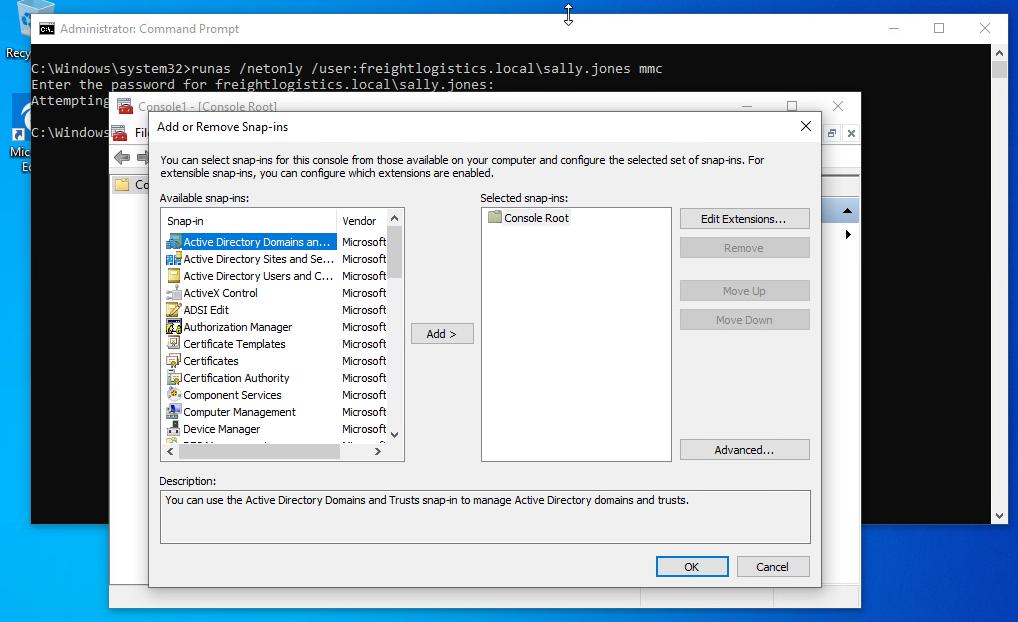
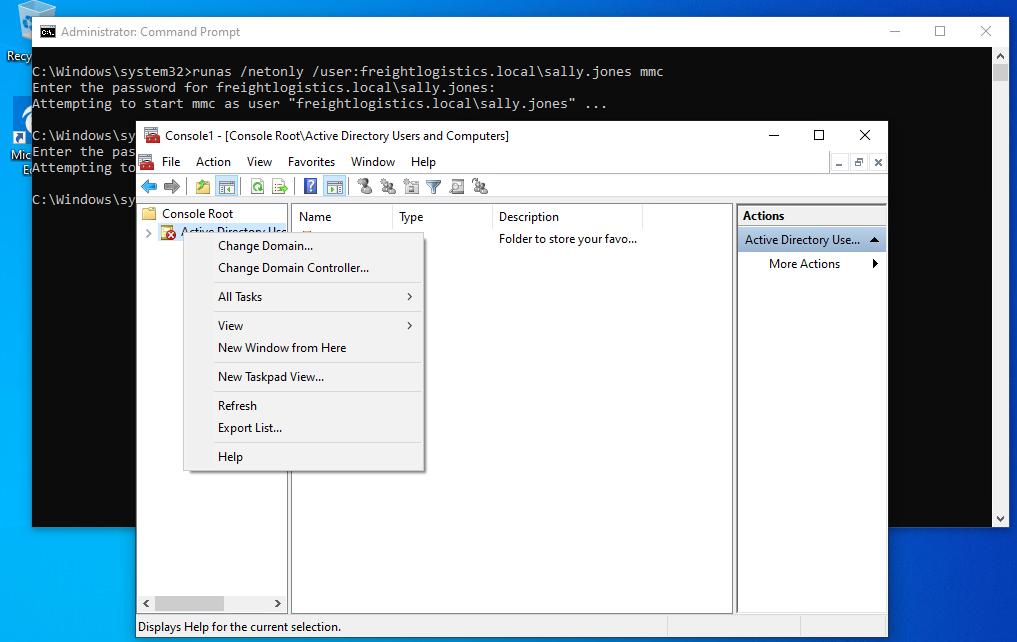
After adding the snap-ins, we will get an error message that the “specified domain either does not exist or could not be contacted.”
From here, we have to right-click on the chosen snap-in and choose Change Domain.
Powershell#
Get every properties in an AD group
Get-ADGroup -Identity "Administrators" -Properties *Enumerate users in Administrators group
(Get-ADGroup -identity "Administrators" -Properties *).Members.Count
(Get-ADGroup -identity "Administrators" -Properties *).Members
Get-ADGroup -identity "Administrators" -Properties * | Select Members | fl